COMPONENTS · STRUCTURE · SIMILAR FORMS
Chinese radicals worksheet generator Look at the parts. Read the whole character.
Use this Chinese radicals worksheet generator to prepare component grouping, character structure practice and contextual choices between similar forms. Start with a bounded classroom example or enter mappings you have checked. Keep the classification basis beside the task, choose a compact grid and print student pages with a separate teacher reference.
Checked content · Adjustable grid · A4 / Letter
Chinese radicals worksheet generator
Choose checked tasks, review the references and set the paper density.
My worksheets
Drafts save automatically in this browser, including unfinished input. Keep up to 20 named worksheets across all tools. Large images may exceed browser storage; download data as a backup.
Worksheet preview
Fit complete rows onto each page using the selected columns and writing space. Extra page space stays at the bottom; answer gaps are not stretched.
Request 1–6 across and 1–12 rows. Student and reference capacities are estimated independently.
Generate to review the content and matching reference.
Match A4 or Letter in the browser print dialog. Choose Save as PDF and review every student and answer page; switch off browser headers and footers if needed.
Give a small visual difference a clear learning purpose
One visible character, one stated criterion and a reference you can explain.
Teach Chinese character components with a clear purpose
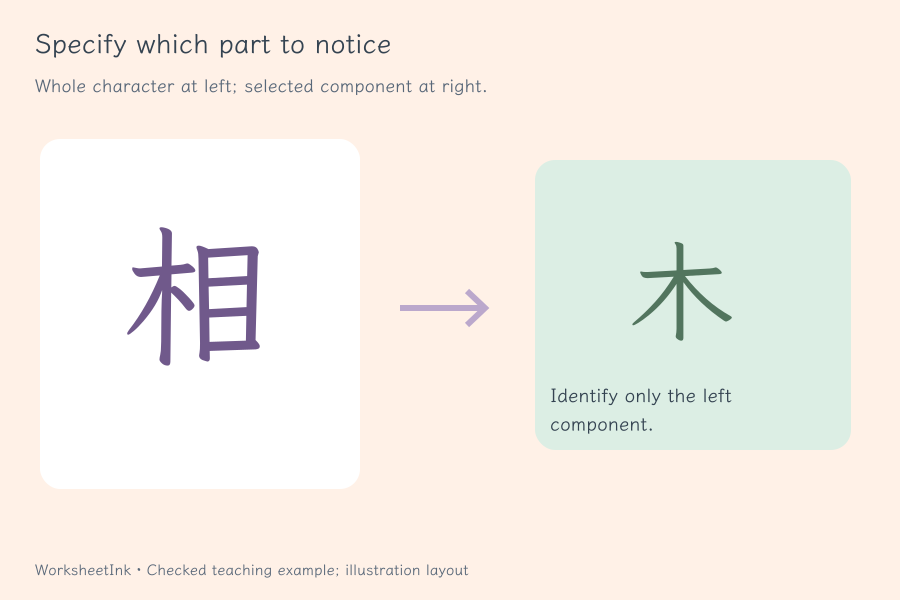
A component is a part used to analyse a character. A dictionary radical is an indexing category chosen under a particular reference system. These purposes overlap, but they are not interchangeable labels for every visible shape. The component task asks for the teacher-specified part, such as the left-hand 氵 in 河. It preserves the written form rather than silently turning it into 水. Write the scope in the printed criterion and review every mapping before distributing the sheet. The tool arranges supplied information; it does not infer decomposition from a font or claim a universal dictionary lookup.
Connect similar-looking characters to a useful context
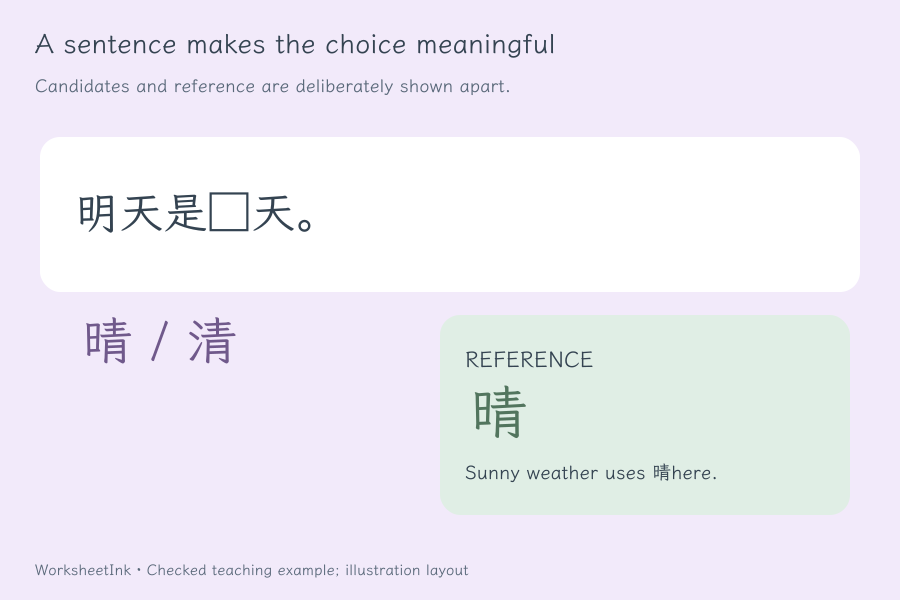
A pair such as 清 and 晴 needs more than a visual reminder. A short sentence gives the learner a reason to choose one form and connects shape with meaning. Enter one square placeholder, a checked correct character and two to four candidate characters. The student sees the choices and a visible gap; the teacher receives your reference and explanation. Structure tasks offer a different focus: the outermost arrangement of a single character. Keep the lesson narrow enough that learners can explain what they noticed instead of guessing from a repeated answer pattern.
Prepare a focused set of Chinese character component worksheets
Choose the teaching distinction first, then make the paper work for it.
- 01
State exactly what learners should identify
Name the textbook, dictionary or classroom convention you intend to use. The printed criterion applies to the whole set. For the starter component tasks it means the designated left-side part; for structure tasks it means the outermost classroom arrangement. This makes the expected response understandable before a learner starts writing.
The starter examples use a small selected set, with source notes available below the controls. They are not a complete character dictionary, an official assessment bank or a claim that every teaching source uses identical labels. If a disputed character depends on a different analysis level, change the criterion and supply an explanation rather than presenting the classification as self-evident.
- 02
Choose components, structures or contextual contrasts
Use the starter buttons to load one practice type or all three. A component row contains a single character, one target component and a note. A structure row contains a single character and one supported Chinese structure label. A contrast row adds one square gap and candidate characters.
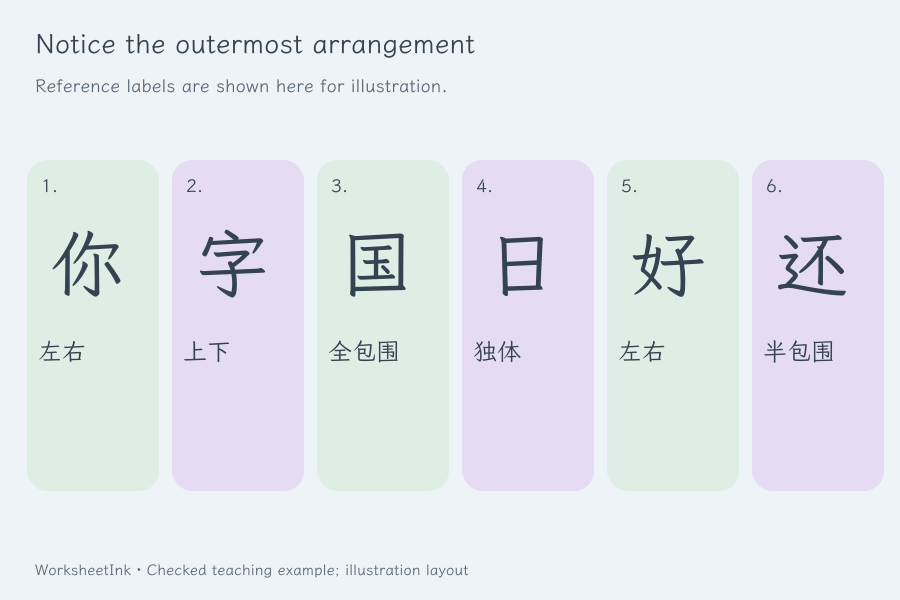
The structure labels are 独体, 左右, 上下, 左中右, 上中下, 全包围, 半包围 and 品字. Their presence is a set of available classroom labels, not evidence that all characters have one universally agreed analysis. The generator checks the row format and permitted label. It cannot establish that a teacher-supplied decomposition is linguistically correct, so compare custom entries with your chosen reference.
- 03
Make the context decide between similar forms
Write an original, short sentence with exactly one □ where the character belongs. Include the correct character among two to four distinct options. In the teacher note, explain why that character fits the meaning or grammar of this particular sentence. Avoid a sentence where every offered form could reasonably work.
A structural check confirms the single gap, the option count and the presence of the supplied answer. It does not read the sentence semantically. If two characters are defensible, rewrite the sentence or make them separate discussion prompts. This is especially useful when visually similar forms also differ in grammatical function, as with an action word and a measure word.
- 04
Review the selected pool before making copies
Request one to 200 items in input order or a seeded shuffled selection. Repeated identical rows do not become extra practice. If the same task and prompt appear with conflicting mappings, both versions are omitted and their input positions are reported. Invalid lines are reported separately.
Requesting more than the valid pool produces the available count rather than fabricating characters. The item editor keeps the prompt, answer, candidates and teacher explanation together, and records a new revision when you change content. Saving a data file preserves the selected questions as well as the input pool, which helps you reproduce a specific review lesson later.
- 05
Use the page in both directions
Choose one to six questions across, one to twelve problem rows and compact, normal or extra writing space. Short character-identification prompts can use a denser student grid than longer contextual sentences. Two visible answer lines remain under each item, while square gaps also have an inline underline.
The student and reference grids are estimated separately. Long teacher explanations therefore do not automatically expand the student sheet. Actual columns, rows and page counts are shown after generation. The calculation can reduce a requested density to preserve readable size; it does not guarantee six long questions will fit across a page. Inspect A4 or Letter output at the intended printer scale.
- 06
Keep the same content version for both outputs
Choose student pages, teacher reference pages or both. The student copy hides the supplied mappings and notes. The reference uses the same numbering and version identifier, even when its longer explanations require more pages. Keep those identifiers together when printing the outputs separately.
Download JSON for a portable copy of the pool, criterion, selected questions, notes and layout. Local browser saving is convenient for returning to work on the same device, but it may be cleared. Import rechecks the worksheet before restoring it. Changing only density or writing space preserves the content version; replacing a character or its teaching explanation creates a new revision.
Questions before you print
Practical details about source content, answers and paper.
Components describe parts used in character analysis; radicals are selected categories used in dictionary indexing. A classroom exercise may focus on a visible component that resembles a dictionary radical, but that does not make the two systems identical. This maker records your chosen component and criterion. Use the intended dictionary when the lesson specifically asks learners to look up a radical.
It uses a limited classroom set and the outermost arrangement, with Chinese labels printed in the reference. The examples include straightforward single, left-right, top-bottom and enclosure cases. Available labels do not turn the tool into an automatic classifier. Different teaching conventions or levels of decomposition can produce different explanations, so state the adopted basis and check custom characters.
Use a contrast row with one □ and two to four distinct character options. Add the intended answer and a teacher note explaining the context. Learners choose the form that fits and write it in the underlined space. The tool checks that the answer occurs among the choices; a teacher still needs to check that the sentence makes that choice meaningful.
Provide the mapping yourself or start from the bounded sample. The generator does not analyse arbitrary glyphs, fetch a dictionary classification or convert traditional and simplified characters. This avoids presenting a font-based guess as authoritative. For a custom list, use a consistent reference and explain unusual or ambiguous cases in the teacher notes.
You can request one through six columns and up to twelve rows, then choose extra writing space. The actual student and teacher grids are calculated separately from the supplied text. A short identification task may remain compact while a long explanation needs fewer columns. Read the capacity summary and inspect the intended A4 or Letter preview before making classroom copies.
The student output shows the prompt, any candidate characters and writing lines. Supplied component mappings, structure labels and explanatory notes appear only in the reference output, unless you have deliberately included them in the prompt or criterion. Review the student copy for unintended clues before printing. Both outputs retain the same question numbers and content version.
Yes. Edit the task fields together, then save or download the updated worksheet data. Content edits create a revision and are validated again. Import checks the question data and matching version before restoration. Layout changes preserve the content identifier. Browser saving stays on the device; downloading JSON provides a file you can retain and import later.
Teacher-authored traditional characters can be used where the bundled font supports them, with mappings checked against your chosen reference. There is no automatic script conversion or claim that simplified and traditional decompositions match. The website prepares paper tasks and teacher references; it does not collect student responses, judge handwriting or automatically grade their component explanations.
Observe the next useful distinction
Review the task and give learners room to explain.
Browser printing & PDF · No registration