MOMENTS AND THE SPACE BETWEEN
Clock worksheet generator read the dial, draw the hands, follow the time
Use this clock worksheet generator for reading analogue clocks, drawing hands and calculating elapsed time or missing start and finish times. Choose minute intervals, a 12-hour or 24-hour display, and one to six questions per row. Every teacher answer uses the same time data as its student prompt.
Custom skills · 1–6 per row · A4 / Letter
Set up clock and time practice
Choose the skills, ranges and paper density.
My worksheets
Drafts save automatically in this browser, including unfinished input. Keep up to 20 named worksheets across all tools. Large images may exceed browser storage; download data as a backup.
Worksheet preview
Fit complete rows onto each page using the selected columns and writing space. Extra page space stays at the bottom; answer gaps are not stretched.
Columns, requested rows and working space are independent; actual rows may be reduced. Layout changes retain your questions.
Choose settings and generate to review the matching copies.
Match A4 or Letter in the browser print dialog. Choose Save as PDF and review every student and answer page; switch off browser headers and footers if needed.
Give every clock and interval a clear meaning
Separate reading a time of day from measuring a duration.
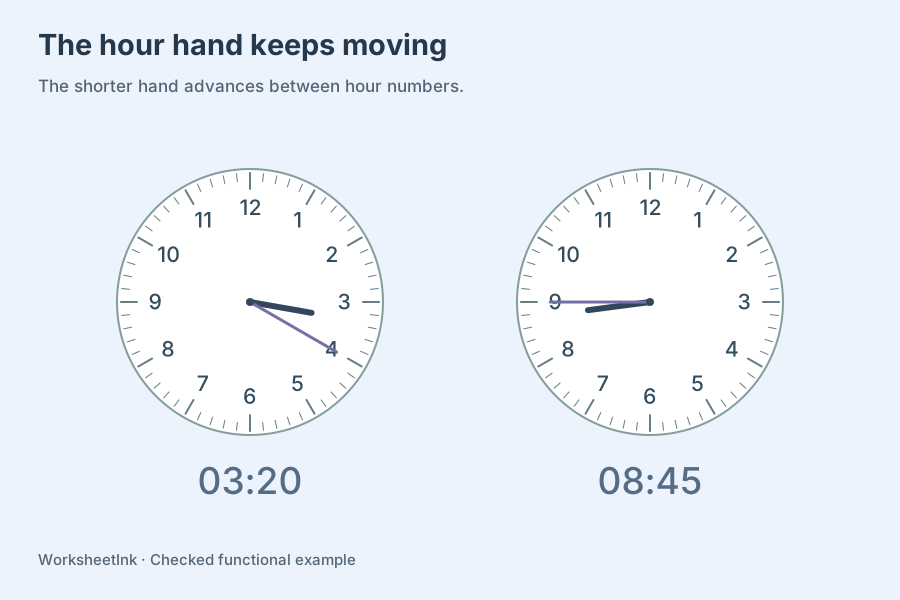
The hour hand moves between the numbers
An analogue clock is not a pair of arrows snapped to hour labels. As the minute hand travels, the hour hand advances continuously. At half past four it belongs halfway between four and five. Each generated dial has sixty minute ticks, twelve hour numbers and hands with different lengths and widths. Read-clock prompts show the hands; draw-clock prompts leave them blank on the student copy and restore the correct positions on the teacher copy.
Crossing midnight needs an explicit day
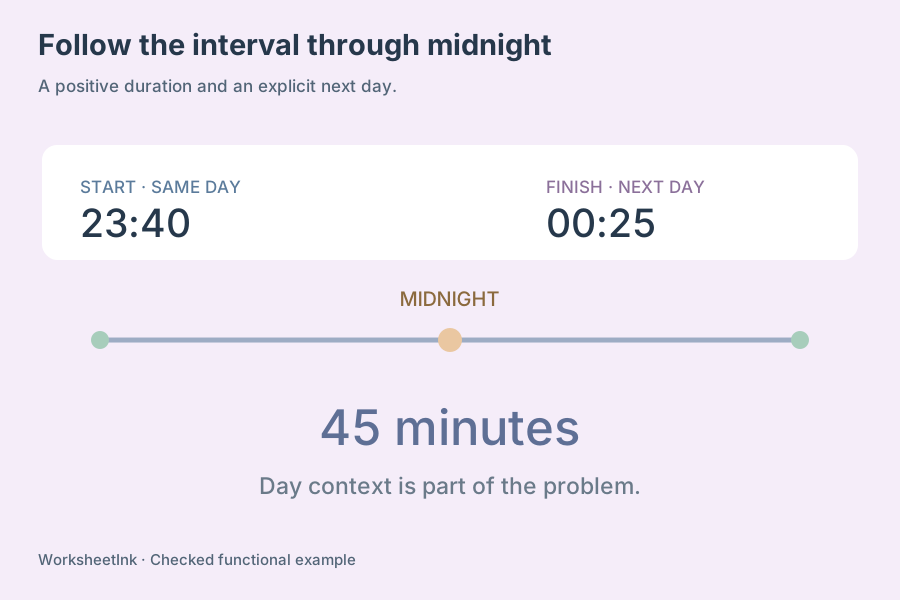
Elapsed time worksheets must identify which day each time belongs to. The generator stores a start in the current day and adds a positive duration of at most twelve hours. When the result reaches or passes midnight, the finish is labeled next day. You can allow or exclude such questions. A 12-hour display includes AM or PM; a 24-hour display uses 00:00 through 23:59. No time-zone or daylight-saving conversion is implied.
Prepare telling time worksheets with useful progression
Choose a clock skill, an interval and a paper layout independently.
- 01
Begin with the kind of answer pupils should give
Select read clocks, draw the hands, find elapsed time, find a finish time or work backwards to a start time. Several selected skills produce a mixed review with separate prompts. Read and draw tasks use a dial. Duration and missing-time tasks present clearly labeled digital times and amounts of time, leaving space for a number line or handwritten method.
A pupil may read a displayed clock comfortably but still struggle to draw the hour hand between numbers. Treat those tasks separately when diagnosing difficulty. When you combine them later, compare the representations rather than assuming that similar-looking worksheets exercise exactly the same knowledge. Teacher answers include a complete dial for every drawing prompt.
- 02
Choose the minute interval deliberately
Available intervals are sixty, thirty, fifteen, five and one minute. They define the allowed minute grid, so a thirty-minute setting includes whole and half hours, while fifteen-minute settings include quarter-hour positions. Five-minute intervals let pupils connect each hour number to a multiple of five; one-minute intervals use all the tick marks.
Set the earliest and latest starting hours from zero through twenty-three. The upper hour includes all eligible minutes within that hour. A range from eight to ten therefore can include 10:55 at five-minute precision. Read-clock prompts also give AM or PM context so learners can produce an unambiguous time even though an analogue dial repeats every twelve hours.
- 03
Keep duration bounds compatible with the interval
For elapsed, finish and start questions, choose minimum and maximum durations from one to 720 minutes. Only durations that are multiples of the selected interval are eligible. A sixty-minute interval and a duration range of fifteen to forty-five minutes contain no allowed duration. That skill is reported as unavailable rather than quietly changing your conditions.
Allow midnight crossings when pupils are ready to use day labels. If crossings are disabled, every finish remains before the next midnight; reaching exactly 00:00 is also excluded. The starting-hour range applies to the underlying start, including when the printed question asks the learner to work backwards from a given finish time.
- 04
Use 12-hour or 24-hour time consistently
The 12-hour form includes AM and PM, with 12:00 AM at midnight and 12:00 PM at noon. The alternative gives 24-hour time and retains leading zeros. Day labels appear with the digital times in either form. Duration answers are expressed in hours and remaining minutes, so ninety minutes becomes one hour thirty minutes rather than the misleading decimal 1.30 hours.
To solve an interval across midnight, count to midnight and then on to the labeled next-day finish. For instance, 23:40 to next day 00:25 lasts forty-five minutes. These are ordinary classroom time calculations on a fixed twenty-four-hour day. Calendar dates, seconds, time zones and seasonal clock changes are outside this tool’s scope.
- 05
Balance clock size with paper capacity
One to six columns and one to twelve requested rows are available. The dial diameter shrinks with the selected column width and is capped at thirty-eight millimetres on paper. A six-column sheet is intentionally compact; fewer columns give children more room to identify tick marks and draw accurate hands. Extra working space adds zero, six or twelve millimetres per task.
Effective rows are calculated from the actual mix of dial and written tasks within a conservative vertical budget. Long digital-time prompts reserve additional height in five or six columns. Changing the layout preserves all times, edits and the content version. Choose A4 or Letter, review the effective capacity, and match the browser print settings to the selected paper.
- 06
Review, edit and preserve the exact time set
Questions are generated without duplicate skill/time/duration combinations. Small domains are counted completely; larger domains use a bounded search with an honest shortage notice. The preview shows the actual quantity and counts by skill. Edit a question to change its underlying start, duration or selected task, and the finish, dial and answer are recalculated together.
Replacements must still obey the chosen minute grid, starting-hour bounds and midnight rule. Download data to keep a reusable JSON copy; browser-local saving belongs to this device. Import checks the conditions and derives the answers again. Student and teacher printing share one version, making it easier to distribute the right answer key with the right class sheet.
Questions before you print
Clear expectations for the prompts, answers and paper layout.
The hour hand advances throughout each hour. At 3:30 it is halfway between three and four, while the minute hand points at six. The generated dials use this continuous position rather than leaving the short hand on three. This also helps distinguish a time just before the next hour from a time just after it.
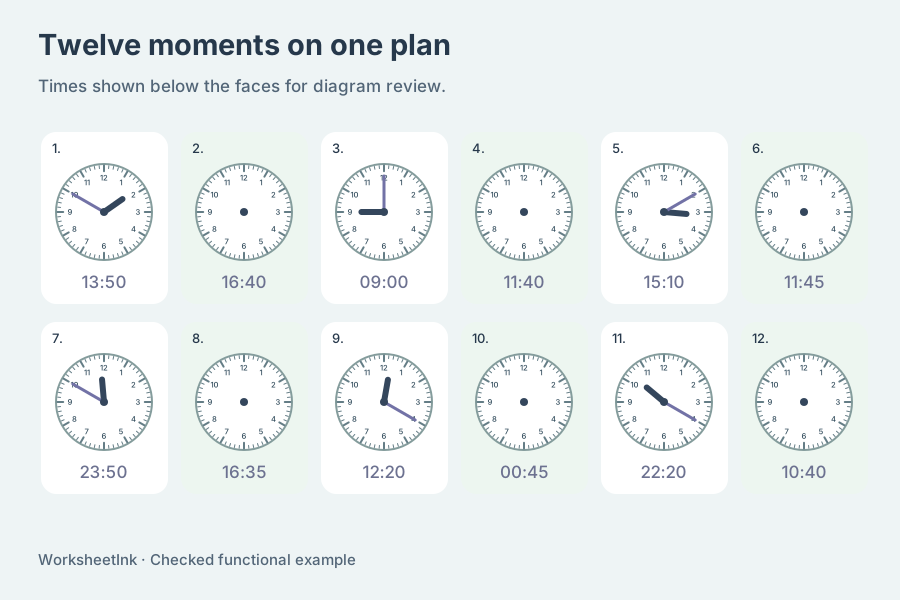
Yes. A drawing prompt provides a digital time and a blank numbered dial. The student draws both hands on paper. The teacher copy shows their calculated positions and the corresponding time. A reading prompt already shows the hands and asks for the time. Neither task is an online drawing game or automatic handwriting grader.
Choose whole hours, thirty-minute, fifteen-minute, five-minute or one-minute steps. Larger intervals constrain both starting minutes and eligible durations. A half-hour setting includes whole and half-hour positions. For duration tasks, make sure at least one multiple of the interval lies between your minimum and maximum; otherwise that selected skill cannot generate questions.
Enable crossings to allow a finish on the following day. Both digital times carry their day context, and the next-day label is explicit when needed. When crossings are disabled, a finish at or beyond midnight is excluded. Durations are positive and limited to twelve hours, so the problem never silently spans several days.
In the 12-hour form, midnight is 12:00 AM and noon is 12:00 PM. The 24-hour form uses 00:00 for midnight and 12:00 for noon, with later hours up to 23:59. Analogue reading prompts include AM or PM context. Durations remain hours plus minutes in either display, because a duration is not a clock reading.
The tool offers six columns and reduces dial diameter to fit the available width. This is a compact practice option, while two to four columns give more drawing space. Requested rows may be reduced to respect the vertical budget. Check the effective capacity and try one real printed sheet before producing a large batch for learners.
The editor uses the underlying start in the current day and a positive duration. It then recalculates the finish, day label and answer together, even when the printed task asks for the missing start. The replacement must follow the existing limits. A new revision identifies the changed set, and later layout adjustments retain it.
Yes. Browser saving retains the data locally, and the downloadable JSON preserves the times, settings and revision for import. Choose student, teacher or both copies before printing through the browser. PDF saving uses that print dialog. The tool has no cloud account, real-time clock animation or learner-score storage.
Prepare the next useful practice sheet
Choose a focused skill, review the matching answers and fit the paper layout to the work learners need to show.
Browser print / Save PDF · No registration