YOUR WORDS, REARRANGED
Word scramble generator a fresh puzzle for familiar vocabulary
Use this word scramble generator to rearrange the letters in your own English spelling list. Add meaning clues, keep the first letter as a helper, and choose how many words to use. Review the scrambled student copy alongside its numbered answers before printing.
Your word list · Matching answers · A4 / Letter
Set up your word scramble
Enter the words, choose a helper and review the resulting questions.
My worksheets
Drafts save automatically in this browser, including unfinished input. Keep up to 20 named worksheets across all tools. Large images may exceed browser storage; download data as a backup.
Worksheet preview
Fit complete rows onto each page using the selected columns and writing space. Extra page space stays at the bottom; answer gaps are not stretched.
Enter a word list and generate to review the student worksheet and matching answers.
Match A4 or Letter in the browser print dialog. Choose Save as PDF and review every student and answer page; switch off browser headers and footers if needed.
Useful clues and honest letter arrangements
Build a word scramble worksheet around vocabulary you have already introduced.
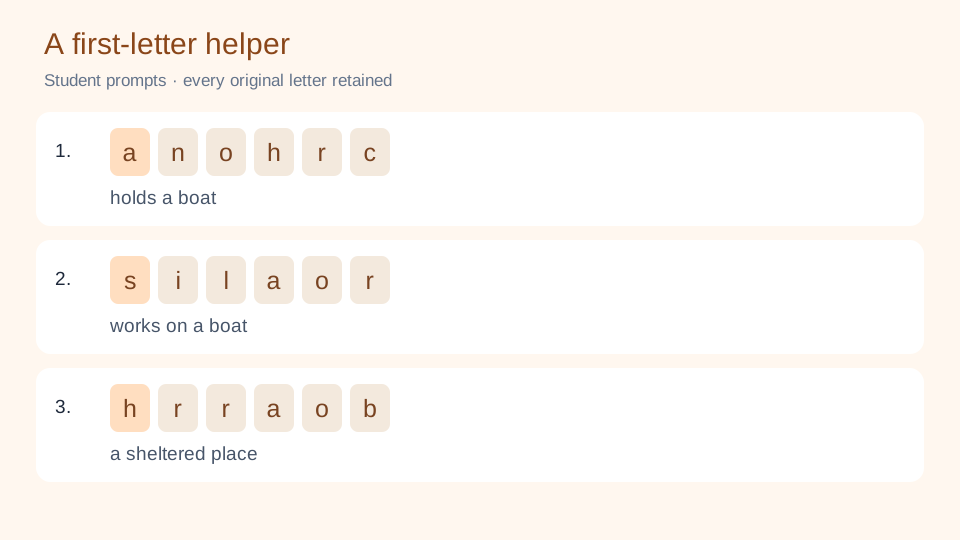
Every prompt uses the original letters
A jumble keeps every letter, including repetitions, and changes the order. The tool checks that the result differs from the original spelling. A word whose movable letters are all identical cannot produce a changed puzzle and is reported instead of printed as if it had been scrambled. Keeping the first letter reduces which letters can move, so short entries may become unavailable under that setting.
Treat anagrams as a clue-writing task
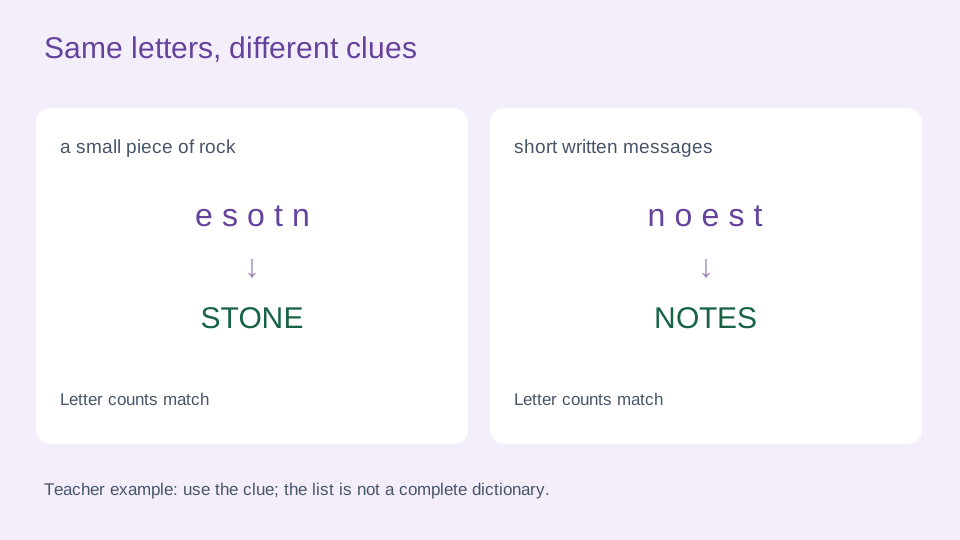
The same collection of letters can spell different words. For example, STONE and NOTES share a letter signature. The tool compares each question with the entire input list, including words not selected for this worksheet, and flags other candidates. A precise meaning clue can identify the intended word. Without that context, read the alternatives in the key and consider another valid rearrangement rather than assuming every jumble has a single dictionary answer.
Make a spelling worksheet that is easy to check
Work through the list, the letter helper and the actual student copy.
- 01
Start with a small, familiar word list
Type one English word per line. A word must contain two to 24 letters A–Z; spaces, hyphens, apostrophes, accents and phrases are outside this input format. Add an optional meaning clue after a vertical bar, such as anchor | an object that holds a boat in place. Clues may use another language and can contain up to 120 characters. You can enter up to 200 nonempty lines.
Check the original spelling yourself. This tool rearranges a supplied word; it does not look up definitions, correct spelling or select a school curriculum. Repeated words are compared without regard to case. Identical repeated entries are used once, while conflicting clues for the same word need a decision from you. Invalid lines are identified by their original line numbers, so you can correct the source list instead of guessing what was omitted.
- 02
Choose a helper and a selection order
Leave Keep first letter off to allow all positions to move. Turn it on when an initial-letter clue suits the lesson: the first character stays in its original position while the remaining letters change order. This does not guarantee a particular reading level. Try two or three questions with the learner before preparing a longer set.
Request one to 200 questions. Input order selects the first eligible words; alphabetical order selects by spelling; random selection shuffles the eligible list before taking the requested amount. Changing the seed can change the letters and a random selection, but it does not automatically replace an input-ordered vocabulary set. A repeated-letter word, or a short word with its first letter fixed, may have no legal rearrangement. Such entries are listed clearly, and the actual count may be smaller than requested.
- 03
Read the clue before deciding what counts as correct
For a short warm-up, choose six nautical words such as anchor, harbor and sailor, add concise definitions, and keep the first letter. Let learners explain how a clue fits the word they reconstructed. In a later review, keep the same vocabulary and remove the first-letter helper. Changing one parameter makes the difference between the two activities clear without pretending that more questions alone mean greater difficulty.
If two words in your list use the same letters, examine their clues together. A clue such as a small piece of rock points toward STONE, while short written messages points toward NOTES. The alternatives check is limited to your input list, not the whole English language. Even when no warning appears, another genuine word may use the same letters. Judge the response against the clue and the lesson context; the page does not automatically grade student answers.
- 04
Review, edit and keep the exact worksheet
Generate and read the student copy. Every prompt has a corresponding word number in the answer copy. Use Edit to replace a selected word or clue; the replacement must fit the input rules and must not duplicate another list entry. The new scramble and its possible alternatives are checked together, and the version marker changes after a successful edit.
Changing the number of columns rearranges the current questions without changing their letters, clues or version. Other generation settings apply when you generate again. A notice marks a preview whose settings have changed, and regenerating an edited worksheet asks before replacing it. Save in this browser for later use on the same device, or download the data file to keep the exact questions and edits. Import that file into this generator to restore it. A seed reproduces an unedited selection with matching rules; it is not a substitute for saving manual changes.
- 05
Give each word enough writing space
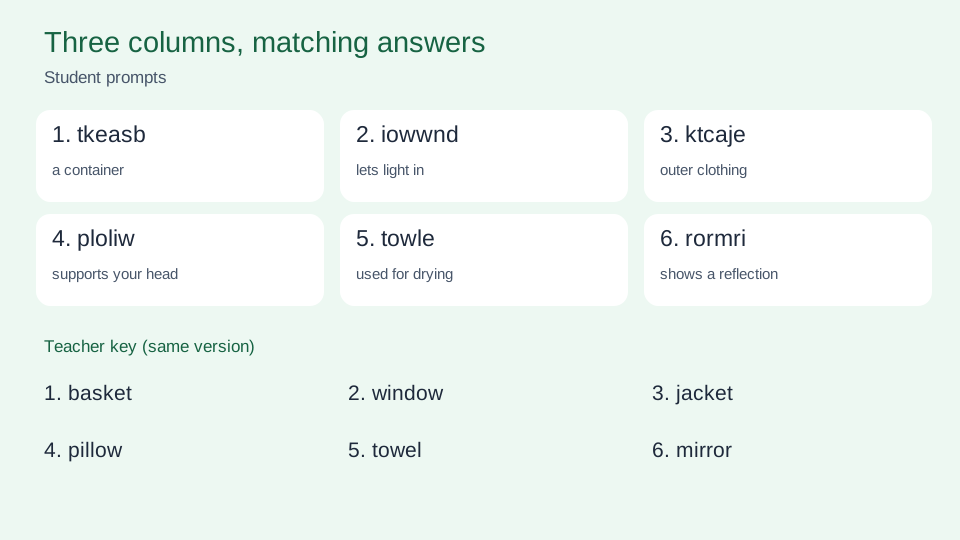
Choose one to six words across a row. Short words with short clues can work in a compact layout, while long spellings or substantial clues need fewer columns. The student copy leaves blank space for writing the original word rather than adding a heavy answer line. Page capacity depends on word and clue length, and changing columns updates the page count.
Select student output, answers or both. Combined output places the student pages first, followed by corresponding teacher pages. Choose A4 or US Letter here and in the browser print dialog, use portrait orientation, and inspect each page before printing or saving a PDF. The answer copy keeps the target word and lists matching candidates from your vocabulary set. Keep that copy for checking. Downloaded data preserves a reusable puzzle; a printed PDF preserves its appearance. Neither creates a shared online classroom or a cloud backup.
When anagrams are present, the teacher copy adds candidate-group pages, with up to 20 words per appendix page and the applicable question numbers. Those pages are numbered separately so a long candidate list does not crowd the writing area.
Questions about making letter scrambles
Practical answers about your list, prompts and printed copies.
No. It takes words you provide and creates scrambled prompts for a worksheet. It does not find every dictionary word that can be made from arbitrary letters. Candidate checks compare the words in your own list.
Invalid entries, exact duplicates and words with no possible changed arrangement are reported. Fix the original line, turn off the first-letter helper when appropriate, or use a different word. The actual count is shown; missing questions are not filled with duplicates.
Not in the generated questions. If repeated letters or a fixed first letter leave no changed arrangement, the word is skipped with a message. The algorithm uses a checked unequal-letter swap if random shuffles do not change an otherwise eligible word.
Check whether the answer uses every letter the same number of times and fits the clue. The key lists matching candidates from your input list, but other English words may exist. A clear definition or lesson context is needed when the task expects one target.
Yes. Keep first letter fixes the initial character. Show clues prints the optional text supplied after the vertical bar. Neither supplies a definition automatically. Changing these rules after generation requires another generation to update the current puzzle.
Choose one to six words per row in the preview. The current questions and manual edits are preserved while both copies are rearranged. Use fewer columns for long words or clues, and check every page before printing.
Download its worksheet data and import it into this generator later. Browser saving works on the same browser and device. A different language interface can open the data, but the words and clues remain exactly as you entered them.
The word field accepts only two to 24 English letters A–Z. Convert a phrase into separate suitable words if that matches the lesson. Clues can use Chinese or other languages. The interface language does not expand the supported word alphabet.
Turn this week’s spellings into a letter puzzle
Choose familiar words, add useful clues and review a short sample.
Keep the numbered answers ready for checking.
Custom vocabulary · Browser printing and PDF