WORDS · NUMBERS · LOCAL PICTURES
Bingo card generator One shared calling pool, many different cards
Use this bingo card generator to prepare classroom cards from your words, numbers or locally selected pictures. Choose a two-to-five-square grid, an optional centre free space and a batch of up to sixty different layouts. Keep the matching caller checklist, inspect actual differences and adjust how many readable cards fit on each sheet.
Checked content · Adjustable grid · A4 / Letter
Bingo card generator
Review the material, generate a set and adjust the paper.
My worksheets
Drafts save automatically in this browser, including unfinished input. Keep up to 20 named worksheets across all tools. Large images may exceed browser storage; download data as a backup.
Worksheet preview
Fit complete rows onto each page using the selected columns and writing space. Extra page space stays at the bottom; answer gaps are not stretched.
Request 1–6 items across and 1–12 rows. Actual player/student and teacher capacities are estimated separately.
Generate to review the content and matching reference.
Match A4 or Letter in the browser print dialog. Choose Save as PDF and review every student and answer page; switch off browser headers and footers if needed.
Make classroom bingo easy to prepare and easy to explain
Players see different layouts; the caller keeps the exact matching items.
Know what is different about the generated cards
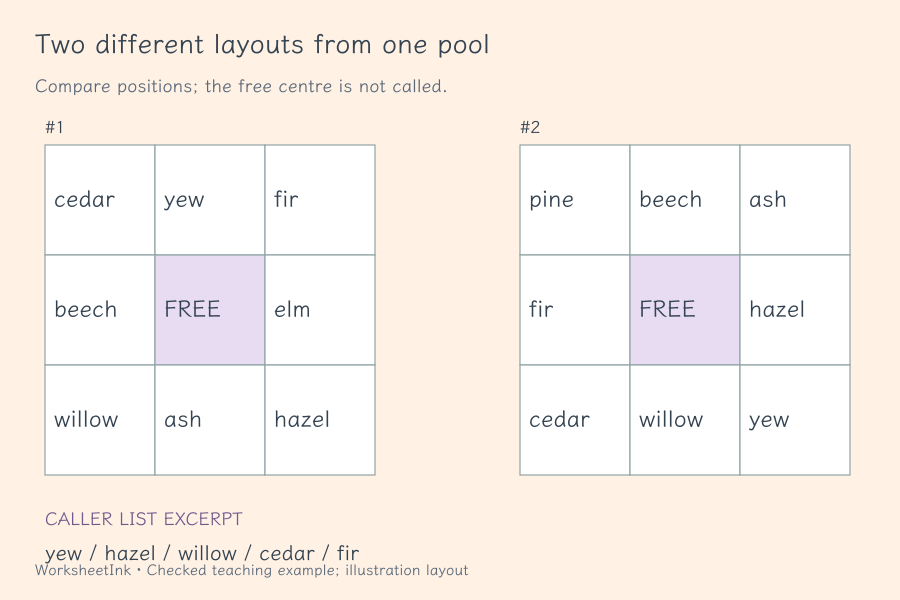
Two cards can contain the same words in different positions. That is different from choosing different sets of words. This maker checks exact layouts, counts distinct content sets and reports the smallest positional difference between any pair. It does not promise every student receives different vocabulary or guarantee a unique winner. When the pool is small, a notice explains the repeated sets. Use the statistics to decide whether to add more items before printing, especially when you want variety beyond rearrangement.
Use vocabulary bingo or picture bingo with one consistent list
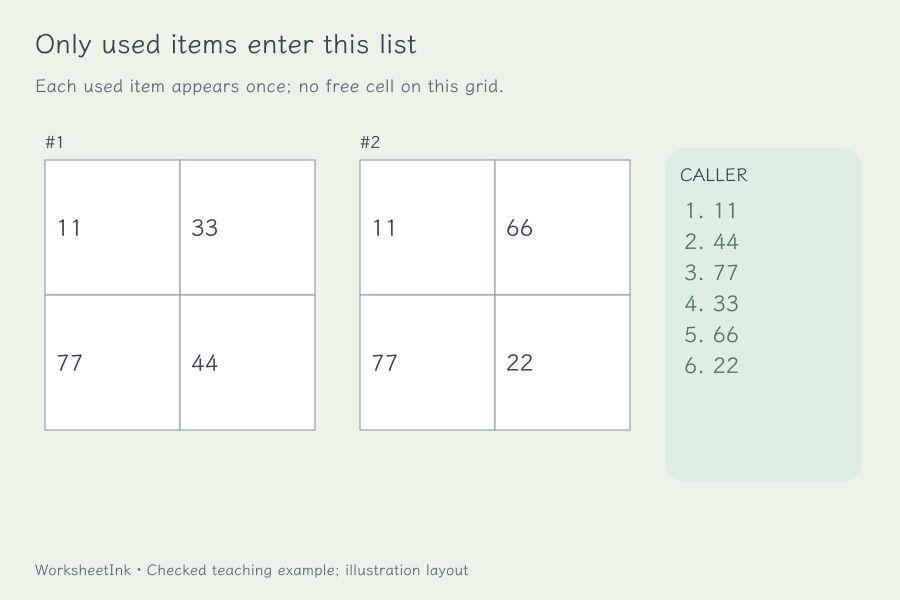
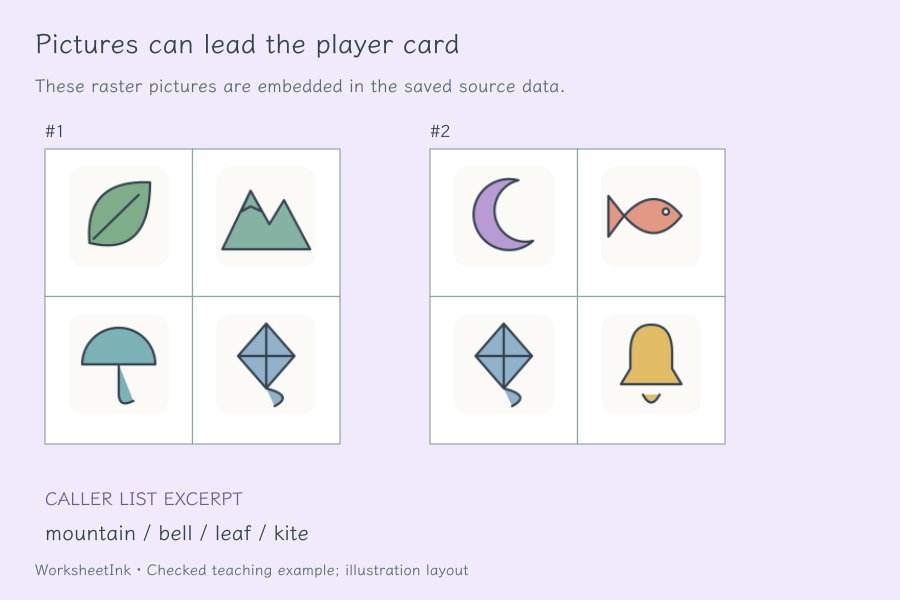
Paste words or numbers one per line, or select local PNG, JPEG or WebP images and review their labels. Pictures are reduced in the browser and included in the saved worksheet data; no image hosting account is required. The calling checklist contains the union of items actually present on the generated cards, once per item in a seeded order. Picture labels remain on the teacher list even when you hide captions on player cards. Decide beforehand whether the caller will say a word, read a clue or show a picture.
Prepare the cards, then agree how the round will work
Clear pool, clear differences and a caller list tied to the version.
- 01
Start with items learners can distinguish
Use a focused pool of words, symbols represented as text, or numbers. Each text entry can contain up to thirty-two characters. The number shortcut fills one through forty as custom classroom items. These are not standard seventy-five-ball bingo columns; every item is drawn from the pool you provide.
Text labels are normalized for case and compatibility before duplicate removal. Avoid near duplicates that students cannot distinguish by sound or meaning. In picture mode, each image needs a clear teacher label. Exact repeated labels or identical image data are removed, but the website cannot recognize two visually equivalent photographs or decide whether your clue has one unambiguous match.
- 02
Choose grid size and a centre free space
Select a square grid from two by two through five by five. A centre free space is available only for odd grids, three or five, because even grids have no single centre cell. Give it a short label that is distinct from the pool. Its meaning and whether it counts toward a winning line should be explained before play.
The required distinct item count is the number of cells minus the free space. Five by five therefore needs twenty-four items with a free centre and twenty-five without one. A shortage stops generation rather than filling a card with repeated items. A larger pool can produce different content sets as well as different positions, although individual cards may still share many items.
- 03
Generate a batch and read its actual difference statistics
Request one to sixty cards. The generator assigns different ordered arrangements from the available pool without duplicating a layout. When the mathematical number of arrangements is smaller than requested, it returns the available count and explains the limit. A two-by-two card made from exactly four items has twenty-four possible ordered layouts.
The summary separates distinct layouts, distinct item sets and minimum changed positions. A layout difference is not a guarantee of different winning opportunities: rotations, shared sets and the chosen winning rule can matter. Review the statistics, add more items if needed and choose a new seed for another reproducible batch. The website does not analyse fairness or predict a winner.
- 04
Prepare pictures with useful labels
Select local PNG, JPEG or WebP files up to six megabytes each, with at most sixty image entries. Large source dimensions are rejected. The browser resizes accepted images to small raster assets suitable for card cells; each encoded image and the total pool have limits so downloaded worksheet data remains portable.
Check each thumbnail after processing and correct its label before generating. Animated WebP uses a still decoded frame rather than animation. Captions can be hidden on player cards while teacher labels remain available. Only local raster files are supported; remote image links, SVG uploads and automatic picture recognition are not part of the workflow. Decoding is checked again before printing.
- 05
Fit readable cards to A4 or Letter
Request one to six cards across and up to twelve card rows, then choose additional spacing. The actual grid is reduced when cell size, labels or pictures need more room. A five-by-five card cannot stay readable if six such cards are forced across a narrow page. The summary reports the actual card capacity rather than shrinking everything to satisfy the request.
Caller pages have their own capacity estimate and page count. They contain checkboxes and optional picture thumbnails, not a duplicate of every player card. Longer labels and pictures reserve more space; player caption hiding keeps a conservative allowance. Inspect the selected paper and print scale yourself, and use enough room for the counters or marks your learners will place.
- 06
Keep the calling checklist with the exact batch
Choose player cards, caller checklist or both. Agree a winning pattern before the round, such as a complete row, column or diagonal, and check claimed matches against the called items. The printable checklist supports teacher-led calling; there is no live online draw room, student account or automatic winner detection.
Editing an item label updates that shared item everywhere it appears and creates a new content revision. Layout changes and caption visibility preserve the content identifier. Download JSON to retain pictures, pool, cards and calling order; local browser saving can be cleared. Import validates card positions, pool references, statistics and version. Match the version on all printed pages before using the batch.
Questions before you print
Practical details about source content, answers and paper.
Use at least twenty-four distinct items when the centre is free, or twenty-five when it is not. Other grid sizes follow the same cells-minus-free-space rule. Duplicate labels and identical picture data do not create extra usable items. A larger pool can provide more content-set variety; generation stops with a clear shortage message if the chosen grid cannot be filled.
Every generated card has a different exact arrangement, but several cards may contain the same set of words. The summary reports both layout and set counts, plus the minimum changed positions. Repeated sets trigger a notice. These checks do not guarantee a unique winner or equal winning chances under every rule; review the batch for your classroom purpose.
An optional single centre cell is available on three-by-three and five-by-five grids. Two-by-two and four-by-four grids have no single centre, so this option is disabled. Give the cell a short label that does not duplicate a pool item. Explain whether it is already marked and how it contributes to the winning pattern before learners begin.
Yes. Select local PNG, JPEG or WebP images, review the reduced thumbnails and edit their teacher labels. Limits apply to source size, dimensions, encoded image size and the complete pool. Player captions may be hidden; caller labels remain visible. Images are embedded in saved JSON, and browser decoding is checked before printing. Review recognizability yourself after resizing.
Request one to six cards across and one to twelve rows. Actual capacity is calculated from grid size, text length, image space and additional spacing. It may use fewer columns than requested to maintain usable cells. Caller pages are estimated separately. Check the A4 or Letter preview and leave enough space for the marks or counters you plan to use.
It lists each item used somewhere in the generated batch once, in a seeded order, with a checkbox and any picture. Unused pool entries and the free cell are excluded. You can read directly from the list or prepare your own clues, checking that they identify the intended item. The checklist is printable; it is not an interactive draw or winner-validation service.
The generator limits the batch to the number of possible ordered layouts and shows the actual count. For example, exactly four items on a two-by-two card allow twenty-four arrangements. It never pads the batch with identical layouts. Even with different arrangements, shared content sets and similar winning patterns can remain, so review the reported differences.
Yes. Download JSON for the embedded images, pool, generated layouts, calling order and settings. Editing a label changes that shared item on every card and creates a revision. Caption visibility and paper density preserve the content version. Import validates the saved structure and derived statistics; local browser storage may be cleared, so keep a downloaded copy for reuse.
Prepare the next classroom round
Review the task and give learners room to explain.
Browser printing & PDF · No registration