CUSTOM ENGLISH PRACTICE
Cloze worksheet generator Choose the gaps, preserve the context
Use this cloze worksheet generator to make a reading passage or a set of short fill-in tasks from your own text. Mark exact words or phrases, or choose a regular English-word interval. Add a shuffled word bank and an optional first-character hint, then set the requested columns, rows and working space before printing.
Custom text · Adjustable density · A4 / Letter
Prepare your gap-fill activity
Keep the content choices separate from the paper layout.
My worksheets
Drafts save automatically in this browser, including unfinished input. Keep up to 20 named worksheets across all tools. Large images may exceed browser storage; download data as a backup.
Worksheet preview
Fit complete rows onto each page using the selected columns and writing space. Extra page space stays at the bottom; answer gaps are not stretched.
Choose requested columns, rows and extra space. Long text may reduce the applied grid; the current content stays unchanged.
Generate to review the content and matching reference.
Match A4 or Letter in the browser print dialog. Choose Save as PDF and review every student and answer page; switch off browser headers and footers if needed.
A useful gap tests a decision you can explain
Keep control of the source and the missing information.
Manual marking makes the teaching target explicit
Put double square brackets around the exact material learners should supply: The seedlings need [[water]] and [[light]]. A bracketed phrase becomes one gap, so [[in the shade]] stays a single answer rather than three disconnected words. Other occurrences of water remain visible unless you mark them too. This gives you direct control over vocabulary recall, factual terms or familiar expressions. It does not automatically establish that a gap tests a particular grammar rule. Read the surrounding context and decide what evidence a learner has for choosing the missing answer.
A word bank supports selection without claiming one possible answer
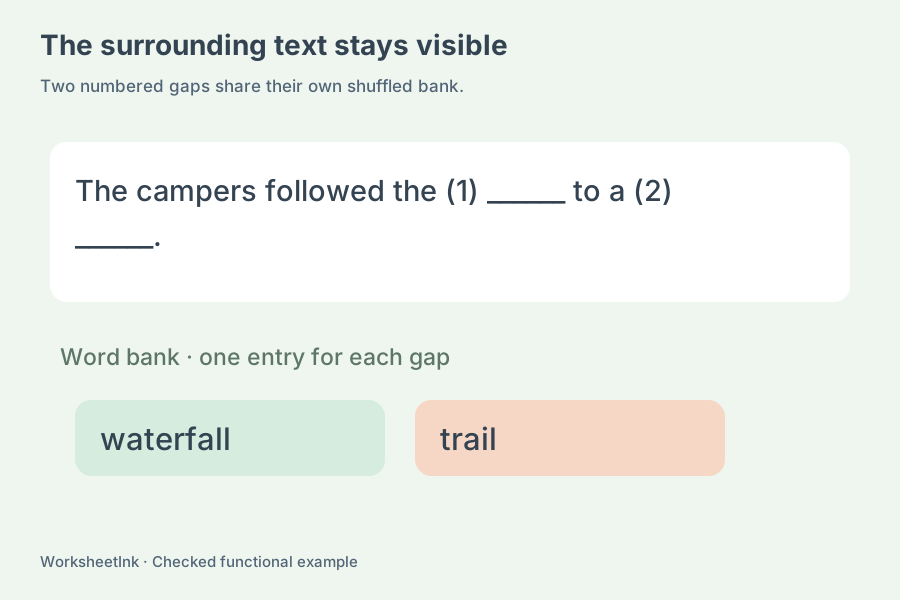
Each activity has its own shuffled bank containing one entry for every removed occurrence. Repeated answers remain repeated, which makes the available quantity clear instead of silently suggesting that each different word can be used only once. Hide the bank to make the task more open. The teacher sheet restores the original passage and lists the numbered source answers. Another word may still fit the meaning and grammar; the source key records what you removed, rather than proving that every other response is wrong. Teacher review remains part of preparing word bank worksheets.
Turn your passage into a checked classroom activity
Choose the source, the gaps and the paper layout as separate decisions.
- 01
Separate independent activities with an empty line
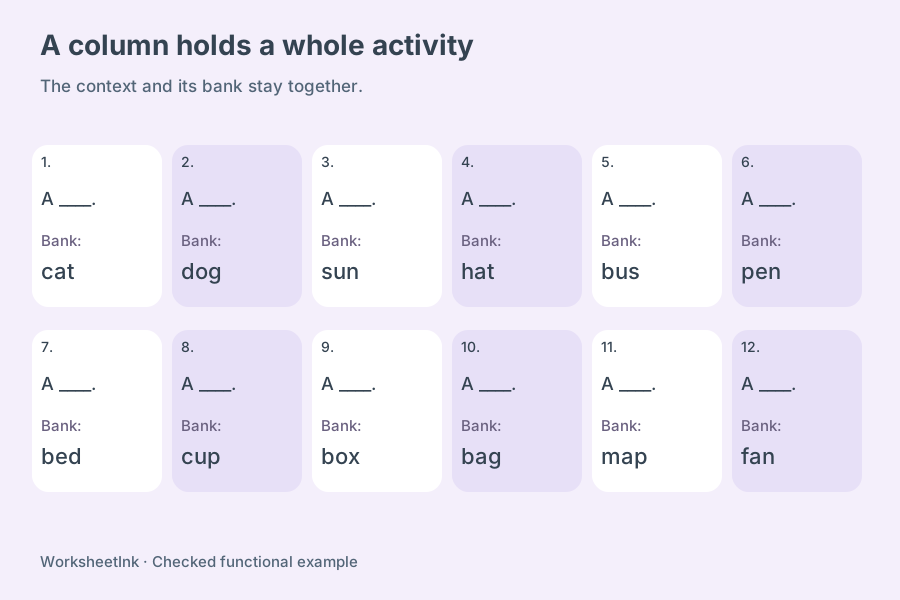
Paste up to 200 activity blocks, using a blank line between them. A block can contain a short paragraph or several connected sentences. Single line breaks inside one block become spaces; an empty line starts the next numbered activity. This keeps each short context and its word bank together when the page is arranged into columns.
Each block may contain up to 600 characters after the marking brackets are removed, and up to twenty gaps. A single marked answer may contain forty characters, including spaces. Split a longer reading into sensible, self-contained sections rather than making a narrow column carry an entire article. There is no document upload or automatic article summarization: the input is the text you paste or recover from a saved worksheet file.
- 02
Mark exact occurrences for focused practice
In manual mode, wrap each selected answer with [[ and ]]. Leave the punctuation outside when it should remain visible, as in Please bring [[boots]], a coat and a hat. You may also include punctuation inside a phrase if that is genuinely part of the answer. Empty, nested or unmatched bracket pairs are rejected instead of producing uncertain answer positions.
Use a fill in the blank worksheet maker for a small vocabulary set by writing two or three short contexts with one marked term each. The same term can be removed more than once if repeated retrieval is useful. A teacher can also mark Chinese vocabulary explicitly; manual marking does not rely on English word boundaries. Ordinary square brackets are reserved for the marker syntax, so remove unrelated bracket notation from the input.
- 03
Use interval removal as a transparent starting rule
Automatic mode removes every second through fifteenth English word, according to the interval you select. Counting restarts at the beginning of each block. English letter sequences count as words, with internal apostrophes and hyphens retained. Numbers and punctuation do not advance the count. The nth word itself is the first gap, not a random starting position. Each student gap has a visible writing line, including when a first-character hint is shown.
This rule does not identify verbs, academic vocabulary, proper names or grammatical difficulty. It can remove small function words as well as long content words. Read the result and decide whether those gaps serve the lesson. Automatic mode requires unmarked text; switch back to manual mode to choose exact occurrences. If the interval creates no gap, or would create more than twenty, the block is reported as invalid.
- 04
Adjust support without changing the source meaning
Show a shuffled bank for a recognition task, hide it for recall, or add the first character of each source answer as a hint. Hints preserve the original case. A phrase hint reveals its first character only, not the first letter of every word. Blank writing room has a consistent visible width rather than revealing the full answer length.
For a short science review, use an original paragraph about seed growth and mark three taught terms. First offer the bank, then discuss why each term belongs in its context. A later version can hide the bank while retaining the same passage. Explain acceptable variations before marking, especially when a learner offers a sensible synonym. The generator neither creates distractors nor turns this activity into a multiple-choice examination.
- 05
Choose horizontal and vertical density together
Request one to six activities per row and one to twelve rows per page. Extra space adds zero, eight or sixteen millimetres per activity. The layout checks words, gaps, word banks, restored text and numbered answers. A long phrase or a tall block can reduce the actual grid, which is reported alongside the requested settings.
One activity means a whole context block, not one individual gap. Six tiny single-gap tasks can use a compact layout, while a paragraph usually needs one or two columns. The question area is conservatively planned for both A4 and Letter, using readable text rather than forcing every selection onto the sheet. Changing only density or working space preserves the gap positions, bank order, edits and content version.
An exceptionally tall block may still exceed the single-page area at one column. Generation or editing then asks you to split or shorten it; content is not clipped or silently dropped.
- 06
Check and preserve the student and reference copies
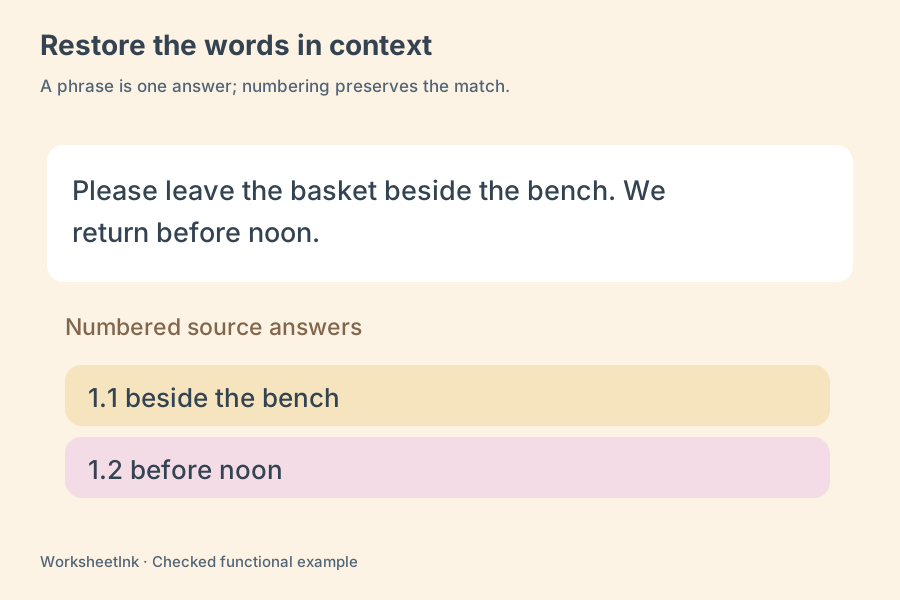
Each gap is numbered with its activity and local position, such as 2.3 for the third gap in activity two. The student sheet shows the unremoved context, enabled bank and hints. The reference copy restores the missing material in context and includes a numbered source-answer list. These outputs are built from one data set, including after a manual content edit.
Choose student, teacher or both copies before printing, and match A4 or Letter in the browser dialog. Save a PDF there if needed. Browser-local saving is useful on this device; downloaded JSON preserves exact selections and settings for validated import. A seed repeats the bank and activity ordering for the same input. No student responses are submitted, no automatic scoring is provided, and no cloud backup is implied.
Questions before making the class set
Understand the source, support and output choices.
Yes. In manual mode, mark each selected occurrence with double square brackets. Marking one occurrence does not hide every matching word in the passage. This lets you leave an introductory example visible and remove a later occurrence for practice. Generate and check the context before distributing the student copy.
Yes. Everything inside one valid marker pair is one answer, including internal spaces, up to forty characters. A phrase occupies one bank entry and one numbered gap. Choose fewer columns when it is long, and add extra working space if students need room to write a multiword response.
The interval counts English words from the start of each activity block and removes the nth, second nth and subsequent positions. Internal apostrophes and hyphens remain part of a word. Numbers and punctuation are not counted. The rule does not infer vocabulary importance, and an interval that creates no gap or over twenty gaps is rejected.
The bank keeps one entry per removed occurrence, including duplicates. If the same word answers two gaps, it appears twice. Bank order is shuffled independently for each block. This is a source-based supply list, with no additional distractors or invented choices. Hide the bank when you want learners to retrieve answers without it.
Manual mode can hide an explicitly marked Chinese word or phrase and keep the remaining text as context. Automatic interval mode counts English words only and does not segment Chinese. The tool does not add pinyin, correct a passage or select language targets for you. Check the pasted content and the intended answers yourself.
It is a custom gap-fill maker using your supplied text and either explicit markers or a fixed removal interval. It does not write a passage, assign proficiency levels, generate four distractors per gap or explain grammar automatically. You decide which terms and contexts make the exercise useful for the current lesson.
You can request six columns, plus a separate row count and extra-space setting. Actual capacity depends on the entire block, bank and reference answers. Short contexts fit more densely than paragraphs, and the applied grid is displayed. Changing those layout settings retains the existing gaps and bank order.
Yes. Local save keeps the set in this browser, and JSON download preserves the exact content for validated import. The reference copy restores the source answers and lists their gap numbers. Use browser printing for a PDF. It remains a teacher reference: other sensible wording may also deserve credit depending on your instructions.
Prepare your next short practice
Check the content and give learners enough space to respond.
Browser print / Save PDF · No registration