NOTICE · DECODE · REVEAL
Cryptogram maker A message worth figuring out
Turn a classroom reminder, a short fact or your own sentence into a printable cryptogram. This cryptogram maker keeps repeated characters connected by the same code, gives learners clear writing lines and pairs every message with its answer. Choose number or letter codes, offer a few mapping hints and arrange several short puzzles on one sheet.
Your messages · Consistent codes · Matching answers
Cryptogram maker
Use your own messages, keep a consistent code and leave room to write.
My worksheets
Drafts save automatically in this browser, including unfinished input. Keep up to 20 named worksheets across all tools. Large images may exceed browser storage; download data as a backup.
Worksheet preview
Fit complete rows onto each page using the selected columns and writing space. Extra page space stays at the bottom; answer gaps are not stretched.
Request 1–6 questions across and 1–12 rows. Actual capacity depends on text length, references and writing space.
Generate messages to review the student lines and matching decoded answers.
Match A4 or Letter in the browser print dialog. Choose Save as PDF and review every student and answer page; switch off browser headers and footers if needed.
Make the message part of the lesson
Choose words your learners can read, then decide how much of the code to reveal.
One character keeps the same code
The cryptogram generator uses one shared mapping for the selected messages. Every occurrence of the same character receives the same code, and different characters receive different codes. English uppercase and lowercase letters share a mapping entry. Number mode can encode English letters, digits and supported Chinese characters; letter mode accepts English letters with permitted spacing and punctuation. Spaces and punctuation remain visible, so learners can use word lengths and sentence boundaries as clues. Those visible marks are not answer spaces.
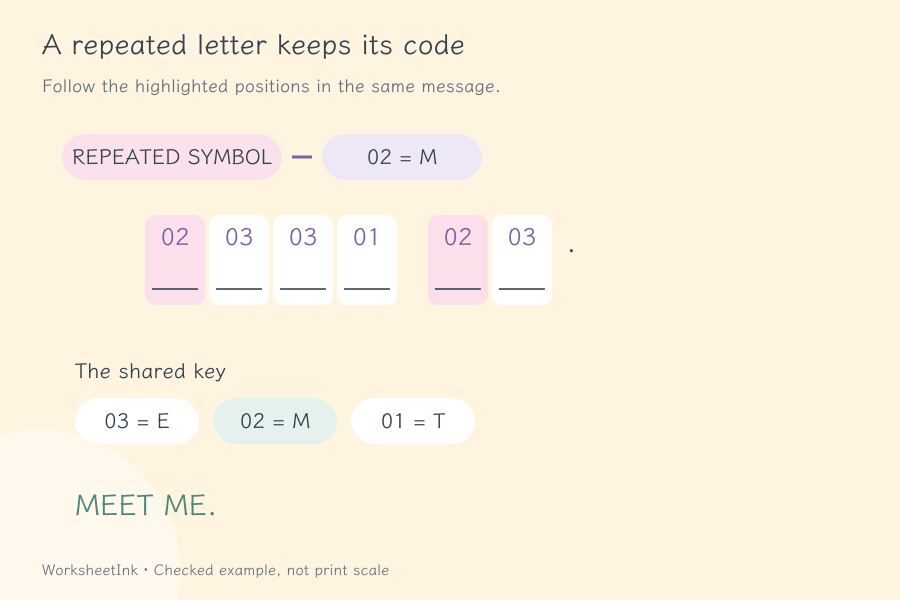
A secret code worksheet with room to write
Each encoded character has a line for the decoded character underneath it. A text clue can give context without supplying the complete message. Teacher pages include the original message and the full code entries used in that item, so checking does not depend on remembering a shuffled alphabet. Keep the reference separate when you want learners to work independently. With a complete key, the activity becomes careful matching and transcription; with fewer hints, it invites discussion of repeated letters and possible words.
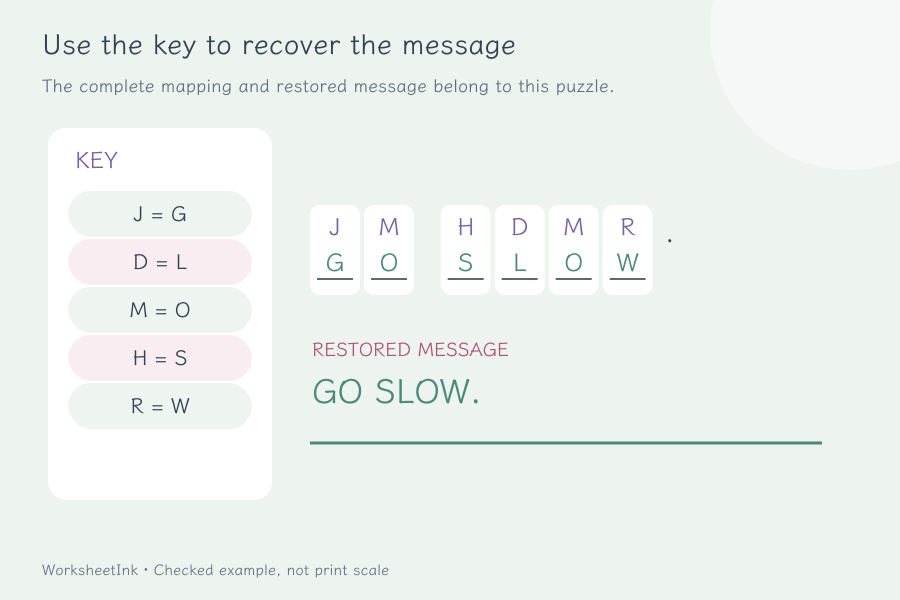
Build a code activity that learners can finish
Start with a useful message, add support and leave comfortable space for every character.
- 01
Write one message per line
Enter up to 24 nonempty lines. A line may contain a message on its own, or a message followed by a vertical bar and an optional clue: Read the map. | A travel reminder. The bar separates the two fields, so it cannot also appear inside either field.
Each message and clue may contain up to 120 characters. Choose a short, familiar sentence before trying longer material. A learner who does not know the vocabulary has two tasks at once: decoding the characters and understanding the words. Use your own suitable text and check spelling before generating; the tool preserves the message you supply rather than correcting its meaning.
- 02
Choose number codes or an English code alphabet
Number mode assigns distinct numeric codes to the characters present in the selected set. These are shuffled identifiers, not a fixed A=1 alphabet. English letters, digits and supported Chinese characters can be encoded together. Accented letters, emoji and other unsupported characters produce an input message instead of disappearing silently.
Letter mode is for English A–Z letters, with allowed spaces and punctuation. Lowercase letters use the same mapping as their uppercase versions; the reference still retains the original sentence. A number in the message needs number mode. Check the example before printing, especially when a lesson combines Chinese and English, and use the supported character set consistently.
- 03
Select the set and decide how much help to give
Keep the input order or shuffle the messages, then request one to 24 items. Exact repeated messages are omitted, and a short source list produces an honest smaller count. The selected set can contain at most 100 different characters to encode. A version seed reproduces the same selection and mapping under the same settings.
Choose zero to eight mapping hints from the shared key. Each item shows only the chosen entries that actually occur in its message, so it may display fewer hints than the setting. A clue is separate from these letter or number correspondences. Review both supports together: a specific clue and several revealed characters can make a short message much easier than either alone.
- 04
Use the editor to improve the wording
After generating, open an item to change its message or clue. The replacement passes the same character and length checks, and an exact duplicate of another message is rejected. Read the revised sentence aloud and check that the clue is helpful without accidentally repeating the entire answer.
An edit creates a new content revision. Because the set shares one key, adding or removing a character can rebuild the mapping and change codes in other items too. Review the complete set and replace older answer copies after an edit. This shared-key approach lets learners carry a discovered correspondence from one message to another during a group activity.
- 05
Fit short messages efficiently on the page
Request one to six items across, one to twelve rows and zero, four or eight millimetres of extra space below each item. The planner wraps codes into rows while retaining a writing line for each encoded character. Longer text, clues and mapping entries need more height, so the actual page grid can be smaller than requested.
Try several brief messages across for a quick warm-up. Use fewer columns for longer sentences so learners can follow the words comfortably. Student and teacher capacities are calculated separately because the reference carries more information. Follow the displayed actual counts, select the matching A4 or Letter paper in the print dialog and review the final preview before making a class set.
- 06
Keep a reusable copy of the exact activity
Print student pages, teacher pages or both, using the item numbers and content identifier to match them. Save in the current browser for a quick return, or download the worksheet data when you need a portable copy of the exact messages, mapping, hints and layout.
Import checks the saved content before restoring it. Local browser storage can be cleared, so retain the downloaded file for an activity you plan to repeat. Changing only the page density, extra space or hint count preserves the code content version. Generating again or editing a message can change the activity; review the new reference rather than pairing it with an older printed sheet.
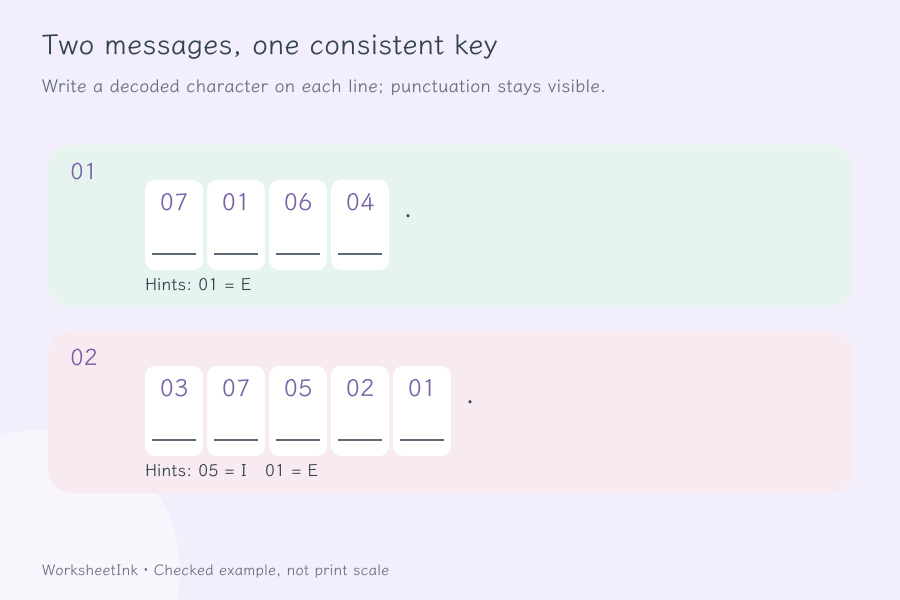
Before you share the secret
Practical answers about messages, hints and printed copies.
One shared key assigns a different code to each distinct character in the selected messages. Repeated occurrences use that same code throughout the set. Uppercase and lowercase English letters share an entry. Number codes are shuffled rather than fixed alphabet positions. The teacher reference provides the correspondences used in each message, so the original text can be checked character by character.
Yes. Enter one message per line, optionally followed by a vertical bar and a text clue. Number mode supports English letters, digits and supported Chinese characters; letter mode supports English letters. Each message and clue has a 120-character limit. Unsupported characters are reported. Review names, spelling and classroom suitability yourself before handing out the worksheet.
Use a familiar short sentence, add a useful context clue and reveal some mapping entries. The zero-to-eight hint setting selects entries across the shared key; each message displays only selected entries that it uses. It therefore does not promise eight hints on every item. Learners can also transfer a discovered code from one message to another in the same set.
Permitted spaces and punctuation remain visible in their original order, while letters and other supported encoded characters receive codes. Repeated characters keep a consistent correspondence. Each code has a writing line beneath it; literal punctuation does not. Long messages can wrap across several rows, so check the preview if keeping an entire word together matters for your activity.
The complete key determines the stored answer. A short message with an unknown or partial key, however, can allow more than one plausible reading. This tool does not prove that every learner can infer a unique sentence from the visible clues alone. Give enough context for your purpose and discuss reasonable suggestions before revealing the intended message.
Yes. Choose one to six across and up to twelve rows, then read the actual student and teacher capacities. Codes, answer lines, clues and key entries all need space. A long message may reduce the usable columns or rows. For efficient printing, shorten the messages or reduce extra space while keeping the writing area comfortable.
Saved worksheet data retains the messages and mapping. Density, spacing and hint-count changes keep the content identifier. Editing a message creates a revision and may rebuild the shared key, including codes in other items. Generating again can also replace the set. Keep matching student and teacher copies together and use the identifier when checking versions.
This is a classroom decoding activity using simple substitution. It is not designed to protect private information, create account passwords or replace secure communication software. Use ordinary lesson messages, clues and short facts. The purpose is to practise reading a correspondence table, spotting repeated characters and explaining a possible decoding on paper.
Give the next lesson a message to uncover
Write a short message, choose the clues and keep its matching answer copy.
Browser printing & PDF · No registration