SHAPES · LABELLED MEASUREMENTS
Geometry worksheet generator See the figure. Read the labels. Explain the result.
Use this geometry worksheet generator to combine shape identification with perimeter and area practice. Choose figures, integer dimensions and units, then review the diagram beside its matching calculation. Adjust columns, rows and working space before printing a student sheet and its reference.
Checked content · Adjustable grid · A4 / Letter
Geometry worksheet generator
Choose the content, review the result and adjust the paper.
My worksheets
Drafts save automatically in this browser, including unfinished input. Keep up to 20 named worksheets across all tools. Large images may exceed browser storage; download data as a backup.
Worksheet preview
Fit complete rows onto each page using the selected columns and writing space. Extra page space stays at the bottom; answer gaps are not stretched.
Request 1–6 across and 1–12 rows. Unlabelled figures can be dense; measured figures use at most 3 columns so labels remain readable.
Generate to review the content and matching reference.
Match A4 or Letter in the browser print dialog. Choose Save as PDF and review every student and answer page; switch off browser headers and footers if needed.
The figure and the question should tell the same story
Give the right information for the geometric task.
Separate a boundary from the surface inside
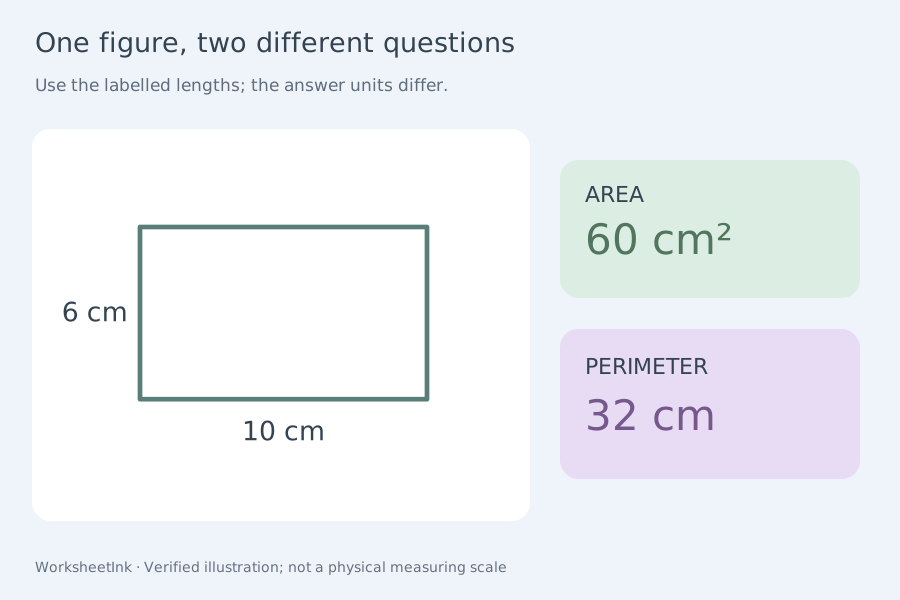
Area and perimeter worksheets are useful when the task makes the distinction visible. A labelled rectangle can support either question, but the expected unit and calculation change. This generator names the task explicitly and derives the reference from the same dimensions used by the drawing. It keeps the scope focused: squares, rectangles and right triangles for measurement, with a wider selection for shape worksheets. There are no composite regions, circles requiring pi, missing-side puzzles or three-dimensional solids in the current measured set.
Name a shape without relying on its usual orientation
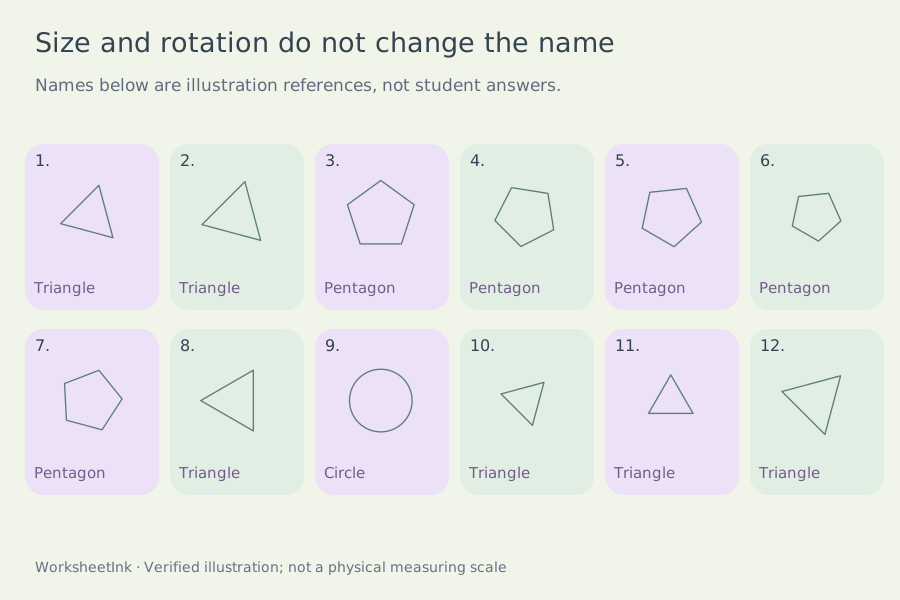
A triangle does not stop being a triangle when rotated, and a square can be presented away from its familiar upright pose. Identification examples vary size and rotation while keeping their defining geometry. Directions supply a naming list and ask for the most specific entry. A square's reference additionally acknowledges its rectangle relationship. The maker provides a consistent task convention rather than claiming that all mathematical descriptions collapse to one word. Review the chosen convention with learners before using the reference to mark their responses.
Make a sheet around the property you want learners to notice
Choose the task, check the dimensions and preserve useful working space.
- 01
Start with one clear geometric goal
Choose identification, perimeter, area or a mixture. Identification asks learners to use the most specific name in a supplied list. Measurement tasks ask for a numerical result with an appropriate unit. These goals can be practised together, but counting sides is different from applying an area relationship.
Select the shapes that belong in this lesson. The identification pool includes circles and several polygons; the measured pool is deliberately limited to squares, non-square rectangles and right triangles. A selected shape does not automatically support every task. Check the generated task counts and read unavailable-task notices before printing, especially when you request a very small set.
- 02
Keep dimensions inside a useful working range
Choose integer side limits from one to thirty and one common length unit for the sheet. Square sides are equal. Rectangle sides are unequal, and their ratio is limited to four to one so a very thin diagram does not make the labels difficult to read. Results can be larger than the largest side: an area is not itself another side length.
Triangle perimeter questions use whole-number right triangles whose three labelled sides meet the chosen limits. Narrow ranges may contain no such triangle. Area questions need only two perpendicular legs and can therefore use other integer pairs. The generator reports the real available set rather than inventing an impossible figure or duplicating a question to fill a requested count.
- 03
Read the labels before choosing a relationship
For a rectangle, the two adjacent labelled dimensions determine its perimeter and area. A square needs one side because its definition supplies equality. The reference shows the arithmetic, not just a final value. Learners should still explain whether they are finding boundary length or enclosed surface.
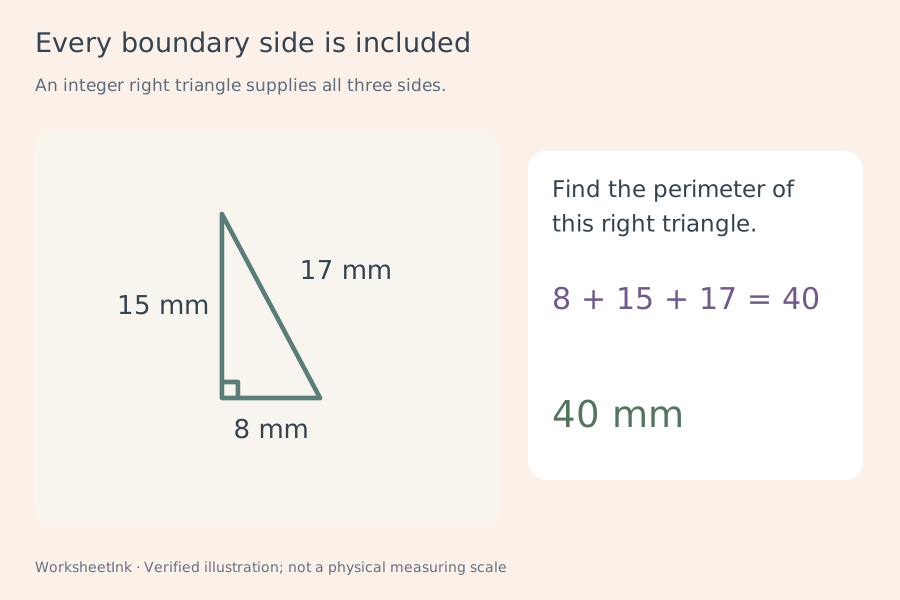
Right-angle markers identify the perpendicular legs used as base and height in triangle area questions. Perimeter questions label the hypotenuse as well. That is a different information requirement: base and height alone do not generally determine the perimeter of an arbitrary triangle. This tool uses right triangles explicitly and does not silently apply a triangle formula to an unrelated pair of lengths.
- 04
Treat the drawing as a diagram, not a measuring instrument
Each measured drawing preserves the ratio of its own two perpendicular dimensions. Its overall size is then fitted independently into the printed cell. Two figures on the same sheet do not share a physical scale, so doubling a labelled length does not promise twice the printed edge length.
The repeated scale note tells learners to calculate from the labels. This is not a ruler-measurement worksheet, a centimetre-square counting grid or a full-size construction template. Identification figures vary their displayed size and rotation to provide distinct visual examples; the same shape name can appear more than once. Rotation and resizing do not change the mathematical category.
- 05
Choose a compact grid without shrinking the labels
Request one to six figures per row and one to twelve rows. Extra work space adds zero, eight or sixteen millimetres per item. Short identification tasks can use dense columns, while numerical tasks retain at most three actual columns so the dimension labels stay readable.
Capacity also reserves room for the reference calculation and any classification note. Longer material can reduce rows or columns, and the actual grid is displayed beside the controls. Changing these settings rearranges the current figures without selecting new ones. Choose more room when learners need a written method, and check all A4 or Letter pages in your own print preview before making a class set.
- 06
Review definitions and preserve the exact version
Check units, side labels, right-angle markers and the requested task. For a square, the teacher copy explains its relationship to rectangles while retaining the most specific listed name. For an area, check the squared unit. For a perimeter, check that every boundary side is represented in the calculation.
The item editor rebuilds both figure and reference under the current rules. A successful edit creates a new revision and rejects exact repeats. Download JSON to retain the actual questions, dimensions, edits and layout, or use local browser saving for convenience. Import validates the derived content. This page provides printable practice; it does not mark students' drawings, infer their grade level or assess a photographed worksheet.
Questions before you print
Practical details about source content, answers and paper.
Choose circle, triangle, square, rectangle, pentagon and hexagon for identification. Perimeter and area tasks use squares, rectangles and right triangles. You may combine task types, but circles and the two larger polygons do not receive measurement questions here. The actual task counts show what was selected; a small request or a restricted range may leave some selected tasks unrepresented.
Set a minimum and maximum from one to thirty, and choose millimetres, centimetres or metres. Every labelled side must fit that range. Rectangles have unequal sides and an aspect ratio no greater than four to one. Triangle perimeter questions additionally require a whole-number hypotenuse within the range. The item editor checks these same constraints when you change dimensions.
Area questions show two perpendicular legs and a right-angle marker, so the legs serve as base and height. Perimeter questions show all three side lengths and use verified integer right triangles. You do not need to calculate an unlabelled hypotenuse. A sloping side should not be substituted for the perpendicular height when finding area; the reference states the relevant calculation.
Area measures a two-dimensional region, while perimeter measures boundary length. The reference therefore uses mm², cm² or m² for area, and the corresponding plain unit for perimeter. Half-unit triangle areas are displayed exactly with .5 when necessary. This page keeps one unit throughout a sheet; it does not mix units, convert them or apply an approximate circle formula.
Measured figures preserve their own aspect ratio, but each figure is fitted independently into its available space. A printed centimetre label is not a promise that the edge measures one physical centimetre on paper. Use the labels, not a ruler on the drawing. Identification figures deliberately vary size and rotation without changing the underlying shape. The scale note repeats in the worksheet directions.
Yes, under the inclusive geometric definition. Identification directions ask for the most specific name from the supplied list, so Square is the intended listed response. The teacher reference explicitly notes its rectangle relationship. Non-square rectangle drawings are used for the separate Rectangle category. Discuss these definitions with learners rather than marking every broader but mathematically valid description as an unexplained error.
You can request one through six columns and one through twelve rows. Unlabelled identification figures can use a dense layout. Measured figures use at most three actual columns to keep dimension labels readable. Longer prompts, references or extra writing space can reduce capacity further. The display reports the actual grid, and density changes preserve the selected figures and their content version.
Yes. Edit a numbered item within the current task, shape, dimension and unit rules. The figure and reference update together, and the edit creates a revision. Save in the current browser or download JSON to preserve the exact set. Import recomputes and validates the derived content. A seed alone cannot preserve manual edits, and local storage is not a cloud backup.
Prepare the next useful practice sheet
Review the task and give learners room to explain.
Browser printing & PDF · No registration