CHINESE WRITING PRACTICE
Chinese character worksheet generator From a clear model to your own writing
Use this Chinese character worksheet generator to make writing practice from your own Hanzi list. Choose complete models, a controlled 28-character step-by-step stroke set, or blank grid paper. Set Tian Zi Ge, Mi Zi Ge or plain squares, keep a physical writing size, and arrange tracing and independent practice around the lesson. Full blank grids can fill 1–20 pages, with an optional title, name and date header.
Custom text · Adjustable density · A4 / Letter
Chinese character worksheet generator
Set the content, then adjust the printable arrangement.
My worksheets
Drafts save automatically in this browser, including unfinished input. Keep up to 20 named worksheets across all tools. Large images may exceed browser storage; download data as a backup.
Worksheet preview
Fit complete rows onto each page using the selected columns and writing space. Extra page space stays at the bottom; answer gaps are not stretched.
Choose 1–6 groups across and 1–12 rows. Each group contains one character’s cells. Space adds 0 / 6 / 12 mm.
Cells wrap within a group. Preserve a usable square size; the applied group grid may be reduced.
Generate to review the content and matching reference.
Match A4 or Letter in the browser print dialog. Choose Save as PDF and review every student and answer page; switch off browser headers and footers if needed.
Give each stage of writing its own space
Choose the support that belongs in this lesson.
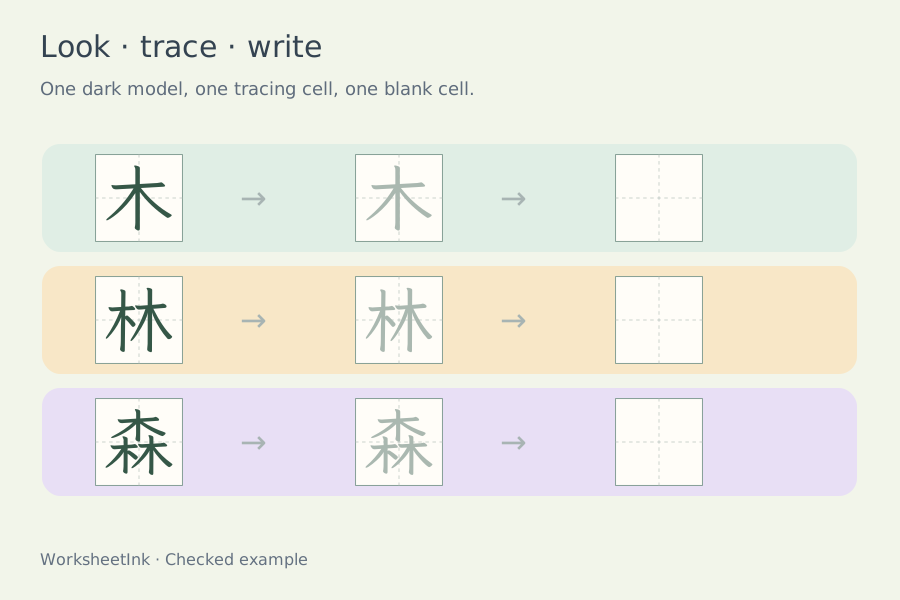
Separate looking, tracing and independent writing
Chinese character tracing can begin with one dark model, continue with up to four light tracing characters, and finish with up to four blank practice cells. You decide the balance. A learner meeting a new form may benefit from a model and repeated tracing; a learner recalling a familiar character may need mostly blank squares. The model can be hidden, while a small item label still identifies the target. Every item must retain at least one tracing or blank practice cell. The reference copy fills the practice positions with dark models for comparison. It is a visual reference rather than an assessment of how a learner formed the strokes.
Use the grid to support the character’s structure
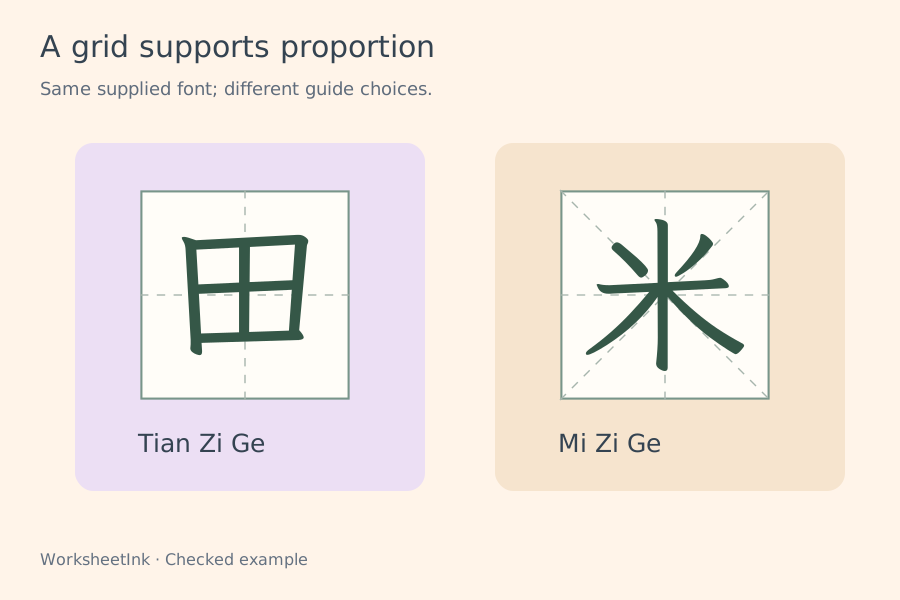
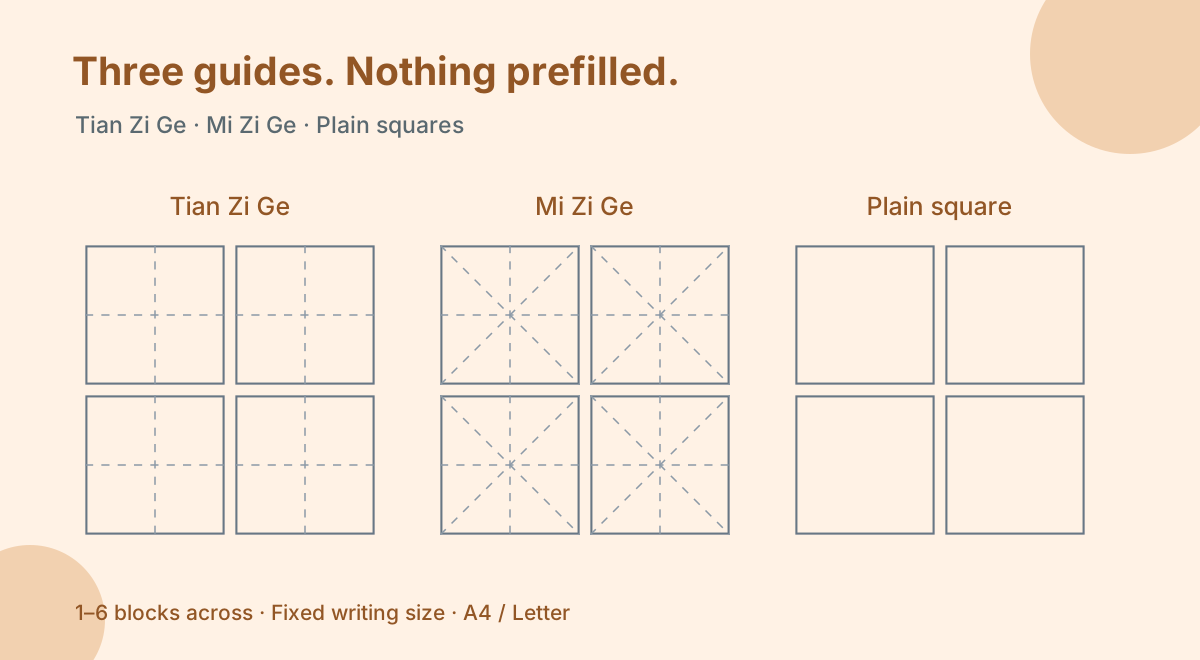
Tian Zi Ge divides a square with a horizontal and vertical centre guide. Mi Zi Ge adds two diagonals. Plain squares retain only the outside boundary. Choose the support that matches your lesson. Ordinary model practice supplies its own writing font, while step-by-step mode draws separate ordered stroke paths from a fixed Make Me a Hanzi subset. Its completed models and tracing forms use those same paths, so the learner sees one consistent form throughout that mode. Neither mode judges handwriting or offers animation.
From your lesson list to a usable practice sheet
Review the content first, then adjust the paper.
- 01
Start with a manageable character list
Paste Chinese characters from the current lesson. Spaces, line breaks and punctuation are ignored; a word such as 山水 becomes two separate practice groups. Each accepted character therefore receives its own consistent set of cells. The input can contain up to 4,000 characters, with at most 200 accepted entries after filtering and optional deduplication.
Enable removal of repeated characters when you want one group per distinct form. Leave it off when a character should recur in a planned sequence. Unsupported characters are reported rather than replaced with empty boxes. The bundled font covers a large everyday Hanzi set, including many traditional forms, but it does not cover every rare Unicode ideograph. Check the preview when your material includes names or uncommon characters.
- 02
Choose a grid and a physical cell size
Available square sizes are ten, twelve, fifteen, eighteen and twenty millimetres. Larger cells leave more room for a beginner to observe parts and reproduce a form. Smaller cells can be useful for compact review once the learner has enough control. The guides remain thin so they support the writing without overwhelming it.
A cell size is a paper measurement at actual-size printing, not a recommendation for every age or a promise about the browser zoom level. Choose A4 or Letter consistently, print at one hundred percent when that measurement matters, and check one sample with a ruler. Browser margins or a fit-to-page option can change the final physical scale. Avoid shrinking the whole page simply to force an ambitious density setting.
- 03
Set the model, tracing and blank balance
Choose zero to four tracing cells and zero to four blank cells after the optional dark model. At least one practice cell is required. Tracing can be soft gray or muted red. The model and teacher reference remain dark. Character fill can be seventy, eighty or ninety percent, controlling how the actual glyph fits inside the square.
Try one model, two tracing cells and two blank cells for an introduction. Later, reduce tracing and retain more independent positions. The character is centred using measurements from the supplied font, including forms whose outlines are taller or wider than usual. That protects against clipping at the edge of the grid. These controls change the practice scaffold; they do not simplify the character or change its strokes.
- 04
Plan groups across and rows down
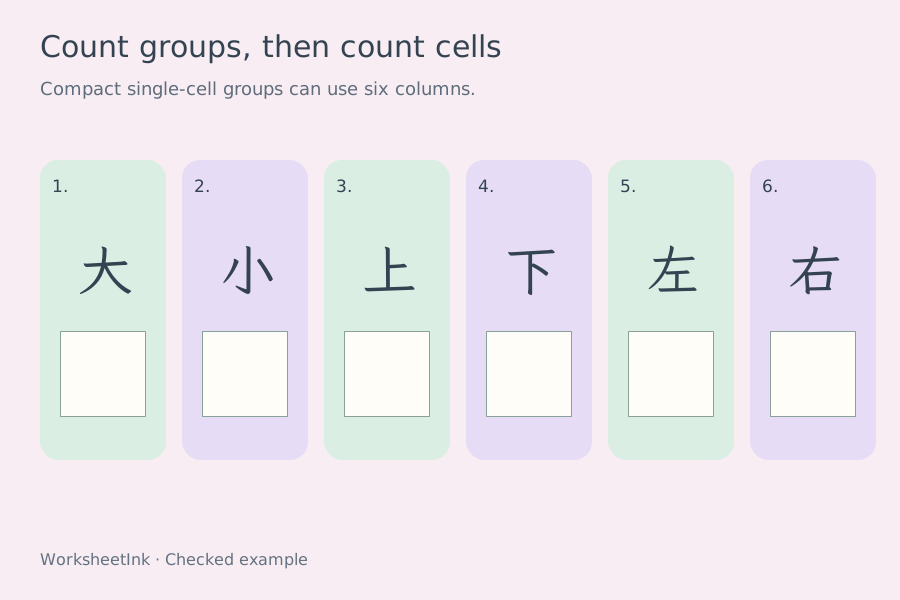
Request one to six character groups per row and one to twelve group rows per page. A group contains all cells assigned to one character; it is not the same as one square. If the cells cannot sit side by side inside a group, they wrap to another line within that group. This lets you keep a larger writing size without losing any tracing or blank positions.
The ordinary model mode may reduce the applied columns when a large group exceeds its conservative budget. Step-by-step mode instead retains your requested columns and square size, wrapping the sequence inside each group. An impossible arrangement is rejected with suggestions to use fewer columns or practice cells. The shared automatic print layout continues placing complete group rows toward the page bottom; a group stays together when the next row cannot fit. A long sequence can therefore leave more space than a short one.
- 05
Select the entries and check each form
Request one to 200 groups, preserving input order or choosing a shuffled selection. When the valid pool is smaller, the actual count is displayed rather than padded with unintended repetitions. Review the student copy, then switch to the reference to compare the dark models. You can replace an individual character without rebuilding the entire selection.
An edit changes that item and creates a new revision. If repeated input is allowed, editing one occurrence does not rewrite every occurrence of the same character. Density, guides, cell sizes, colors and the model-to-practice balance can be adjusted around the current selection without changing its version. For a word-level task, discuss how the separately practised characters combine after the writing activity; this maker does not preserve a multi-character word as one continuous group.
- 06
Print with the writing font ready and save the data
The print action first waits for the supplied font portions needed by the selected characters. A loading failure is shown before the browser print dialog opens, so you can retry. Select the student copy, the dark reference copy or both, and keep the item numbers and version together when preparing classroom sets.
Use browser Save as PDF when you need a portable file. Review the final page breaks and tracing lightness on your printer. Browser saving stays on this device; downloading JSON preserves entries, selected occurrences, edits and layout for validated import. Neither method stores a learner’s written work. For reading and tone marks, use the separate pinyin tool. Step-by-step mode is a visual teaching reference: discuss the actual movement and the conventions used in your class rather than treating the sheet as handwriting feedback.
- 07
Retain a precise number of blank practice blocks
In blank-paper mode, choose Fixed practice blocks when you need an exact number of small writing areas. This retains the original block layout and its saved files. For a continuous grid covering the printable page, choose Full page grid instead.
Set the total number of blank blocks from one to 200, and choose one to four empty squares in each block. These are explicit quantities: the generator does not repeat a character list or manufacture extra blocks to fill a final page. One to six blocks can sit across the page. Squares keep the selected ten, twelve, fifteen, eighteen or twenty millimetre size. If several squares will not fit side by side within a narrow block, they continue below in that same block, rather than shrinking or silently reducing the column setting.
Automatic pagination uses A4 or Letter height to place complete blocks near the bottom margin whenever enough content remains. Extra writing space is separate from cell size, so select the smallest spacing that suits the task when saving paper matters. Empty paper has one output, not an invented answer sheet. Downloaded JSON stores the blank layout and can be imported later without a font or character list. Keep the same paper selection in the print dialog and use actual-size printing when measuring the squares.
- 08
Choose a small, source-based stroke sequence
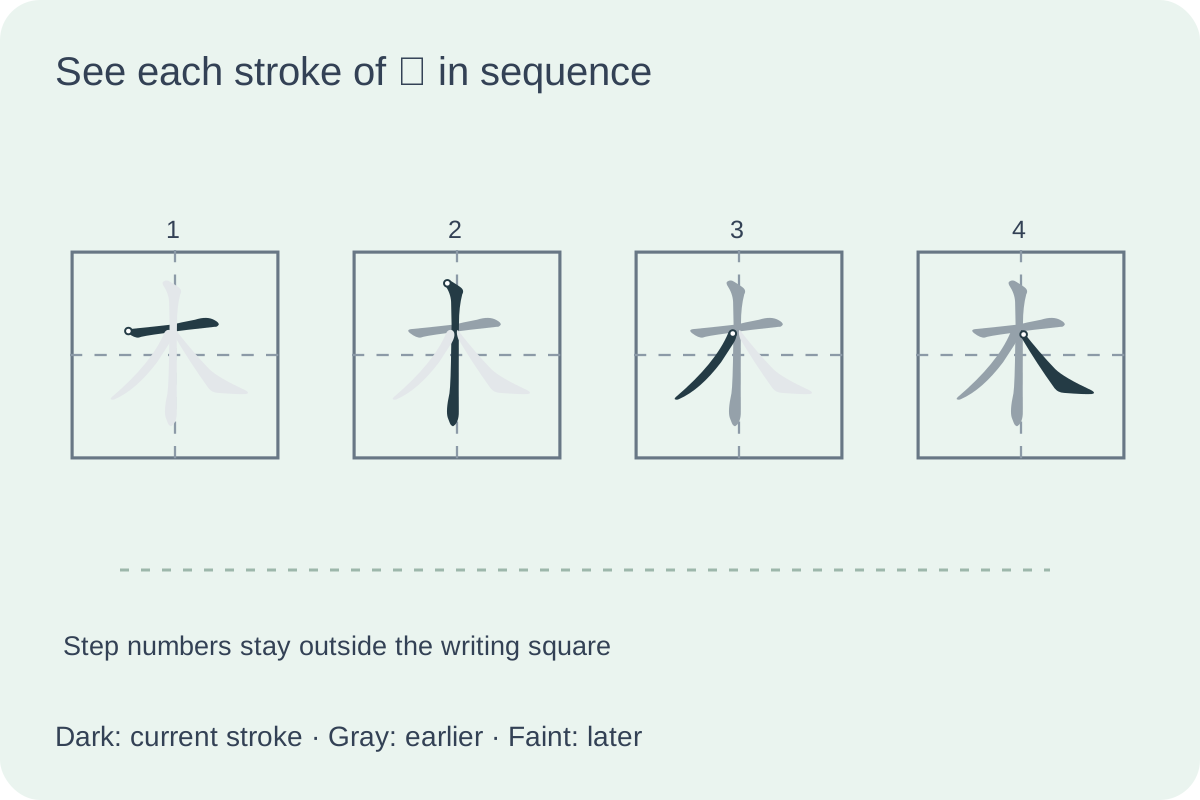
Select Step-by-step stroke models for the 28 characters shown beside the input. This deliberately limited set includes basic forms such as 一 and 十, left-right forms such as 林 and 明, and top-bottom forms such as 早 and 字. Every character has its own ordered outlines and matching centreline data; the maker does not guess strokes from the appearance of a completed font glyph.
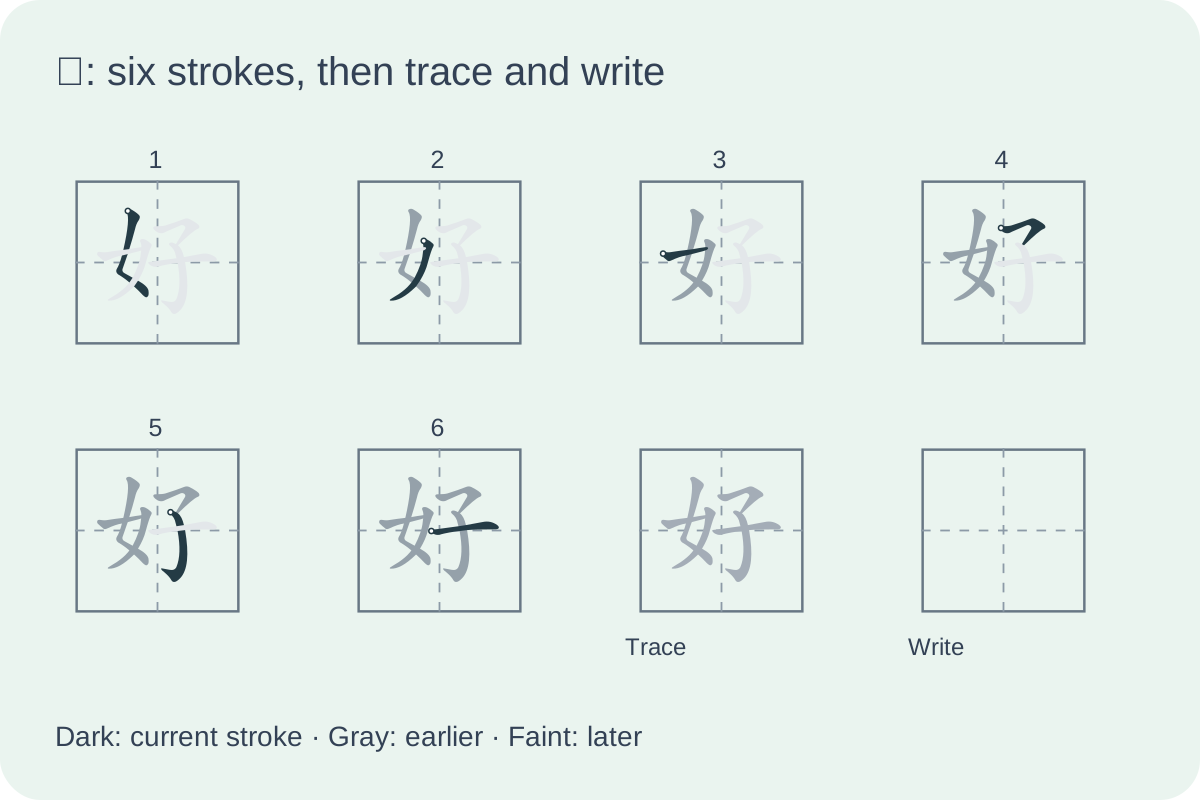
Read the sequence from left to right, then continue on the next line within the same group. The current stroke is dark, completed strokes are gray, and the remaining shape stays faint for position. Optional numbers sit above the diagrams rather than covering them. A separate switch adds a small ring at the source centreline start; it is a location cue, not an arrow, pressure guide or exact pen trajectory. Use a teacher demonstration when direction or a turning stroke needs explanation.
The data is a selected, fixed-version part of Make Me a Hanzi graphics, derived from Arphic fonts and distributed under the Arphic Public License. Source data, attribution and the full licence are linked in the settings. The upstream project targets mainland Chinese stroke order; regional instruction can differ. The selected diagrams have been checked for their structure and sequence, but are not presented as official curriculum certification. Compare them with the material you teach.
- 09
Keep the demonstration and writing task together
After the step diagrams, keep an optional complete model and choose up to four tracing and four empty practice squares. At least one tracing or independent square remains. The student sheet includes the demonstration because this mode teaches formation; it is not a test that hides the target character. The reference copy fills the practice positions with the same complete vector form.
Try a few characters first. At ten or twelve millimetres, narrow groups can wrap into several short lines while preserving six groups across. Larger squares, more strokes and more practice cells make a taller block; choose fewer columns when it no longer fits safely. The entire sequence stays with its practice cells rather than beginning one character on one sheet and finishing it on the next.
An unlisted character produces an explicit error even if it would appear later than the requested selection. Nothing is silently discarded or substituted. Keep the listed characters for this mode, or switch back to ordinary model practice for the broader supplied font. Saved ordinary practice and blank-paper files still open, while a saved stroke worksheet retains its mode, chosen entries and display options.
- 10
Make a complete page of empty writing squares
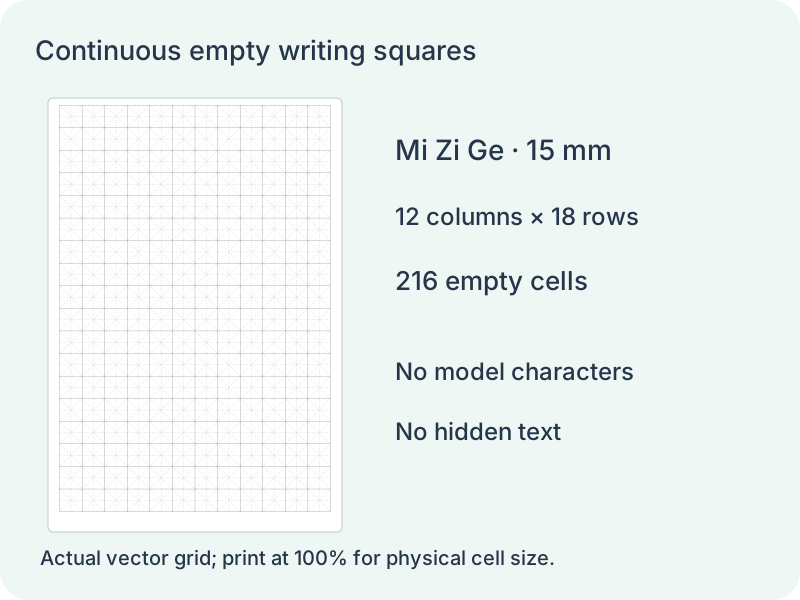
Select blank paper and Full page grid, then choose Tian Zi Ge, Mi Zi Ge or plain squares. The generator calculates the greatest number of complete rows and columns that fit inside the printable area. Each cell keeps its selected 10, 12, 15, 18 or 20 millimetre side. The grid is centred horizontally, and an incomplete strip at the bottom is left empty rather than stretching the final row.
Request one to twenty pages. Each page contains the same empty grid; the file stores a page recipe, not a hidden list of example characters. The older fixed-block option still supports exact block counts and one to six blocks across. Those controls describe separate practice groups and do not control the number of grid columns in a full page.
- 11
Choose the paper and header before printing
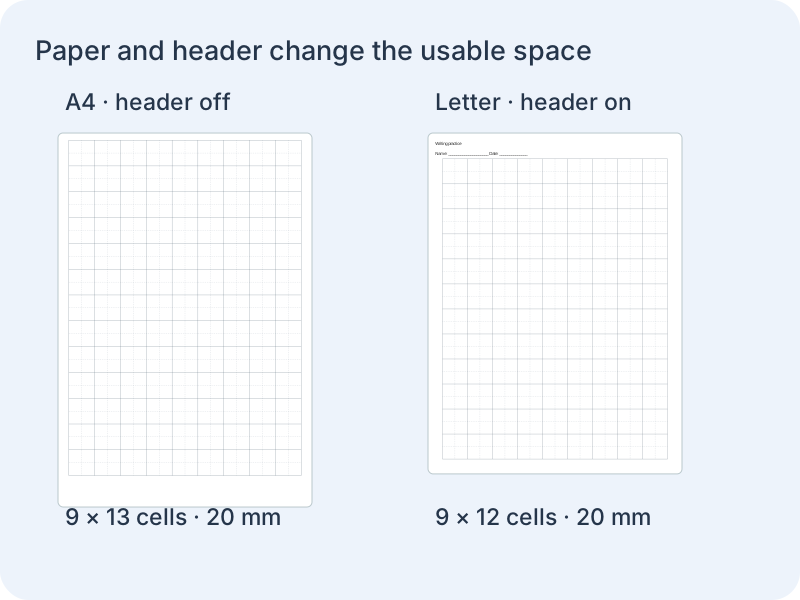
A4 and Letter have different printable heights, so changing paper can change the grid row count. The optional header contains your worksheet title and blank name/date fields. Longer titles wrap and reserve their actual line space. Turn the header off to return that space to the grid; the page then has no printed text, task numbers or footer.
Use the same paper in the print dialog, choose actual size or 100 percent, and disable browser headers and footers when they are unwanted. A fit-to-page setting can alter physical sizes. This tool supplies vector grids through browser printing or Save as PDF; it does not claim a separate native PDF exporter. Saving and importing the document restores the paper, grid, page count and header choice.
Questions before printing
Practical answers about readings, writing and paper.
Yes. Paste your own Hanzi list and choose how many groups to select. The maker separates words into individual characters and ignores punctuation and spacing. Repeated forms can be removed or retained. Review reported unsupported characters before you rely on the accepted list.
Both are square guides with a central horizontal and vertical line. Mi Zi Ge also includes diagonals. A plain square has no internal guides. Choose the scaffold that helps your learners notice proportion and placement; the tool does not infer which grid a particular character requires.
Yes. Keep or hide the main dark model, then choose up to four tracing and four blank cells. At least one practice position must remain. The student copy keeps the blank cells empty, while the separate reference fills the practice positions with dark examples.
Yes, when you select Step-by-step stroke models. It covers the listed 28-character set using ordered vector strokes, with optional step numbers and source-start rings. Ordinary practice still uses complete glyphs, and blank paper has no models. The sequence is a teaching reference with no animation or handwriting grading.
Ordinary practice reports and omits input outside the supplied font. Step-by-step mode has a smaller, explicit 28-character list and refuses unlisted input rather than removing it. Spaces and punctuation are ignored in both modes. Switch to ordinary practice when your target is font-supported but not in the stroke set.
Choose one to six groups across. A group can wrap its squares internally. Step-by-step and fixed-block blank modes preserve the requested columns and physical cell size, rejecting impossible settings; ordinary model mode may reduce actual columns with a notice. Automatic pagination packs complete rows toward the page bottom. Full-page grids calculate rows and columns from the selected cell size.
They are defined as twelve-millimetre squares in the print styling when that size is selected. Use the matching paper size and actual-size printing to preserve the measurement. A browser or printer scaling option can change it, so check one printed square before producing many copies.
Yes. Grid type, physical size, tracing shade, model visibility, cell counts and density change the scaffold around the current selection. The item numbers and version stay the same. Download the current JSON to preserve edits as well, and use the separate reference as a form comparison rather than an automatic grade.
Yes. Choose Blank grid paper, then set the grid type, physical square size, block count and empty cells per block. All model and tracing text is omitted. The file contains empty blocks instead of hidden placeholder characters.
In blank mode the selected cell size stays fixed. A block with several squares wraps internally if it is too narrow for one line. The requested one to six blocks across remain unchanged. Use one empty square per block for a compact arrangement, or fewer columns when you want a longer run of adjoining squares.
The current stroke is dark against earlier gray strokes and a faint remaining shape. This keeps position visible throughout the sequence. Step numbers and the small source-start ring can each be switched off; the diagrams stay static and print in the same order.
A character group stays intact, including its demonstration, tracing and empty squares. If that complete row cannot fit, it starts on the next page. Reduce extra space or practice cells, or use fewer groups across to reduce internal wrapping; the maker never cuts a sequence between pages.
Yes. Full page grid calculates complete rows and columns from the chosen paper and cell size. Choose 1–20 pages; the older fixed-block mode remains available for exact group quantities.
The space is returned to the grid, but a new row appears only when another complete cell height fits. Cell size is never stretched to use a leftover strip.
Make room for confident character writing
Use a short list you have checked and leave room for the learner.
Browser print / Save PDF · No registration