SNIP · FOLLOW · TURN
Cutting practice worksheet generator A clear starting edge for every small cut
Use this cutting practice worksheet generator to prepare scissor skills cards with a reachable starting point, a bold practice line and paper left to hold. Choose short snips, straight or turning paths, or simple closed shapes. Set the physical card dimensions, check how many fit across the page and save a small practice set for another session. Choose solid or bold dashed paths, mirror the route, and mark closed-shape entries for adult preparation.
7 path types · Real millimetre sizes · 1–6 cards across
Prepare cutting practice cards
Choose the routes, then check the real card size and preparation borders.
My worksheets
Drafts save automatically in this browser, including unfinished input. Keep up to 20 named worksheets across all tools. Large images may exceed browser storage; download data as a backup.
Worksheet preview
Practice cards only — no answer key
Fit complete rows onto each page using the selected columns and writing space. Extra page space stays at the bottom; answer gaps are not stretched.
Default: four 40 mm cards per row, without outside item numbers. Choose 1–6 cards across; fixed millimetre sizes and complete rows are preserved.
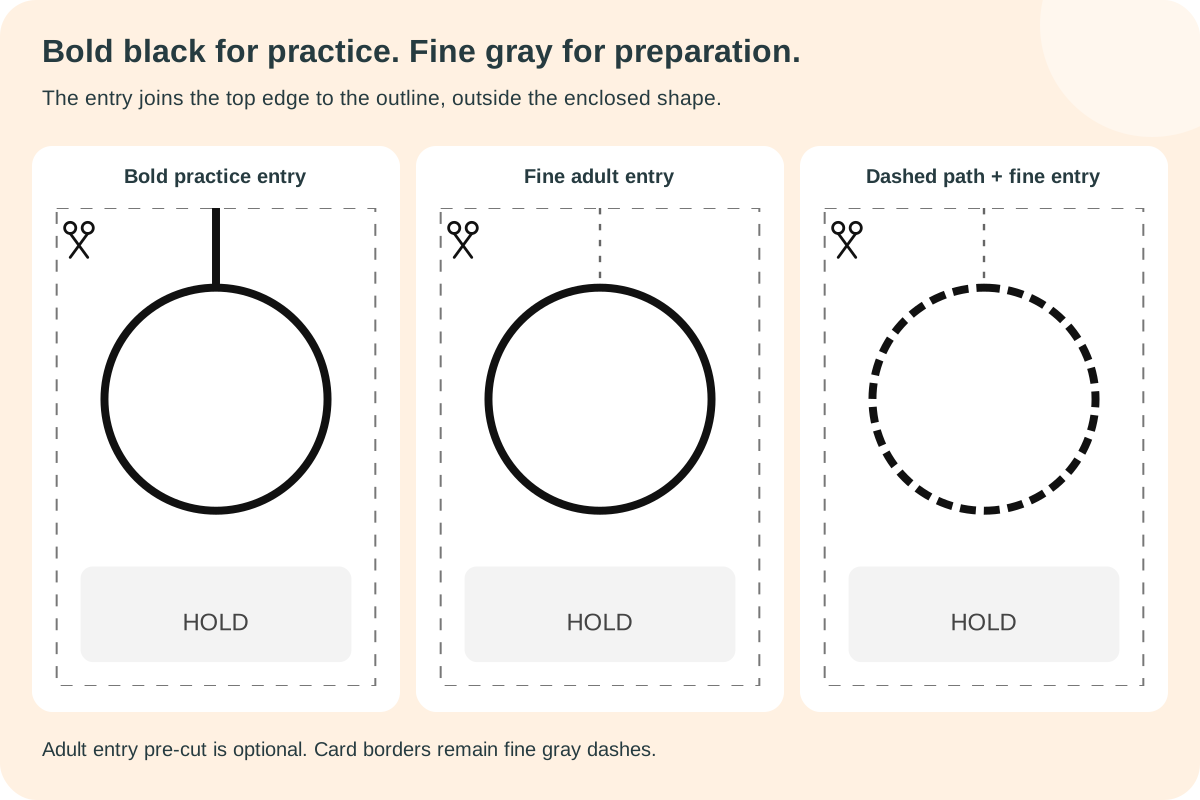
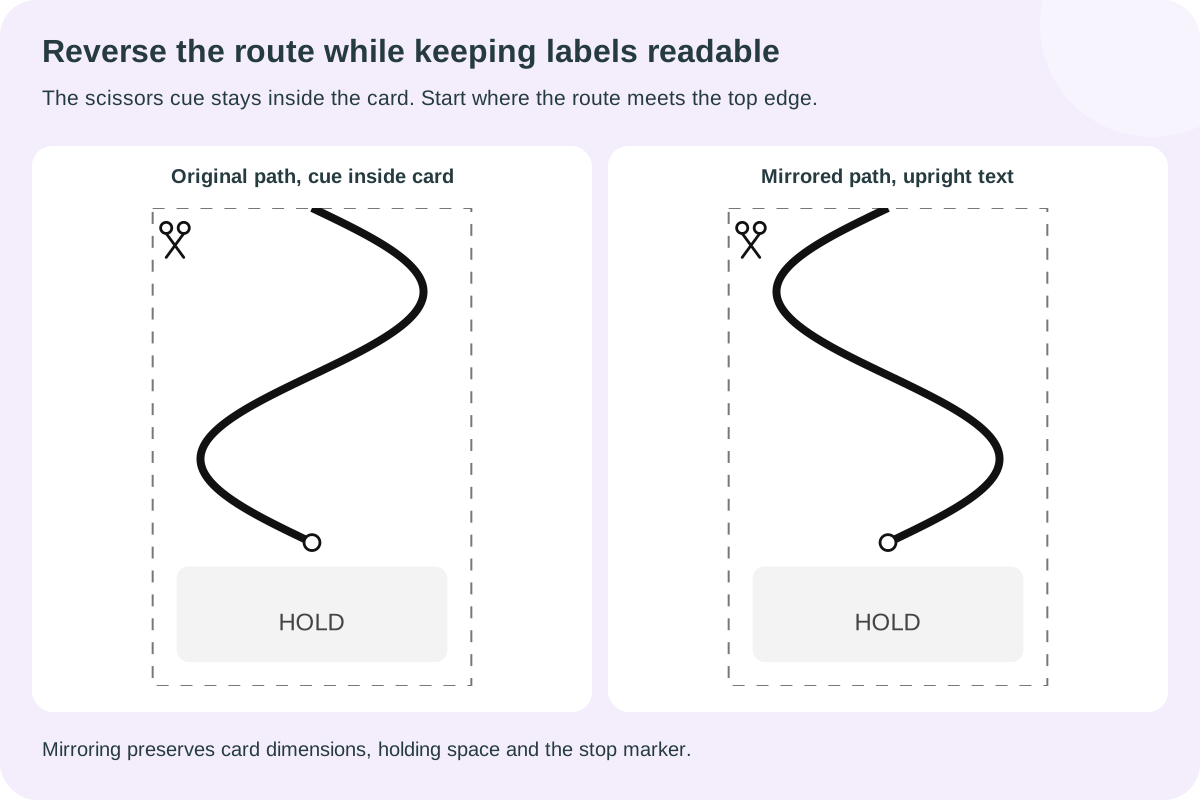
Bold black solid or dashed paths are for practice; fine gray dashes mark adult preparation. Mirroring changes only the path. Text stays upright, and the scissors cue remains inside the separated card.
The bottom 18 mm remains uncut even when its marker is hidden. Closed shapes need at least 20 mm of outline span. Reduce columns before increasing card width.
Create a set to inspect the entry edges, cutting paths and holding space.
Match A4 or Letter, print at normal scale and check the card dimensions. An adult prepares the dashed card borders before practice.
Prepare the edge before the practice begins
Two line styles give the adult and learner different jobs.
Separate a card, then start at its edge
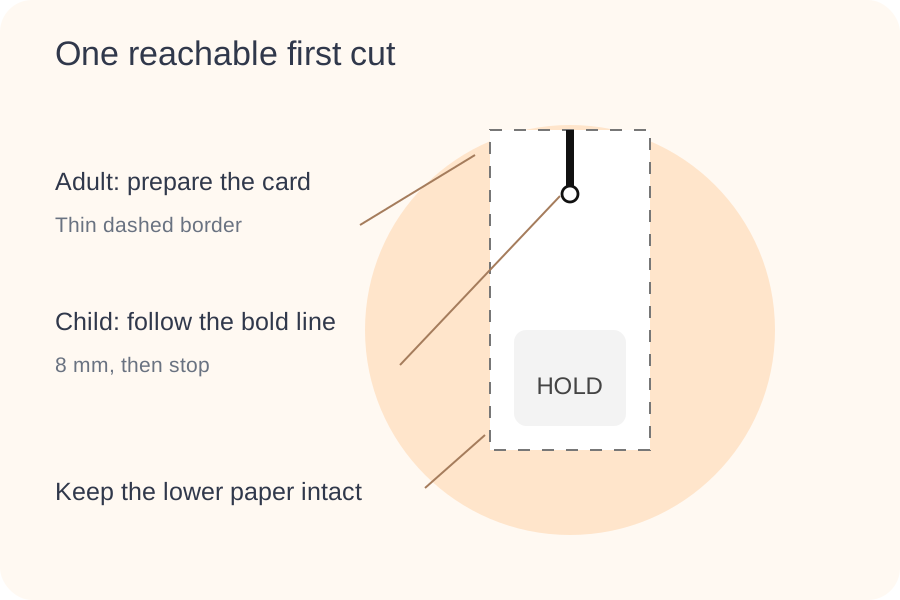
The thin gray dashed rectangle marks the card that an adult prepares first. The child follows the thick black line inside that card. Every practice route starts at the top edge, so there is no need to push scissors through the middle of an intact sheet. A short snip stops after eight millimetres; an open circle marks that stopping point. The rest of the card stays together, with an uncut lower section available for holding.
Reach a shape without cutting across it
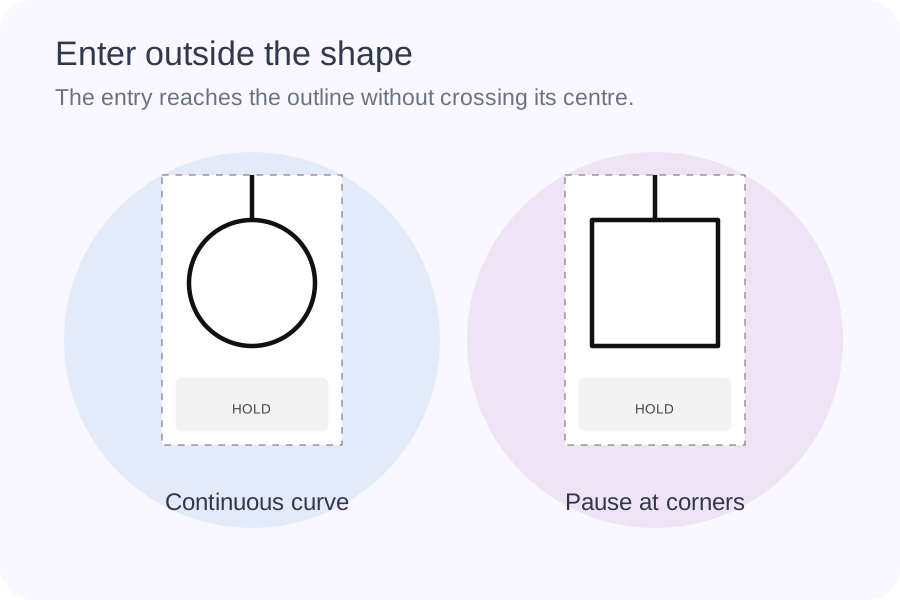
Circle, square and triangle cards include a straight entry route from the outer edge to the top of the shape. Continue along its outline until you return to that meeting point. The entry route stays outside the enclosed shape; it does not make a slit through the piece being cut out. Shapes have a minimum twenty millimetre span in this version. If a compact card cannot preserve that space, the generator explains which dimensions need to increase.
Build a manageable cutting activity
Choose the movement, prepare the paper, then offer a few deliberate attempts.
- 01
Choose a route that matches the next useful movement
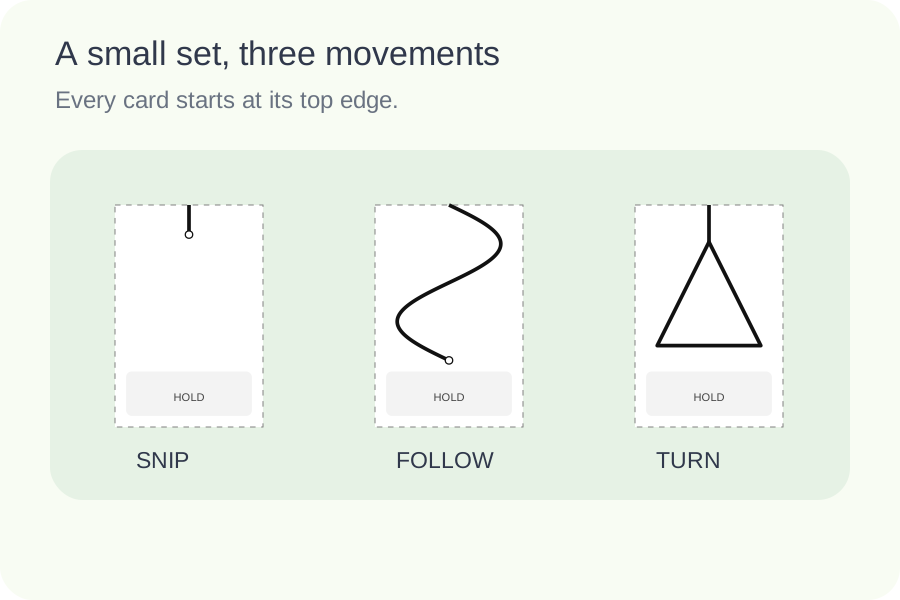
Select short snips, straight paths, zigzags, waves, circles, squares or triangles. You can repeat one pattern or mix a few. The short-snip route is always eight millimetres long, while the straight route extends further down the selected card. Zigzags introduce clear corners, and waves change direction gradually. Closed shapes ask the learner to follow an outline back to its beginning. These choices describe the task rather than assigning an age, grade or score.
Begin with a route the learner can approach comfortably. An adult should supervise the activity, choose suitable scissors and show where the holding hand stays. Offering a shorter or simpler path is often more useful than printing many difficult copies at once. This page prepares paper patterns; it does not assess motor development, recommend therapeutic exercises or promise a result after a fixed amount of practice.
- 02
Distinguish adult preparation lines from practice paths
After printing, an adult separates the rectangular cards along the thin gray dashed borders. Keep the full border dimensions when preparing them: the blank lower section belongs to the card. The learner then starts at the thick black line where it meets the top edge. On an open route, the hollow circle marks the finish. On a shape card, the outside entry line connects directly to the outline, which closes back at that meeting point.
The dashed border is preparation guidance, not another route for the child to practise. Demonstrate this distinction before handing over the card. The optional pale holding area makes the uncut section easy to find without adding a dark frame around it. Turning that marker off removes the shading and label, but the same paper space remains. Keep the supporting fingers clear of the active cutting route throughout the activity.
- 03
Set dimensions before deciding how many cards fit across
Card width and height are measured in millimetres. They are the dimensions of the adult preparation rectangle, not the distance travelled by the scissors. A curved route is longer than its vertical span. The line thickness can be half a millimetre, one millimetre or one and a half millimetres. Choose a visible line that suits the intended task and check it on the paper and printer you plan to use.
The compact preset selects twenty by forty millimetre short-snip cards and six columns. It is a space-saving option, not the default size for every learner or pattern. Larger cards leave more paper to handle and require fewer columns. Closed shapes need at least a twenty millimetre outline span, so a small card that works for short snips may be rejected for a circle. Dimensions never shrink automatically to force a selection into a narrow column.
- 04
Keep the pattern sequence and amount of practice intentional
Choose from one to 120 cards. Cycle order repeats your selected pattern sequence. Grouped order places copies of each selected type together, sharing the requested total as evenly as possible. The selection order is shown beneath the choices; deselect and reselect a pattern to move it to the end. A request smaller than the number of selected types can leave some types unused, so inspect the generated cards before printing.
The bend setting changes how many wave or zigzag cycles appear along the same card. Extra bends increase changes of direction without increasing the paper dimensions. It does not alter circles, squares, triangles or straight routes. A version seed identifies a prepared set, but this generator deliberately follows the selected pattern order instead of randomly inventing shapes. Use the item editor to replace one card while leaving the other cards and their numbers in place.
- 05
Fill printable pages while preserving usable card sizes
Choose one to six cards per row. Automatic pagination packs complete rows into the usable height of A4 or Letter paper and continues on the next page when another row cannot fit. It does not add unwanted cards just to fill a final sheet. The number of rows depends on the real card height, title, instructions and remaining page space. A taller card naturally leaves fewer opportunities to place another whole row.
When the layout reports a width conflict, reduce the column count or choose a smaller card that still suits the task. Change one dimension at a time and inspect the retained preview. If you want extra separation between rows, add the available space below each card; that space sits outside the preparation border. Match the paper size in the browser print dialog and use normal scale. Printer scaling can change the millimetre sizes even when the on-screen layout is correct.
- 06
Save the prepared set and keep the session focused
Download the worksheet data after checking the paths, sizes, sequence and any individual replacements. The JSON file retains the actual cards and settings, so importing it restores the prepared set instead of asking you to rebuild it. Browser saving offers another way to return to the same work on the same device. A downloaded data file is separate from the printable PDF, which you create through the browser print dialog.
This activity has a single practice output. There is no answer key to duplicate the cards or suggest that every cut can be marked against a numerical answer. Keep a finished sample nearby if it helps your demonstration. Offer a small number of prepared cards, collect the scraps and put the scissors away when the activity ends. For drawing along routes with a pencil instead, choose the separate pencil control tool so the printed instructions match the action.
- 07
Choose a solid or bold dashed practice route
Set the practice stroke to 0.5, 1 or 1.5 millimetres, then choose solid or bold dashed. Practice dashes are two millimetres long with one millimetre gaps; they still describe one route. The card perimeter remains a much thinner gray dashed preparation line. With adult pre-cut entry enabled, the short approach to a closed shape also becomes a fine gray dashed line, using a 0.3 millimetre stroke.
An adult cuts that approach only as far as the meeting point with the outline. Turning the option off gives the approach the same weight and style as the practice route. Either way it stays outside the shape. Open paths have no separate shape entry, so this option does not alter them. Demonstrate the fine preparation marks and bold practice marks on one card before using the set.
- 08
Mirror a route while keeping instructions readable
Horizontal mirroring reverses the route’s left and right coordinates while preserving card dimensions and the holding area. Waves and zigzags change direction; symmetric circles or squares may look the same. Holding text and the scissors cue stay readable. This is a geometric choice for the activity, not an automatic selection of scissors or a claim about which hand should be used.
The optional scissors icon sits within the card’s top-left margin, so it remains after the adult separates the card. The actual starting point is where the route meets the top edge. Hiding the cue leaves that geometry unchanged. Line style, mirroring and preparation cues are saved with the data file. Changing them preserves the selected sequence and individually edited cards; importing an older file restores its saved path and cue settings.
Questions about printable cutting practice
Practical answers about starting points, paper space and printing.
Choose short snips or load the compact preset. Each card has one eight millimetre black line beginning at its top edge and ending at a hollow stop circle. An adult separates the cards first. Choose a larger card when the compact format does not leave comfortable paper to hold for your learner.
The learner follows the bold black route, whether solid or dashed. Adults prepare the fine gray dashed perimeter and, when enabled, the fine gray shape entry. Separate the complete card, retain its lower holding section and point out the bold practice route.
An outside entry connects the top card edge to the circle. With adult pre-cut enabled, an adult opens that fine gray entry to the outline, then the learner follows the bold circle. Otherwise the entry uses the selected practice style. Neither route cuts across the circle’s interior.
Choose the movement you want to practise and observe how the learner handles it. Straight routes have no turns, waves change direction smoothly, and zigzags add corners. The bend setting affects waves and zigzags only. The tool does not label a particular pattern as appropriate for every child of a given age.
Yes. The default fits four 40 mm cards across without outside item numbers. The compact preset uses twenty by forty millimetre short-snip cards and six columns. Larger cards require fewer columns, and closed shapes need enough room for at least a twenty millimetre outline span. An incompatible combination shows a message and preserves the previous valid preview instead of silently reducing the printed size.
An adult should select suitable child scissors and paper the learner can handle, then supervise the activity. Check that the chosen printer can feed that paper. Try a single prepared card before printing a large batch. The page does not specify a compulsory paper weight or replace the instructions supplied with scissors or printing equipment.
These are physical cutting paths rather than questions with written answers. Printing a second identical set as an answer key would use extra paper without adding a solution. The tool therefore provides one practice output. An adult can use a separate sample for demonstration and observe the cutting process without an automatically assigned score.
Yes. Use the item editor to replace its pattern. The replacement must fit the current physical card dimensions. Save or download the worksheet data to retain that edit, then restore or import it later. Match A4 or Letter and browser scale when printing again so the card dimensions remain consistent.
Prepare a small set, with a clear place to begin
Choose the next movement and leave room for the hand that holds the paper.
Browser printing & PDF · No registration