LISTEN · SEGMENT · BLEND
Phonics worksheet generator Small words, clear sounds, room to connect them
Use this phonics worksheet generator to choose short vowels and spellings your learners already know, then prepare sound boxes for listening, blending or finding a sound. This focused bank contains 72 words with checked US English sound partitions. Keep the numbered teacher reference beside you, and set one to six questions across the page without shrinking the writing boxes. Picture choice adds 19 illustrated targets: select the matching word, then map its sounds in the same boxes.
72 checked words · 19 picture targets · Four tasks
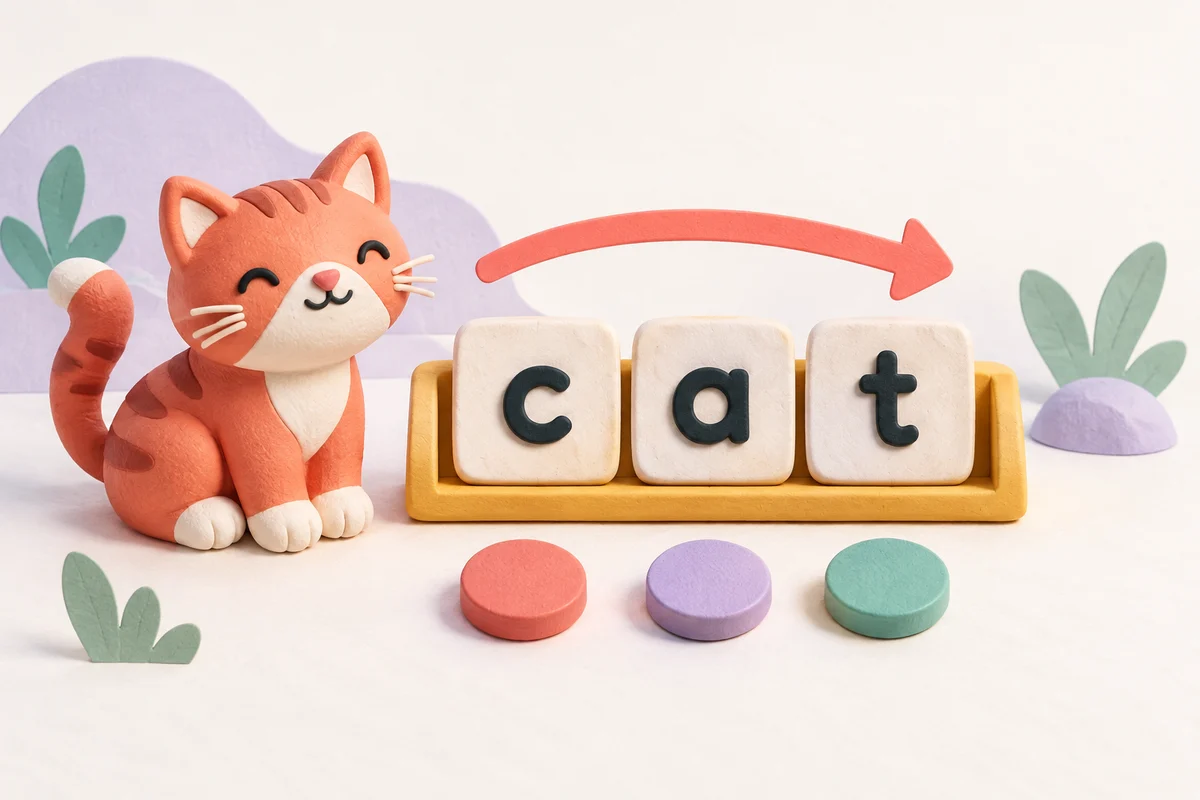
Phonics worksheet generator
Hear the word, map its sounds and blend it back together.
My worksheets
Drafts save automatically in this browser, including unfinished input. Keep up to 20 named worksheets across all tools. Large images may exceed browser storage; download data as a backup.
Worksheet preview
Fit complete rows onto each page using the selected columns and writing space. Extra page space stays at the bottom; answer gaps are not stretched.
Use fewer columns for larger writing boxes. The displayed box size is preserved on paper.
Request 1–6 columns. Three 7 mm boxes fit six columns; four 7 mm boxes need at most four. Larger boxes need more width. Keep the selected physical size and reduce columns when prompted.
Choose the taught sounds, then generate your practice.
Match A4 or Letter in the browser print dialog. Choose Save as PDF and review every student and answer page; switch off browser headers and footers if needed.
Make the sounds visible, one step at a time
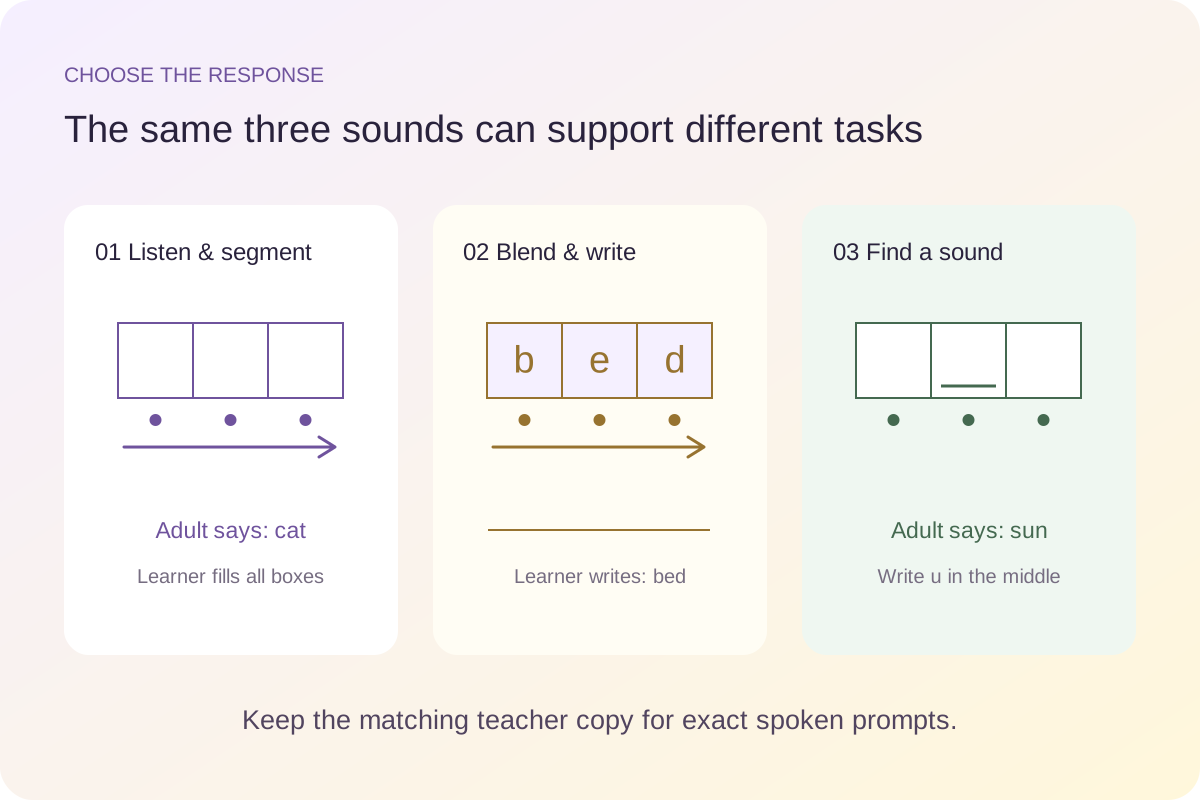
Choose a response that matches the skill you want to hear.
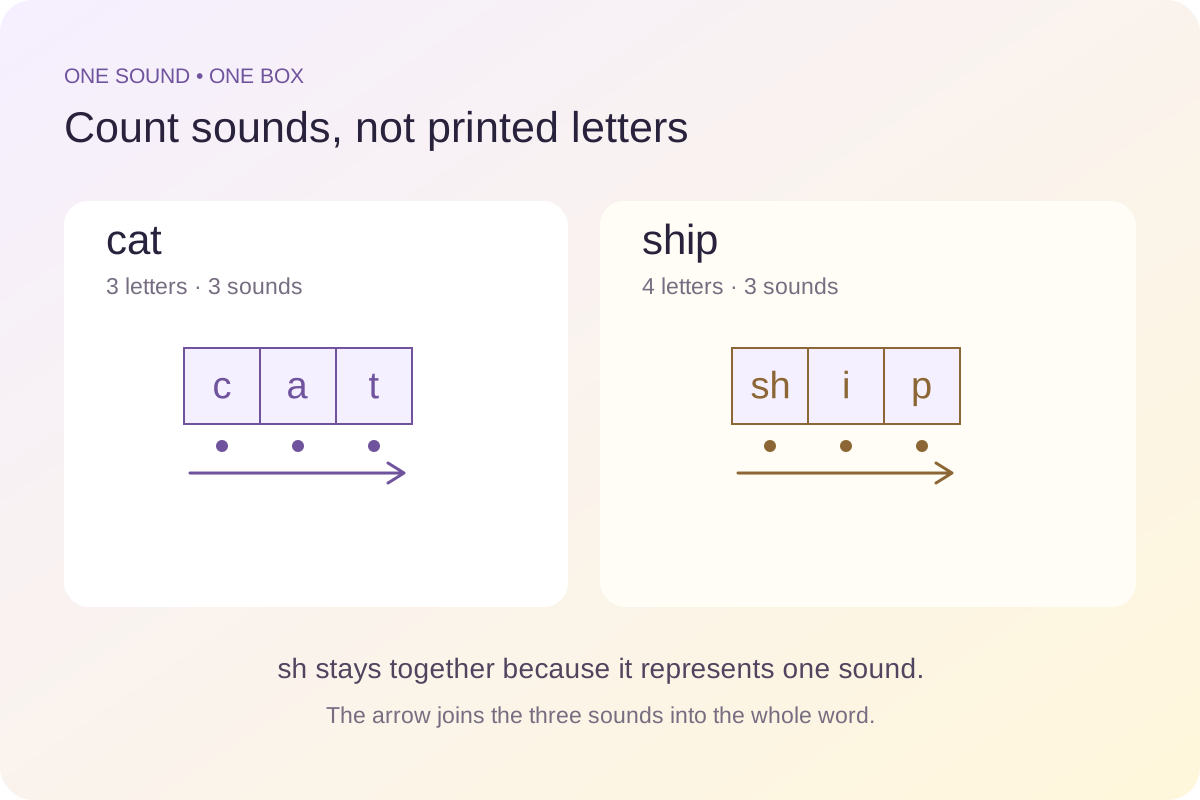
One box for one sound, including a digraph
A sound box represents a phoneme rather than a printed character. Cat has three sounds and three single-letter spellings. Ship also has three sounds, but its first sound is written with sh. The two letters stay together in one box. This generator stores each supported word with an explicit sound and spelling partition; it does not count letters and assume the result is a sound count. The optional digraph set is kept separate so an unfamiliar spelling never enters a basic CVC set unnoticed.
Hear it, tap it, blend it, then write
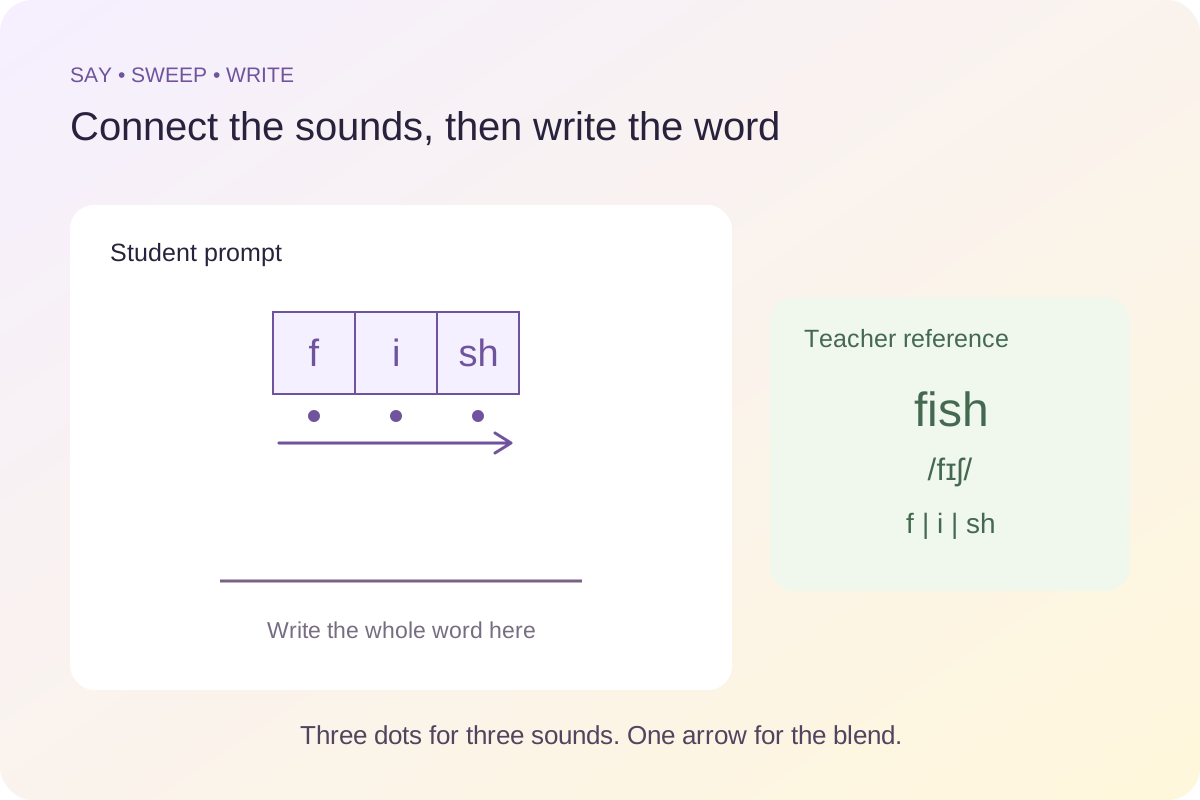
In listening mode, the student sees empty boxes while the teacher receives the exact word, its reference pronunciation and the completed boxes. In blending mode, the spellings are visible above one tapping dot per sound. The arrow invites a continuous sweep into the whole word, and a ruled answer line shows where to write it. Sound-identification mode underlines one position: first sound, short vowel or last sound. The learner writes only that spelling. Use the same familiar words in different tasks when you want to change the response without adding new vocabulary.
Build a short, deliberate phonics lesson
Start with known spellings and keep the spoken task clear.
- 01
Select the spellings that have been taught
Choose one or more short vowels, then check the letters and spelling units available to your group. A candidate word must pass both filters. Selecting short a does not override an unchecked a in the taught-spellings list. Likewise, selecting s and h does not grant permission to use sh. The available-word list updates before generation, so you can read every candidate and confirm that its meaning and pronunciation are familiar.
The compact s, a, t, p, i, n preset is a quick way to try a restricted pool. It changes the selected vowels to a and i and selects the basic CVC pattern. It is an example of a small taught set, not a prescribed curriculum sequence. Add letters when they belong in your lesson. If no word survives all the filters, the tool gives a direct message rather than silently inserting an untaught spelling.
- 02
Decide whether the child should see the word
Hide the whole-word prompt for a listening and spelling task. Read the numbered word from the teacher copy, ask the child to repeat it, and check that both of you mean the same word before working on its sounds. The page provides no recorded audio. Its reference uses US English, including the short-o vowel in cot; choose your spoken model deliberately if your classroom uses another variety.
Showing the whole word changes the support: the learner can inspect the spelling while mapping its sounds. That can be useful for a demonstration, but it does not measure the same response as listening without print. In blending mode the separated spellings are already visible and the unsegmented word stays on the teacher reference. Do not ask children to guess an unknown word from a missing letter or from an ambiguous picture.
- 03
Use the boxes as part of a spoken routine
For segmentation, say the whole word naturally, invite the learner to repeat it, then attend to its separate sounds. Each dot marks one sound position, with three dots for CVC and digraph words and four for CCVC/CVCC words. After matching each sound to its spelling, sweep along the arrow and say the word again. In a digraph word, keep both letters of sh, ch or ck inside the same box; do not add an extra sound just because two printed characters are present.
When the focus is identifying one sound, the underline marks the response box. The other positions remain empty on the student page. The teacher reference fills every box so the adult can see the context and the target together. The written response is the spelling used in this specific word, not a claim that a spoken sound always has exactly one possible spelling. You can also ask for the sound aloud before asking for its letters.
- 04
Add a blend without losing a sound
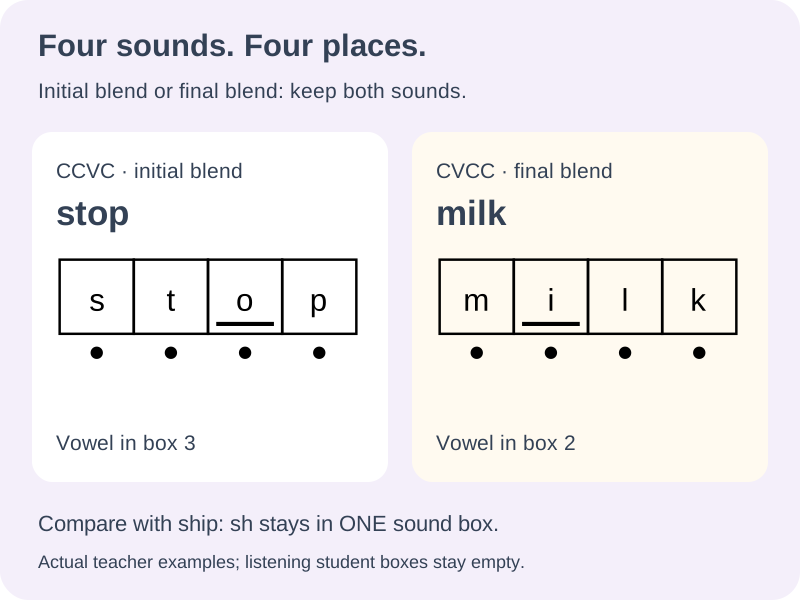
The new CCVC set has two consonant sounds before its short vowel: s / t / o / p. The CVCC set has two after the vowel: m / i / l / k. Both need four boxes. Unlike sh in ship, the neighbouring consonants keep separate positions. Select one pattern first if you want every item to practise the same blend position; use all checked patterns only when a mixture of three and four sounds belongs in your lesson.
There are ten CCVC and ten CVCC entries, two for each short vowel in each group. The displayed candidate list still respects every taught spelling. The original CVC-and-digraph mixed option keeps its original three-sound pool, so adding the new bank does not change an older saved lesson. In sound-identification tasks, the short vowel is the third box for CCVC and the second for CVCC; it is not an arbitrary geometric middle. First and last always refer to the first and last actual sounds.
- 05
Choose the amount of practice and real writing space
Request up to 120 items, with or without repeated words. When repeats are off, a small filtered pool produces a shorter worksheet and a clear count notice. Repeats can provide another attempt with known words, but a longer set does not create additional vocabulary. Use the item editor to replace an individual word with another member of the same filtered bank. The remaining questions and their numbering stay together.
Set one to six questions per row and choose 7, 9 or 11 millimetre boxes. Three 7 millimetre boxes support six columns; four boxes need at most four columns. Larger boxes need more width. If a selection cannot fit, the generator keeps the previous layout and asks you to adjust it. It preserves the physical box size rather than scaling letters down to disguise the conflict. For longer writing or larger handwriting, choose fewer columns and more space below each question.
- 06
Check both copies and save the exact lesson
Select the student copy, teacher answers or both, then choose A4 or Letter. Automatic pagination uses measured content to place complete rows through the usable page height. The teacher page can take more space because it includes the whole-word cue and pronunciation. Its page boundaries may differ from the student pages, while item numbers still correspond exactly.
Use the combined print preview to check every output before opening the browser print dialog. Match the selected paper size there, use normal scale and remove browser headers or footers if they consume useful space. Download the worksheet data to preserve the chosen words, settings and manual edits; restore or import it to prepare the same lesson later. A saved seed is useful for generation, but the data file also retains replacements made after the first version.
- 07
Connect a named picture to a word and its sounds
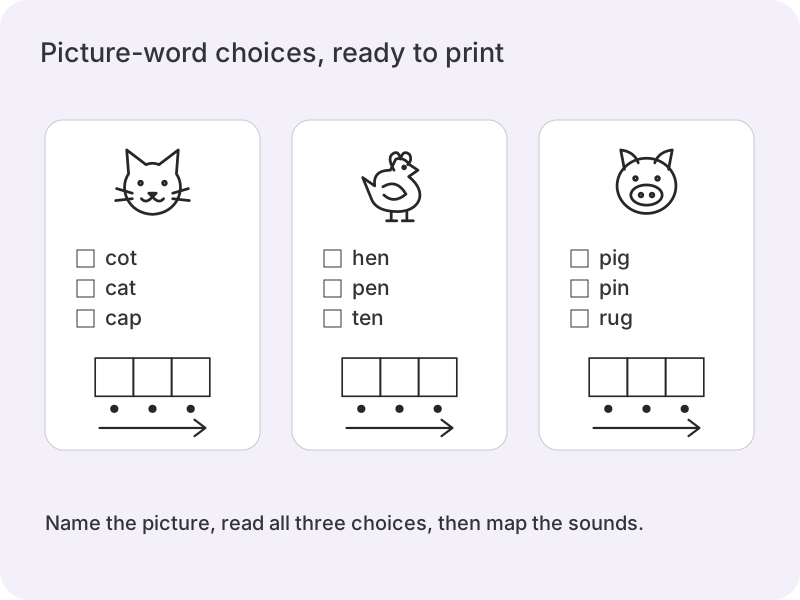
Select picture choice for one illustration, three printed options and a row of sound boxes. An adult names the pictured object before the learner reads the options. Check the matching word, then say and map its sounds. A cat might appear with bat and hat when those spellings are available. Reading the whole word matters. The student copy has no extra heading naming the target and no preselected check; the matching teacher copy marks the option and fills the sound boxes.
These original monochrome drawings remain with the worksheet offline. They do not depend on emoji fonts or external image addresses. Agree on the pictured word first: everyday objects can have several names, and the task uses the specific word printed in the teacher reference. The picture supports meaning; it does not supply a recording or replace an adult’s spoken model.
- 08
Keep every answer option inside the taught word pool
The full bank still contains 72 reviewed words; this feature adds drawings for a fixed subset of 19, without guessing new phoneme partitions. Vowels, spelling units and word patterns constrain both targets and distractors. Targets must also have a drawing, while distractors can be other words from the same filtered bank. Each set has three different words, with the target appearing exactly once. Option order is reproducible from the saved worksheet.
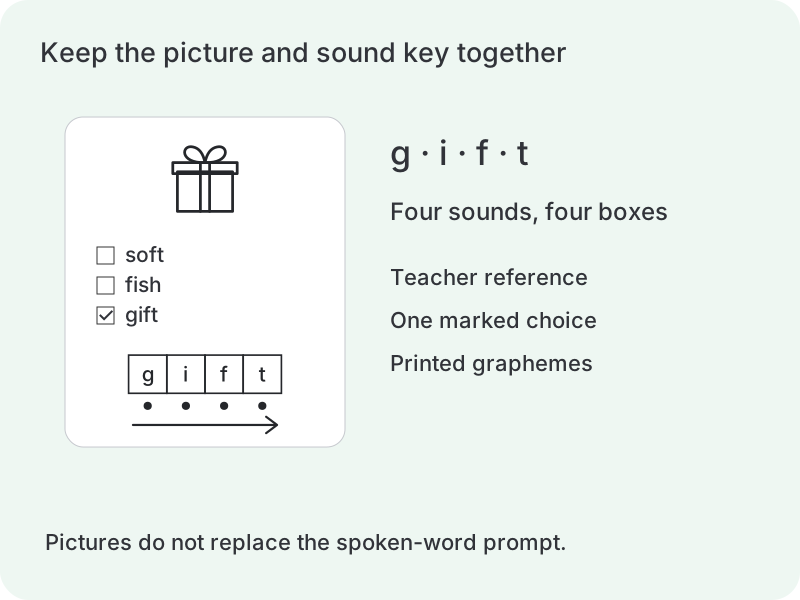
An empty illustrated pool and a pool with fewer than three distinct options produce different messages. The generator never adds untaught spellings to fill the gaps. A short-o selection may leave only top as an illustrated target; repeats must be enabled to use that target several times. The current CCVC group has no picture targets, so use its existing listening, blending or isolation tasks. Gift retains four sound boxes and therefore needs fewer columns than a three-sound card.
Questions about CVC words and sound boxes
A few useful distinctions before the next practice session.
CVC describes a consonant–vowel–consonant pattern. The basic set here uses three-letter examples such as cat, bed, pig, cot and sun, with one short vowel between two consonant sounds. The optional sh, ch and ck set also has three phonemes, but more than three letters. It is shown as a separate pattern so the two ideas remain clear.
No. A box represents one phoneme. Fish has four letters but three sounds, so f, i and sh occupy three boxes. Stop has four sounds: s, t, o and p each gets a box. Choose the checked CCVC/CVCC set to practise blends. Words with x, vowel teams, silent e or other unchecked patterns remain outside this bank; pasted words are not analysed automatically.
Use the blending task and model the sounds associated with the displayed spellings. Touch each dot, then move along the arrow and say the whole word. Letter names and speech sounds are different responses. Keep the practice aligned with the pronunciation model taught in your class, and use a few familiar words when you want to observe the process closely.
Yes. Select the short vowels and the taught spelling units. Every unit in a candidate word must be selected. The live list shows the surviving words. If you request more distinct items than that list contains, the generator produces the available set and tells you the actual count. Turn on repeats only when repeated practice is what you intend.
The teacher answer copy includes each full word, a US pronunciation reference and its completed sound boxes. Print that copy or keep it available while reading the prompts aloud. The default listening student sheet hides the word. There is no built-in audio, and the tool does not infer whether a child has pronounced or segmented a word correctly.
The checked bank currently uses a US English reference. Some vowel qualities differ across accents, especially short o, so this first version does not offer a cosmetic accent switch. It also limits replacements to supported words. Use your classroom pronunciation consistently and review whether this bank fits the lesson; arbitrary words need their own reliable sound analysis before inclusion.
This activity connects a spoken word with its separate sounds and spelling units, then joins those sounds again. The boxes, tapping dots and blending direction support that sequence. A missing-letter activity focuses on completing a spelling, while handwriting practice focuses on forming its characters. Choose the tool that matches the response you want to practise.
Three-sound words fit six columns with 7 mm boxes. Four-sound words need at most four columns at that size, including an all-pattern sheet that contains any four-sound item. Larger boxes may need fewer columns. The generator keeps its physical box size and reports conflicts. Check paper size and browser scaling before printing.
In these checked words, a blend keeps two sounds: the s and t in stop remain separate. The spelling sh represents one sound in ship, so its letters share one box. Listen to the word and check the stored sound grouping; counting printed letters alone does not decide the number of boxes.
For CCVC words such as stop it is the third box; for CVCC words such as milk it is the second. Choose the short-vowel target and the underline follows that position automatically. The teacher reference shows the whole partition, while a listening student copy leaves the other boxes empty.
No. All three options satisfy the selected vowels, spelling units and patterns. The target must also have a bundled picture. If fewer than three different options remain, generation asks you to widen the learned selection instead of silently introducing spellings.
Yes: establish the intended word first. The teacher page retains that word, its pronunciation reference and sound mapping. The learner then reads the choices and writes the sounds. Pictures do not provide audio, and people may name the same object differently.
Give each sound a place to land
Choose a familiar set, keep the teacher cues close and leave enough room for the response.
Browser printing & PDF · No registration