READ · RECORD · REFLECT
Create a Reading Log Printable Keep a small trace of every reading
Build a reading log printable around the reader and the purpose of the record. Choose a weekly table or individual book cards, keep only the fields you need, and leave enough room for a meaningful response. Save the editable document locally and print a fresh copy when you are ready.
A4 / Letter · Local saving · Complete records

Set up your reading log
Start with a blank template or enter your own records. Generate a preview, then select any record to edit it.
My worksheets
Drafts save automatically in this browser, including unfinished input. Keep up to 20 named worksheets across all tools. Large images may exceed browser storage; download data as a backup.
Worksheet preview
Records / planner (no answer key)
Fit complete rows onto each page using the selected columns and writing space. Extra page space stays at the bottom; answer gaps are not stretched.
Generate a document or load the example to see its layout.
Print or save as PDF in your browser. Match the displayed paper size and orientation, use 100% scale and turn off browser headers and footers. Both pagination modes retain complete laid-out pages.
See the layouts you can make
Example images use the generator’s actual page model.
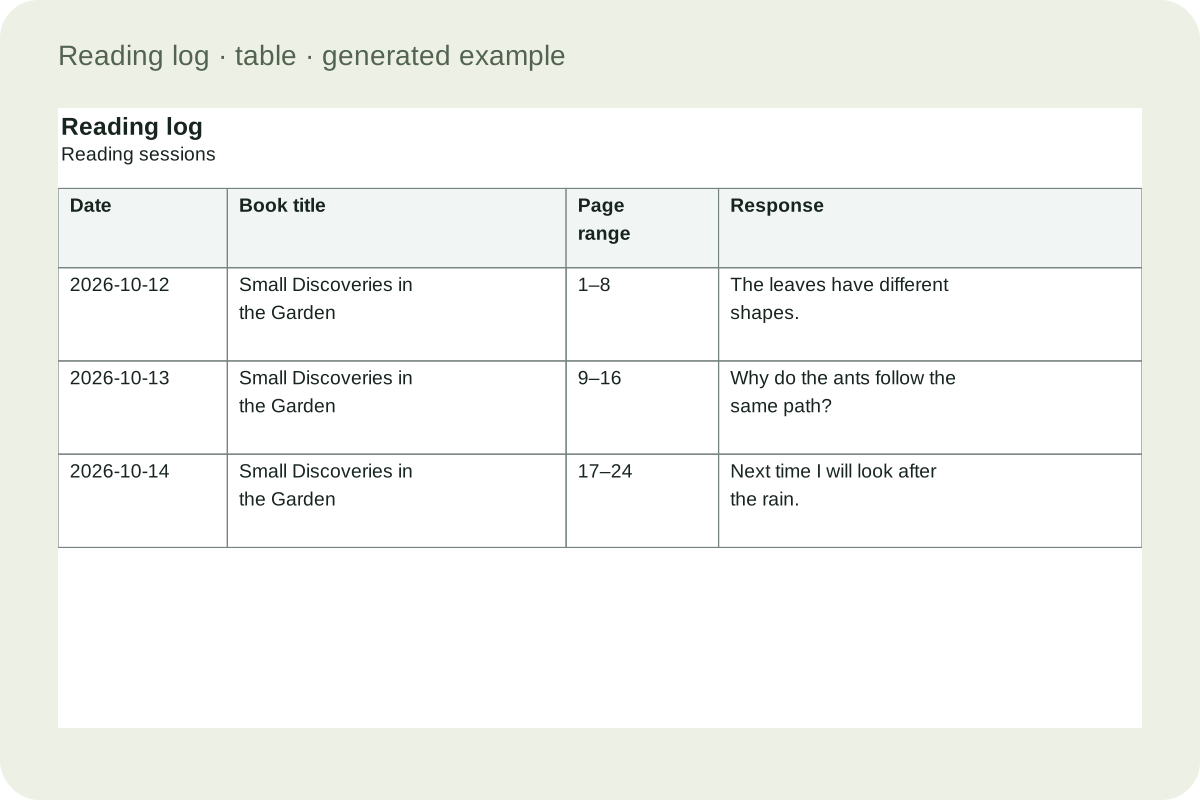
A table that gives each field room
This example comes from the same layout model as the generator. Date and book title remain present while optional columns redistribute the available width. A minimum row height reserves handwriting space, and longer entered text can make a row taller. The table continues across pages without dropping the final record.
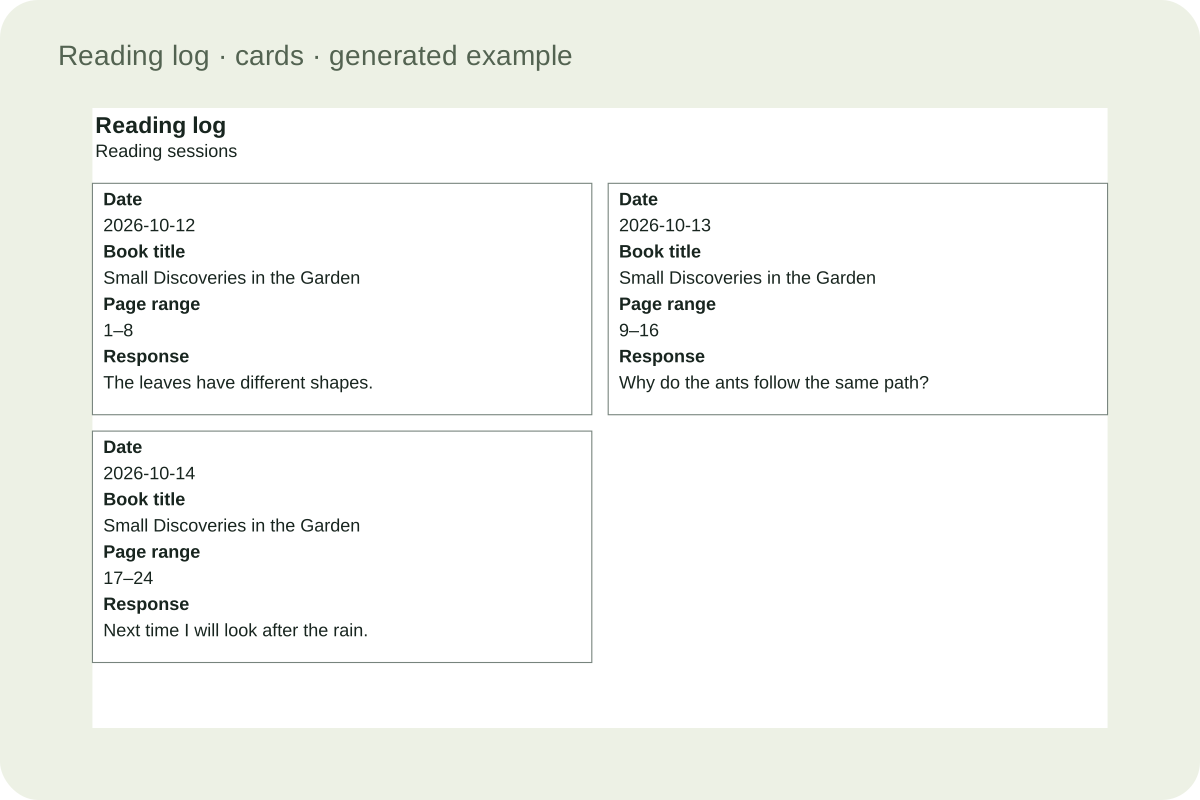
Separate cards for individual responses
Use one to three columns for full records, or four to six with at most four fields. Five and six columns require landscape A4 or Letter to keep each card at least 38 mm wide. Recorded text is retained when you change fields or return to a table.
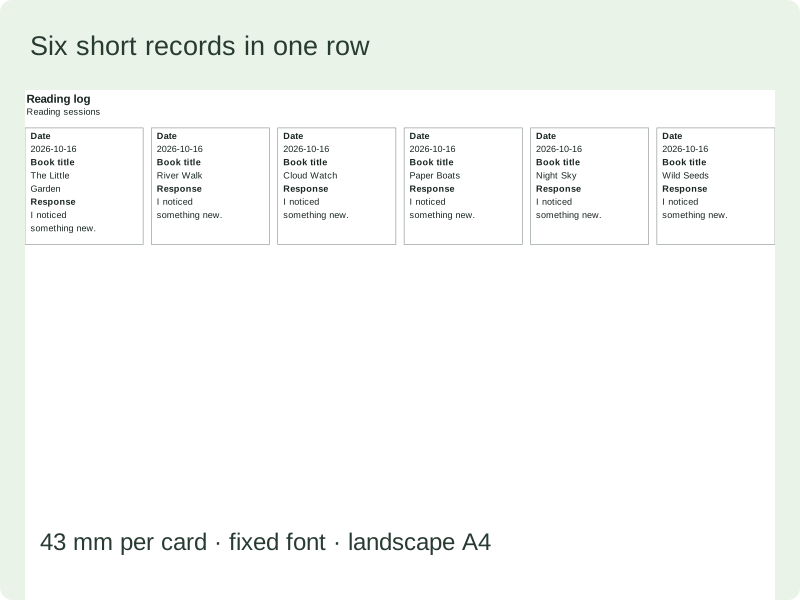
Six short reading cards across
An actual landscape page places six short records across without reducing the print font.
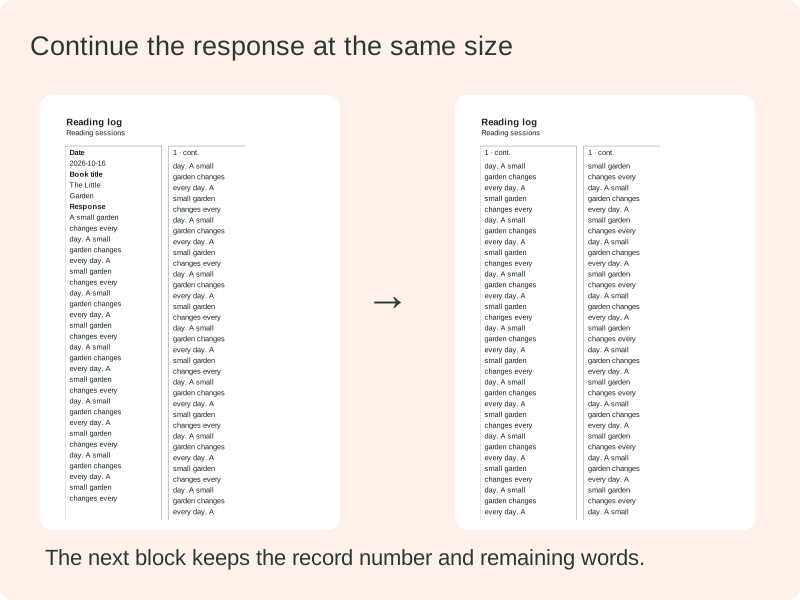
Long responses stay complete
The same record continues in another block when its response exceeds a page; the repeated record number identifies the continuation.
Make a document that fits the task
Choose the information and layout first, then review the generated preview.
- 01
Choose the fields you will actually use
A reading log printable works best when every field has a clear purpose. Date and book title identify a reading occasion; the remaining columns should match the question you want to ask later. Add an author when different books have similar names. Choose a page range when you want to remember where to continue. Use minutes when you need to record time, and leave that field off when no one needs it. Fewer columns give the remaining fields more room for handwriting.
A young reader may need only a title and a small response, with an adult helping to write the date. An older reader may want an author, a page range and a question for discussion. The tool does not assign fields by grade or claim that a longer form is more educational. Start with a simple arrangement, print one sample, and add a field only when you know how it will be used.
- 02
Separate reading sessions from a list of books
Decide what one record represents before filling the sheet. In session mode, each record describes one occasion when reading happened. The same title can appear on Monday, Tuesday and Thursday without becoming three finished books. In book-list mode, organize one record for each book yourself. That record can describe an unfinished book too; the tool does not infer completion from the presence of a title or a page number.
For example, a child might read pages one through eight on Monday and pages nine through sixteen on Tuesday. Two session records preserve those details. A book list could instead keep one title and a short overall response. The page reports a number of records, not a calculated total of completed books. It does not merge matching titles automatically, because two books can share a title and readers can intentionally revisit the same text.
- 03
Use a weekly table or an open-ended record
A weekly reading log starts its blank rows from the week containing the date you choose. Select Monday or Sunday as the first day. Additional blank rows continue through subsequent dates, including the change from December to January. A free record table leaves the dates available for you to fill as needed. Both formats use one wide table with adjustable minimum row height, so the number of fields stays separate from the number of records.
Prefilled records keep their own dates instead of silently changing to match a new week selector. You can therefore enter several sessions on the same day or include an earlier book. If you need a reusable undated sheet, switch off printed dates. The underlying values remain in the saved document so that changing the presentation does not destroy your records. Review the dated preview before sharing a saved file with another reader.
- 04
Write one useful response instead of a long report
A reading log with summary does not need to demand a full book report every evening. One specific thought can be enough for a later conversation: a surprising detail, a question, a connection, or a prediction supported by something in the text. A response such as ‘I wonder why the character kept the key’ gives the reader something concrete to revisit. It is a prompt for discussion, not a score for understanding.
The response field accepts longer notes when they are useful. Text wraps at a fixed readable size, and an exceptionally long record continues onto another page. You can also leave the field blank for handwriting or turn it off entirely. If a child would rather draw, select fewer fields and a larger minimum row height. The generator supplies writing space; it does not judge the response or replace a teacher’s feedback.
- 05
Record different ways of reading without ranking them
Optional tags distinguish independent reading, shared reading and listening to an audiobook. They describe the format of a session rather than placing the reader on an ability scale. A family can use the shared-reading label when an adult reads aloud and the child discusses the story. A classroom can use the same field to distinguish a partner activity from an individual one. Leave the tag blank if that information would not help.
Minutes and page ranges answer different questions. Time describes how long a session lasted; a range points to a location in a particular edition. Neither is a reliable automatic measure of comprehension. A reading tracker for kids may emphasize whether reading happened, while a richer log also keeps what was read and one reaction. Use whichever record supports the conversation you intend to have, without turning every reading occasion into a competition.
- 06
Make book cards with enough room to write
Separate reading cards support one to six columns. One to three allow the full field set; four to six require no more than four fields, including the required date and title. Five and six columns need landscape paper. The 38 mm minimum card width includes 2 mm padding on each side, so the available writing width is smaller. The preview reports the actual width, rows and page count.
Six cards across portrait A4 leave only 28.5 mm per card, so that combination is rejected. Landscape A4 provides 43 mm, and landscape Letter about 40.1 mm. The tool preserves the selected column count and asks you to change orientation or reduce columns instead of shrinking text. Labels and entries wrap; long responses continue in numbered continuation blocks. For extended handwriting, choose fewer columns even when the short-card setting fits. Hidden author, response and other values stay in the saved document and return when their fields are enabled again.
- 07
Keep a blank master and a separate filled example
Blank mode prints the selected headings, dates where requested, and empty writing areas. It does not print the example book title or a hidden response. Prefilled mode lets you add, edit, reorder and remove your own records. Loading the example is a deliberate replacement action with a confirmation when there is existing work. Use it to inspect the format, then return to a clean blank template for students to complete.
Changing the layout or hiding a field does not delete its entered value. Hidden fields are still part of a saved JSON file, so review the record before giving that file to someone else. After editing the settings or draft entries, generate again to apply those changes before saving or printing. The preview shows the generated document. Selecting a record in that preview opens an editor for the corresponding entry.
- 08
Print and keep a reusable copy
Choose A4 or Letter and check portrait or landscape in both the tool and the browser print dialog. Use actual size or one hundred percent scaling and disable the browser’s own headers and footers. The document uses twelve millimetre side margins, eight millimetre top and bottom margins and a small height allowance. The preview reports actual pages and record rows on each page, rather than promising a fixed number for every combination of fields.
Save in this browser for local reuse, or download the JSON document to move the editable records to another device. Import validates the file before replacing the current document. Local browser storage is not a cloud backup and can be cleared by the browser. To make a printable PDF, select the browser’s save-as-PDF destination. There is one record output, with no duplicated teacher answer page, because a personal reading response has no generated answer key.
Practical questions
Details about records, layouts, saving and printing.
Keep the date and book title, then choose fields that have a purpose: author, page range, minutes or a short response. A signature or rating is optional. Removing unused fields gives the remaining columns more writing space, which can be more useful than a form containing every possible detail.
A tracker can simply mark that reading happened. A log also keeps what was read and perhaps a reaction or question. This tool can produce a simple table or a richer response card. It does not translate time or pages into a reading level or a comprehension score.
Yes. A session record can describe a few pages, a chapter or a listening session. Several records with the same title remain several sessions, not several completed books. Use book-list mode when you want to organize one entry per book yourself, including books that are still in progress.
Yes. Cards support one to six columns; four to six use at most four fields. For five or six, select landscape A4 or Letter so the cards meet the 38 mm minimum width. The preview shows the actual card width and page count. Long writing is more comfortable with fewer columns.
No. Blank mode creates empty fields and the requested date labels. It does not copy the hidden example title or response into the printable sheet. Prefilled records stay available if you switch back, so use the mode deliberately and check the generated preview before handing it to a class.
Text wraps at a fixed readable size. Rows grow to fit, and a record larger than the available page continues in another block. The tool does not crop the last words to preserve a one-page appearance. Each response can contain up to four thousand characters within the overall record limit.
No. Visibility controls the printed layout, while the record keeps its value for later use. A JSON download therefore still contains hidden fields. Clear the field or remove the record if you want to remove that information, and review the file before passing it to another person.
Use Print and choose the browser’s save-as-PDF destination. Match the paper size and orientation and use actual-size scaling. The JSON download serves a different purpose: it preserves an editable document for validated import. Local browser saving is convenient but is not a backup on another device.
Prepare your next reading log
Choose what matters for this task and check one printed sample before making a full set.