SMALL PARTS, CLEAR RELATIONSHIPS
Fraction worksheet generator choose the skill, keep the answers exact
Use this fraction worksheet generator for simplifying, equivalent forms, comparison and arithmetic, or start with equal-part pictures and shading. Set the relevant ranges, choose one to six problems per row, and review the student sheet with its matching teacher reference before printing.
Eight arithmetic skills + two picture tasks · A4 / Letter
Set up fraction practice
Choose the skill, operand ranges and the paper layout.
My worksheets
Drafts save automatically in this browser, including unfinished input. Keep up to 20 named worksheets across all tools. Large images may exceed browser storage; download data as a backup.
Worksheet preview
Fit complete rows onto each page using the selected columns and writing space. Extra page space stays at the bottom; answer gaps are not stretched.
Choose 1–6 columns. Automatic mode packs complete rows to the available height; manual mode permits a row limit. Pictures keep their selected dimensions. Layout changes preserve questions and edits.
Choose the settings and generate to review questions and answers.
Match A4 or Letter in the browser print dialog. Choose Save as PDF and review every student and answer page; switch off browser headers and footers if needed.
Control the numbers and the intended skill
Make a focused practice sheet or a clearly mixed review.
Equivalent values are kept exact
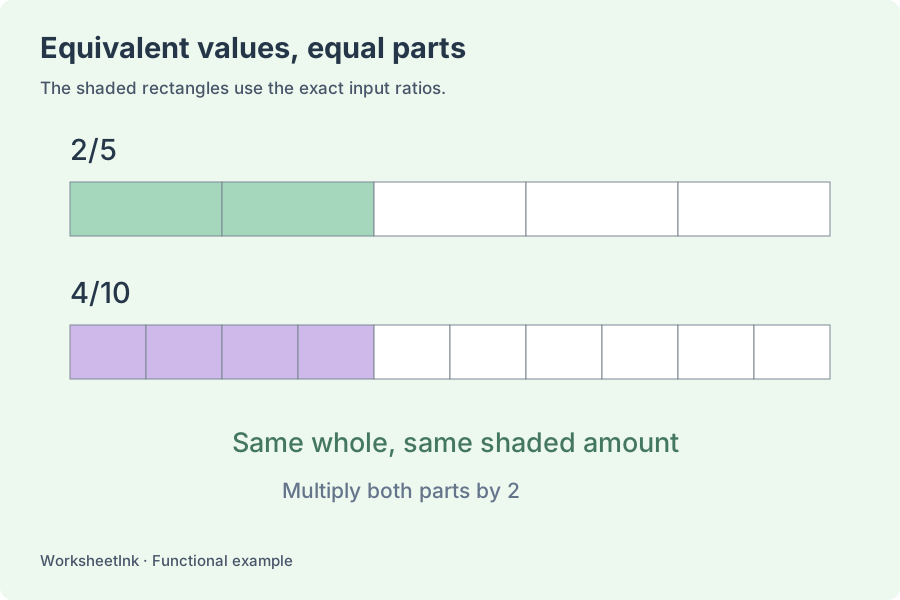
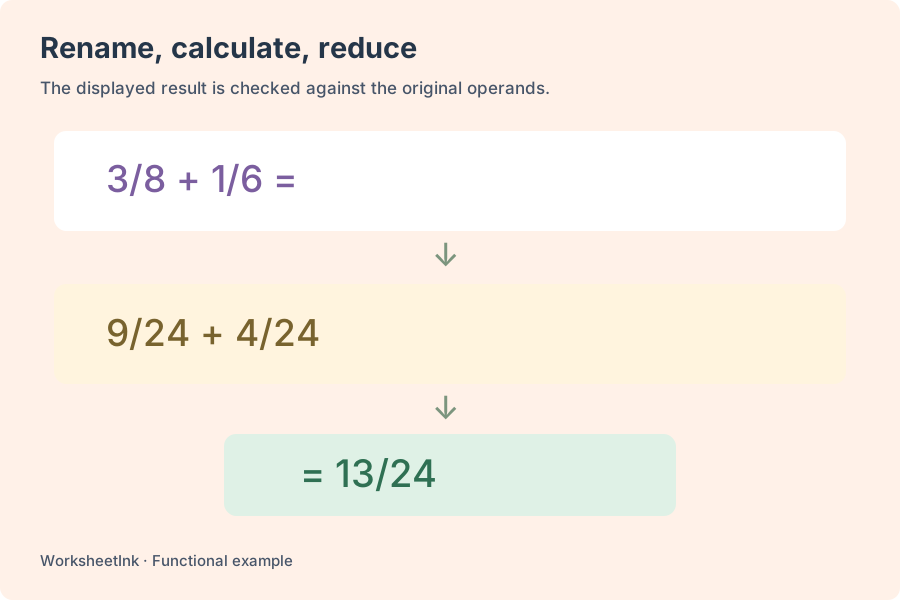
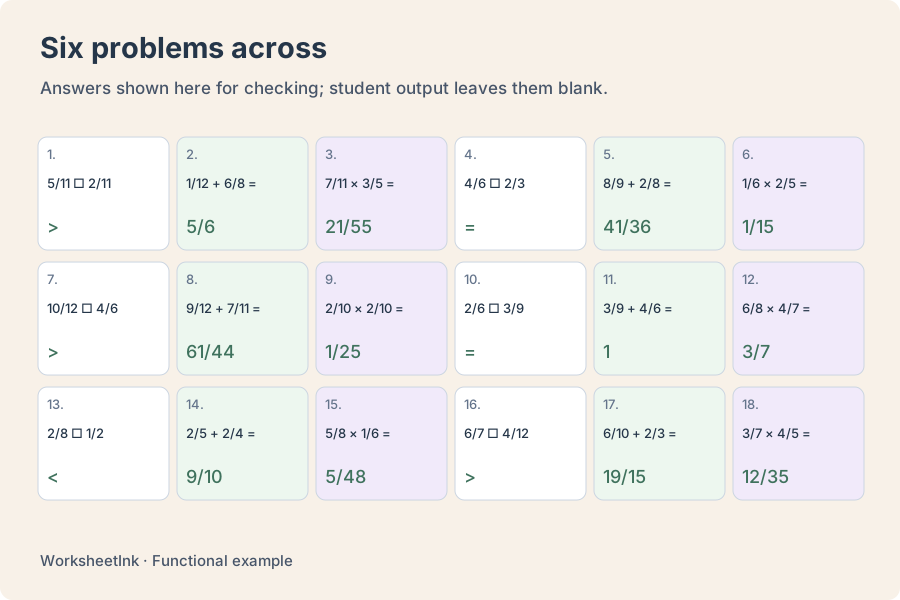
Fraction calculations use integer numerators and denominators, with no rounding to decimal approximations. Numeric results are reduced to lowest terms, zero is printed as zero, and a denominator of one becomes a whole number. Common-denominator tasks deliberately keep both equivalent fractions over their least common denominator. Equivalent-fraction tasks show a target denominator and ask for the missing numerator. These different outputs serve different learning goals.
Set input limits without confusing them with results
Control numerators from zero to 100 and denominators from two to 50. Proper-fraction input restricts each numerator to be smaller than its denominator; the alternative also allows improper inputs. A sum or quotient of proper inputs can still exceed one. Same or different denominator rules apply to addition, subtraction and comparison. Common-denominator exercises always use different original denominators, while multiplication and division are independent of that setting.
See the parts before calculating
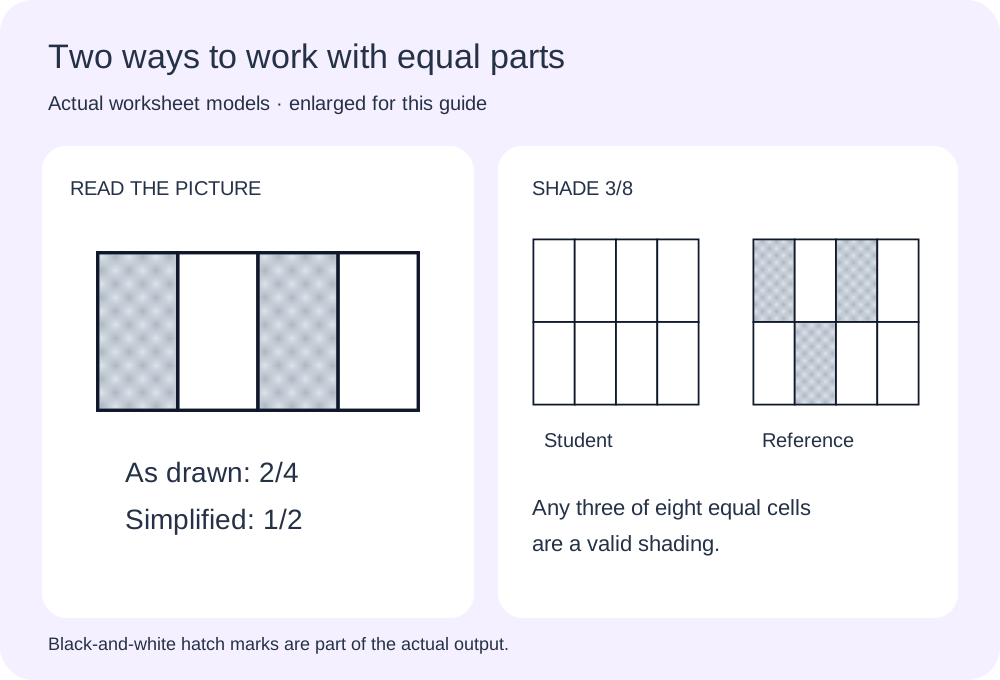
Visual fraction worksheets connect a written fraction to equal areas. Choose bars, rectangular grids or circular sectors, then identify a shaded fraction or shade a blank model. The answer rule says whether two shaded quarters should be written as 2/4 or reduced to 1/2. Shaded regions use diagonal marks as well as tone so a monochrome copy remains readable.
Prepare a sheet that shows useful mathematical work
Choose the task, the input domain and the paper density separately.
- 01
Start with one skill or an intentional combination
Choose simplifying fractions, missing-numerator equivalent forms, common denominators, comparison, addition, subtraction, multiplication or division. Selecting several types cycles through available question pools so the result is a mixed review, not a multi-step expression containing several operators. Request one to 200 questions, with at least as many questions as selected skills.
Simplifying fractions requires a positive numerator and a common factor greater than one, so already reduced fractions are not used as reduction tasks. Comparison asks for less than, greater than or equal to. Common-denominator questions ask learners to rewrite both inputs over their least common denominator. The equivalent-form multiplier runs from two to your selected maximum of two to ten. These are separate prompts rather than interchangeable names for the same exercise.
- 02
Begin with equal parts, then decide what the answer should show
For picture identification, count the equal parts in one whole to find the denominator, then count shaded parts across all the displayed wholes for the numerator. With one whole, two shaded quarters give 2/4. The simplest-form rule gives 1/2 instead. Both describe the same amount, but the printed instruction makes the expected form explicit.
A bar divides into equal-width strips. A rectangular grid uses equal cells, with its row and column counts chosen to multiply to the denominator. A circle divides into equal-angle sectors, which have equal areas because they share the same centre and radius. The supported totals are 2, 3, 4, 6, 8, 10 and 12. Picture denominators are selected separately from arithmetic bounds; use the separate Wholes in each picture setting to extend a visual task beyond one. The arithmetic proper-input setting does not control picture quantities.
For shading fractions, the student receives a stated fraction and a completely unshaded model. The teacher reference shades one valid selection of parts. Students may choose different positions, adjacent or separated, provided they fill the correct number of whole equal parts. Treat the reference as an example, not a stencil to match. For 0/4 no part is shaded; for 4/4 the whole is shaded. These edge cases can each be enabled or excluded.
Keep pictures at their chosen physical size. The default 18 mm width or diameter fits six columns with denominators through eight. A bar needs at least 2 mm for each strip; select 24 mm or more for ten or twelve strips, and reduce the column count if that wider model cannot fit. Grid and circle models also retain their selected size. A rejected layout keeps the existing sheet intact instead of silently shrinking the drawing.
- 03
Show fractions across two or three equal wholes
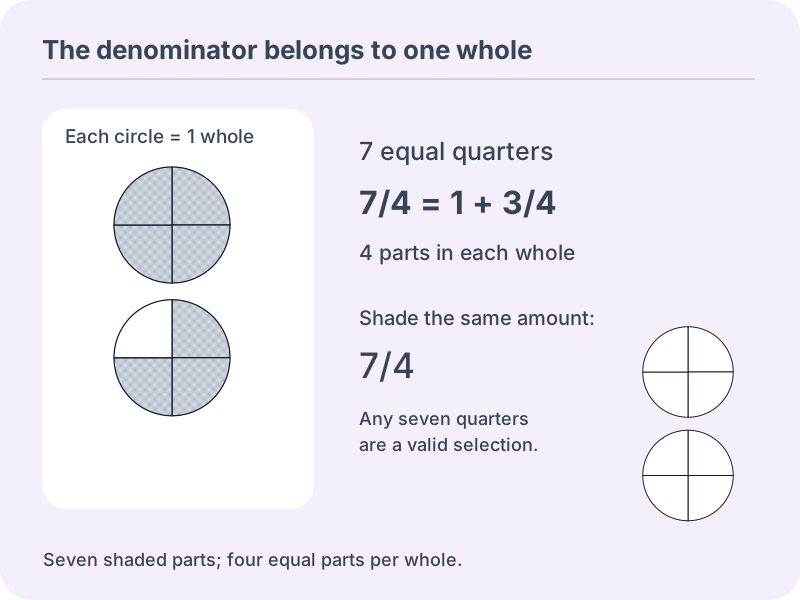
Choose two or three wholes when students are ready to read amounts above one. Every picture uses the chosen number of equal-size shapes, and every shape is divided into the same selected number of parts. For 7/4 with two wholes, the reference fills four quarters in the first shape and three quarters in the second. The denominator remains four because a single whole contains four equal parts. Counting all eight displayed sections as the denominator would describe a different unit.
Select Only amounts greater than one to focus on this next step. Two or three displayed wholes are required; choosing one produces a message rather than silently changing the lesson. The zero option controls zero when that greater-than-one filter is off. Include whole-number amounts controls exact integers such as one, two and three; turning it off excludes every positive multiple of the denominator. This is separate from choosing the number of shapes on the page. Empty shapes do not change the unit or imply that every shape must be coloured.
For identification, Keep the drawn parts gives the original fraction, Simplest form reduces it, and the picture mixed-number option gives a reduced whole-and-fraction expression. Seven quarters becomes one and three quarters. Eight quarters becomes the integer two, with no trailing zero fraction. The student answer area includes a whole-number space and a fraction space for mixed-number work; learners may write only the integer for an exact whole. In shading tasks the printed target remains an ordinary fraction, and any selection with the correct total number of equal parts is valid.
Multiple shapes are stacked vertically at the selected width, so six columns remain possible with small models. A complete stack stays with its prompt and answer area. Three large circles need much more height than a single bar: automatic pagination accounts for the whole group and keeps it together. This can mean fewer rows per sheet without reducing the drawing size. Changing only paper, columns or picture size preserves the exact question data. Save the data file if you want to retain a particular selection or edited shading pattern.
- 04
Set a range that actually contains useful questions
Choose minimum and maximum numerators and denominators within the supported limits. These bounds describe the original operands. Derived target denominators, common denominators and answer numerators can be larger than the input ceiling. For example, an equivalent form expands both parts by its multiplier, while a common denominator may be the least common multiple of two different values.
Proper input does not mean that every answer must remain below one. Addition and division can produce improper results even from two proper fractions. Subtraction is nonnegative unless you enable negative results. Zero can be an operand when the numerator range includes it, but a fraction with zero numerator is excluded as a divisor. A zero denominator is never allowed. Narrow settings can make some selected skills unavailable; the preview identifies those omissions and the actual count.
- 05
Build equivalent fractions worksheets before mixing operations
A short lesson can begin with equivalent forms and common denominators, then move to adding or comparing the same kinds of inputs. Ask learners why the numerator changes when the denominator changes. For a calculation such as one third plus one sixth, expressing both over sixths makes the common unit visible. The tool does not infer a learner’s grade or guarantee suitability from a number range alone.
Use same denominators for a focused addition or subtraction set. Choose different denominators when renaming is part of the goal. For subtraction, enabling negative answers changes the range of possible results rather than simply increasing the number of questions. Teacher steps for addition and subtraction show the converted operands; multiplication and division steps show the unreduced result. They are concise calculation support, not a full lesson explanation or an automatic student grader.
- 06
Choose reduced fractions or mixed-number answers
Numeric answers use simplest-form fractions by default. Switch to mixed-number answers when an improper result should be written as a whole part and a proper fractional part. A negative sign applies to the complete value, including its fractional part. Whole-number and zero results remain plain numbers rather than being padded with a denominator of one.
This display choice does not change the original questions. Neither does toggling teacher steps, working space or the page grid. Equivalent tasks still expect the numerator for the printed target denominator; common-denominator answers still retain their common denominator. Do not demand that those purposefully expanded forms also be reduced, because that would undo the task. Picture tasks have their own answer-format setting, including a simplest mixed number. Inputs still use ordinary numerators and denominators; there is no separate symbolic mixed-number input or conversion-only exercise.
- 07
Fit the practice across and down the paper
Choose one to six problems per row and suitable working space. Automatic pagination fills the available height with complete rows and continues only when another row does not fit. Manual pagination also offers one to 12 requested rows. Short comparisons suit dense settings; calculations and teacher steps need more space. Picture dimensions remain fixed when a layout is accepted.
In manual mode, requests beyond the reserved page height use fewer complete rows. In automatic mode, actual rendered row heights determine page breaks. Questions, manual edits and their version stay unchanged when you change columns, picture size or writing space. Choose A4 or Letter both here and in the browser print dialog, use portrait orientation, and avoid another multiple-pages-per-sheet setting that would shrink the arranged grid.
Edit a selected question when you need a particular example. Its operation and operands must satisfy the current generation rules, and an exact duplicate prompt is rejected. Answers are recalculated with the same question number and a new revision marker. Browser saving preserves the current worksheet locally; a data download keeps the exact problems and edits for import later. Keep the teacher copy with its matching version, and review the actual print or PDF before making a class set.
Questions about fraction practice and printed answers
Useful distinctions between inputs, results and layout.
Select addition alone and choose same denominators. The rule also applies to subtraction and comparison, but not multiplication or division. Common-denominator tasks always start with different denominators so there is something to rename.
Proper input restricts the operands, not the result. Two proper fractions can add to more than one, and a quotient can also exceed one. Choose reduced fraction or mixed-number display for those results; the value stays the same.
No. Reduction uses lowest terms, while common-denominator tasks preserve the two equivalent forms over their least common denominator. Equivalent-fraction questions ask for a missing numerator over a specified target denominator. Each answer follows the task actually printed.
No. A fraction with numerator zero is never used as the divisor. Zero may appear elsewhere when permitted by your numerator range. All original and derived denominators are positive, and results use exact integer arithmetic.
Yes. Select one to six columns. The default 18 mm pictures with denominators through eight fit six across; wider pictures may require fewer columns. Bars also need at least 2 mm per equal strip. In automatic mode, complete rows fill the printable height. Invalid size combinations produce a message rather than a smaller drawing.
The ranges and rules may leave no eligible prompts or too few distinct questions. Small domains are enumerated; larger domains use a bounded seeded search. The notice distinguishes a finite shortage from a search limit and never fills the worksheet with repeated prompts.
The import checks the operands and recomputes the answers. Stored answer fields are not treated as authoritative. Use the question editor to change valid operands; its corrected result and revision are then generated together.
This version accepts ordinary nonnegative numerator-and-denominator operands, with optional negative subtraction results and mixed-number answer display. Mixed-number inputs, multi-step operator precedence, decimal conversion and word problems are not included.
The denominator counts equal units of the same whole. Counting two shaded pieces out of four does not establish 2/4 if the pieces have different areas. This tool constructs equal-width bar strips, equal rectangular cells or equal-angle circular sectors.
Use the picture answer setting. Keep the drawn parts asks for 2/4; simplest form asks for 1/2. A single wholly unshaded or shaded whole becomes 0/1 or 1/1 in the simplified fraction display. The picture keeps its original partition so the relationship stays visible.
No. For a fraction such as 3/8, any three complete equal parts of the eight-part model form a valid answer. The reference shows one possibility. The student model starts entirely unshaded, and diagonal marks make the teacher selection clear in black and white.
Each shape represents one equal-size whole. A quarter is one of the four equal parts in that whole, so seven shaded quarters are 7/4. Two shapes provide eight available quarters; they do not redefine the unit as eight parts.
Yes. Choose two or three wholes and enable Only amounts greater than one. The zero setting then has no effect. Disable Include whole-number amounts if you also want to exclude exact integers such as two and three.
Yes. Select the mixed-number option under Picture answer. It reduces the fractional part; seven quarters becomes one and three quarters, while eight quarters becomes two. The numeric arithmetic answer-format control is separate. Shading prompts continue to display the given ordinary fraction.
Every question keeps the same chosen capacity of one, two or three wholes. Unshaded shapes provide additional equal parts and do not count toward the shaded amount. Students may shade any valid selection of the requested number of parts, even when its placement differs from the reference.
Prepare the next fraction practice with a clear goal
Choose the skill and review a short set.
Adjust the density while keeping space for useful work.
Checked arithmetic · Browser printing and PDF