Free printable math practice
Arithmetic worksheet generator choose facts, blanks and focused times tables
Choose addition, subtraction, multiplication or division, with result calculations or one missing number. Set number ranges, regrouping and selected times tables, then make a single sheet or 2–4 distinct A/B versions with matching answer keys. Arrange 1–6 problems across A4 or Letter while retaining readable answer space.
No account · Local processing · A4 / Letter
Choose one worksheet or a class set
Both drafts stay available when you switch. Each batch version has the same rules and operation counts, with no shared arithmetic facts. This does not certify equal difficulty.
Build your arithmetic worksheet
Choose a skill, then generate and review your practice.
My worksheets
Drafts save automatically in this browser, including unfinished input. Keep up to 20 named worksheets across all tools. Large images may exceed browser storage; download data as a backup.
Worksheet preview
Fit complete rows onto each page using the selected columns and writing space. Extra page space stays at the bottom; answer gaps are not stretched.
Choose your settings and generate a worksheet to preview it here.
For PDF, choose Save as PDF. Match the paper size and turn off browser headers and footers.
Make distinct A–D arithmetic worksheets
Choose two, three or four versions. Save every actual question and its matching answer copy together.
My worksheets
Drafts save automatically in this browser, including unfinished input. Keep up to 20 named worksheets across all tools. Large images may exceed browser storage; download data as a backup.
Worksheet preview
Fit complete rows onto each page using the selected columns and writing space. Extra page space stays at the bottom; answer gaps are not stretched.
Set the rules and generate your version set.
In Student + answers, version A is followed by its answer copy, then B and its answers. Every version and answer section starts on a new page. Automatic pagination fills complete rows down each page.
Set the rules. Keep the right answers.
Control the numbers, choose where learners write, and keep the answer copy matched to the same questions.
Practice one skill at a time
Control operands, result limits and regrouping separately. Begin with a short, focused sheet; increase the range or introduce a missing operand when learners are ready.
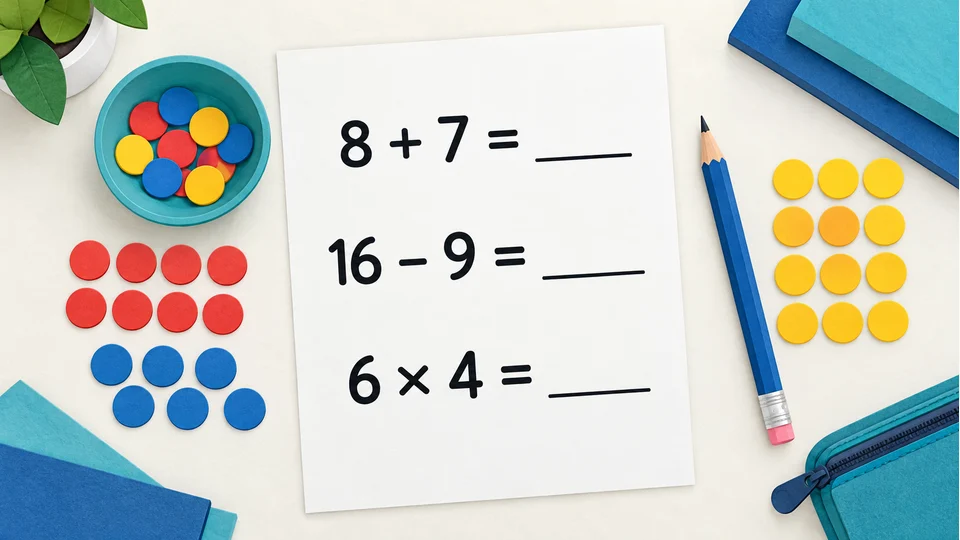
An answer key for the exact same sheet
Edit a question and its answer updates immediately. Both copies carry the current version, including saved blank positions, so you print and mark the same worksheet.

How to use the arithmetic worksheet generator
Read the settings, try a lesson example and review every output.
- 01
Start with one clear learning goal
A short practice sheet is most useful when its purpose is clear. If learners are working on addition facts, select addition alone. For a completed unit, combine operations they already know. There is no automatic grade assignment: learners in the same grade may need different number ranges, and curriculum sequences differ between schools.
The minimum and maximum normally apply to both operands in each question. They accept whole numbers from zero to 999, including both endpoints. The maximum result is a separate limit: numbers from zero to 20 can produce a sum of 40. Set the result limit to 20 when sums must stay within 20. For negative subtraction, it limits the absolute value; for division, it limits the quotient. Selected times tables use the factor rule explained below instead of always applying the same range to both factors.
- 02
Control carrying, borrowing and division
Carrying applies only to addition. Choose any, no carrying, or carrying required. The check covers every decimal place, including the highest place: 50 plus 50 needs carrying even though the ones column does not. Requiring carrying means at least one place carries, not every place. Keeping it off isolates simpler calculations without changing the operand range.
Borrowing applies only to subtraction. No borrowing keeps every place subtraction straightforward; borrowing required includes at least one regrouping step. A calculation such as 100 minus 1 requires borrowing across zeros. Answers are nonnegative by default. Allow negative answers only when that is your teaching goal, with borrowing set to any. This tool does not combine negative results with a required or forbidden borrowing rule.
Division never uses zero as the divisor. In Calculate the result format, turning remainders off gives exact division only. Allowing remainders permits both exact results and nonzero remainders. The key shows a whole-number quotient and remainder, such as 17 divided by 5 giving 3 remainder 2, without rounding to a decimal. Missing-number format uses exact division throughout, including questions with a missing result.
- 03
Make missing addend and missing factor practice
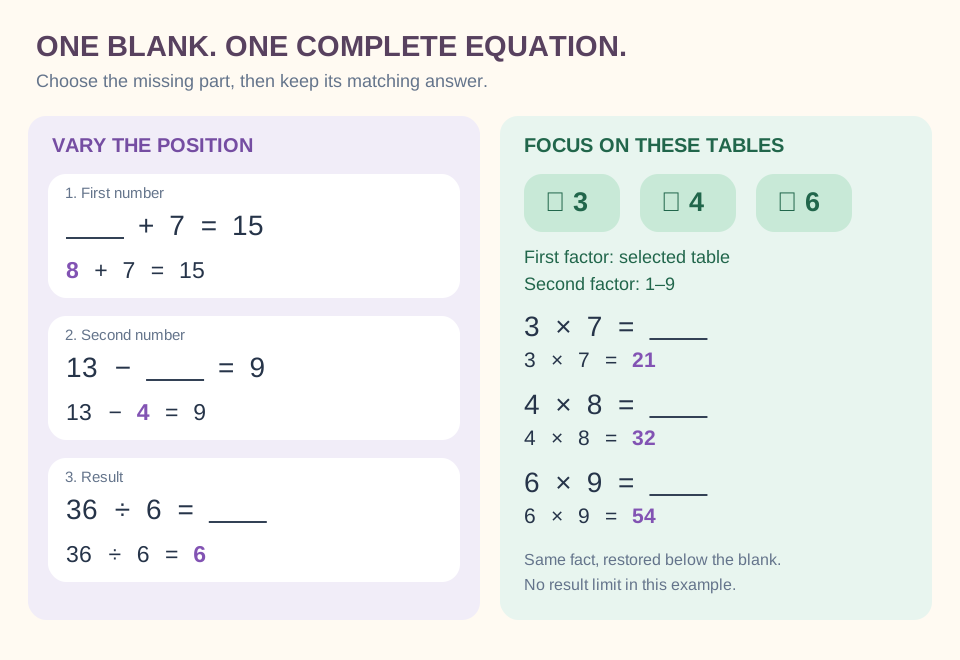
Choose One missing number, then select the first number, second number, result or varied positions. For example, hiding the second number in 8 + 7 = 15 produces 8 + ___ = 15. Hiding the first number gives ___ + 7 = 15. Each question contains just one blank; it does not hide an operator or create a multi-step algebra problem.
Missing addend worksheets work well when learners can explain the whole and its two parts. Read 8 + ___ = 15 as “eight and how many more make fifteen?” A learner might count on, use counters or write the related subtraction. For subtraction, the position matters: ___ − 4 = 9 and 13 − ___ = 9 ask for different parts of the relationship. Review a worked example before mixing positions.
The displayed equation must determine one answer by itself. The generator excludes ambiguous forms such as 0 × ___ = 0 and 0 ÷ ___ = 0. A zero result is still valid when the missing value is determined, for example 5 × ___ = 0 or ___ ÷ 5 = 0. Division blanks use exact integer division, and the divisor is never zero.
A result limit controls the full calculation, not the hidden operand. When the first number is hidden in a subtraction, that number may be larger than the final result. Use the operand range to control it. Varied positions are chosen during generation and stored with each question, so previewing, printing or changing columns cannot move the blank.
- 04
Focus on selected times tables
Select multiplication, choose specific times tables, and check one or more numbers from one to 12. At least one allows the selected factor in either position, with the other taken from the range. Both factors uses only the selected table list for multiplication. Older files retain the original first-factor rule: the first factor comes from the selected list and the second from the range.
For example, check 3, 4 and 6 and set the range to one through nine. With at least one selected factor, 3 × 7 and 8 × 6 are eligible. With both factors selected, 3 × 6 and 4 × 4 are eligible, but 3 × 7 is not. The both-factors rule ignores the minimum and maximum for multiplication; these limits still control other selected operations. The result cap continues to apply in every factor mode.
For practice through nine, use the corresponding range and choose the tables the class has studied. Tables through 12 are available when needed. Leave the result limit blank for all products allowed by the factor rule; a limit of 20 excludes 6 × 8. Combine the selection with One missing number for missing-factor practice. Table settings affect multiplication only and do not automatically create related division facts.
A short random worksheet may not represent every checked table. Single-sheet practice samples unique ordered expressions and can return a smaller actual count when the pool is limited. Batch versions have a stricter no-overlap rule and require enough distinct facts to fill every version; the batch section below explains that difference.
- 05
Try a warm-up, regrouping session or mixed review
For an introductory warm-up, choose addition and subtraction, operands zero to 10, a result limit of 10, and 12 questions. Leave negative answers off. Review the sheet before distributing it: a small number range can still include regrouping when carrying and borrowing are unrestricted.
For a regrouping session, select subtraction, operands 10 to 99, borrowing required, and 24 questions. Ask learners to explain one calculation using place value before completing the rest independently. For broad multiplication recall, use both factors from one to nine and leave the result limit blank. For a mixed review, select several operations; every individual question still contains only one calculation.
At home, generate a small set for the skill a child is currently studying. Keep the answer page with the adult until the child has attempted the sheet, then compare strategies as well as results. Changing the seed in single-sheet mode makes another selection under the same rules, but separate generations can share questions. Use batch versions when the sets within one batch must not overlap.
- 06
Review, edit and keep a worksheet version
In single-sheet mode, the requested count and actual generated count are distinct. Each worksheet avoids repeating the same ordered expression, even when its blank could move elsewhere. Reversed addition or multiplication operands count as different expressions here, so 3 plus 4 and 4 plus 3 may both appear. When its valid pool is smaller than requested, the single sheet reports the smaller count instead of repeating questions.
Mixed practice distributes questions across the chosen operations as evenly as their available pools permit. If any selected operation has no valid question, generation identifies it and asks you to change the rules. For example, division with both operands fixed at zero is impossible. Tight result limits, regrouping rules and a fixed missing-number position can also remove every candidate.
Review the student page and answer key together. Editing one question must update its calculated answer and the version identifier. The edited numbers still need to satisfy the current range and operation rules. Downloading a worksheet data file preserves its exact questions, including edits; a seed alone reproduces the initial generated selection only when all the settings are the same.
- 07
Print student and teacher copies with room to write
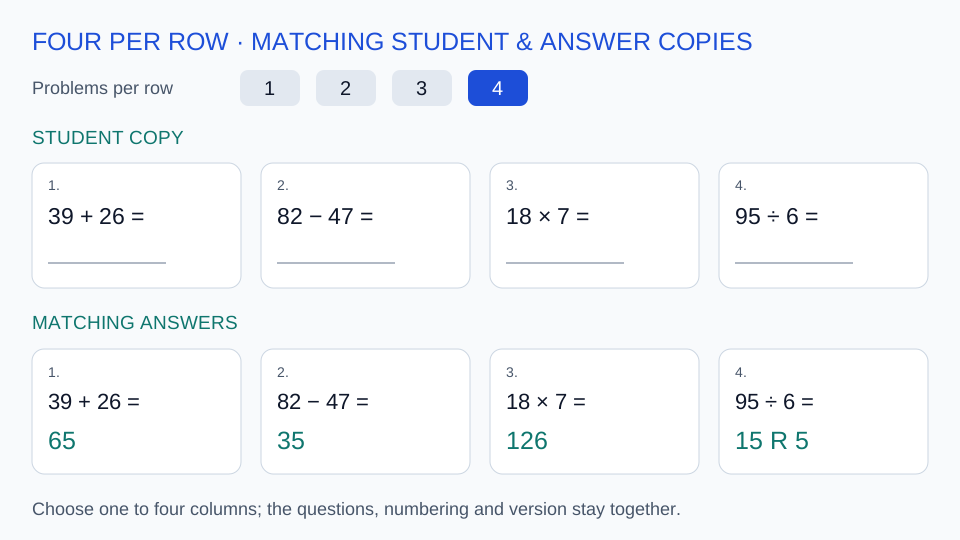
Choose A4 or US Letter before printing, then select the same paper size in the print dialog. Student output leaves a writing line exactly where the answer belongs. Teacher output restores the full equation; in missing-number practice, the formerly hidden value is bold and underlined. For one worksheet, both outputs place its answer section after the student section. Batch output follows A students, A answers, B students, B answers, continuing the same pattern for any further versions.
To make a PDF through your browser, choose Save as PDF as the destination. Review every page in the print preview, disable browser headers and footers if they intrude, and check the selected paper size before saving. If your printer clips the edges, try its fit-to-printable-area option and inspect the preview again. Do not shrink a crowded worksheet until the numbers and answer spaces become hard to read.
Choose Problems per row in the preview to print one through six calculations across the page. Changing columns preserves questions, edits, numbering and version. Five and six columns place the equation across two lines at 11-point type while keeping a writing line at least 12.7 millimetres wide. A question that still needs more horizontal room is refused at that density; reduce columns instead of silently shrinking it. Saved data retains the column choice, while older files keep their supported layout.
Automatic pagination measures the content for the selected paper and carries complete rows onto the next page. It uses the available height instead of leaving a fixed large empty area. A final page or a row that cannot fit may still leave space; the generator preserves legible text and answer lines rather than splitting a problem across pages.
- 08
Prepare A/B versions with distinct questions and matching keys
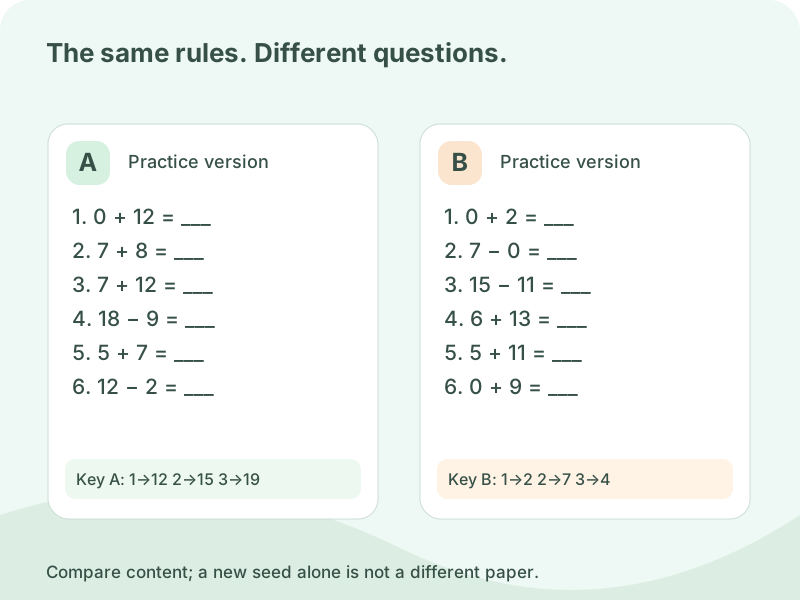
Choose A–D versions when two groups need different practice under the same settings. Create two, three or four versions, labelled A through D. The question count applies to each version. Operation choices, ranges, result limits, missing-number rules and regrouping settings stay shared, and the same number of questions from each operation is used in every version.
Within one batch, a fact is used only once, including across version boundaries. Swapping the operands of addition or multiplication does not make a new fact: 3 + 4 and 4 + 3 are treated as the same, as are 3 × 4 and 4 × 3. Moving a missing-number blank does not make another copy eligible. Subtraction and division retain their order because changing it changes the calculation.
This stricter rule needs a sufficiently large pool. If the chosen settings cannot fill all versions, the batch reports the shortage instead of quietly repeating questions or printing a shorter version. Reduce questions per version, select fewer versions or widen the range. A narrow list with both factors restricted can run out quickly: three chosen factors provide only six unordered multiplication pairs before other rules remove any.
Each version starts on a separate page and carries its own label and matching teacher answer section. All copies refer to the actual stored questions; printing answers does not generate another random set. Check version A against key A before handing out the sheets. The shared rules make the preparation consistent, but they are not a statistical guarantee that every learner will find every version equally difficult.
You can edit a batch question within its current operation, subject to the same rules and the batch-wide duplicate check. The corresponding answer updates while the operation balance remains intact. Download the batch data to preserve all versions and edits together, then import it for reuse. Switching between single-sheet and batch work keeps their drafts separate; save or download important work before leaving the page.
Arithmetic worksheet generator FAQ
Missing numbers, selected tables, number limits and printing.
Set the result limit to 20 and choose an appropriate operand range. The limit applies to the calculated result, not necessarily the hidden number. For division it limits the quotient. Selected-table multiplication also obeys the result cap, whether one or both factors come from the checked list.
Yes. Select addition and choose no carrying. Each eligible expression is checked at every decimal place before it enters the question pool. If your chosen range supplies too few unique expressions, reduce the question count or widen the range. Subtraction has its own borrowing setting and is controlled separately.
Yes, when allow negative answers is enabled. The operands themselves remain nonnegative whole numbers. Use the unrestricted borrowing setting with negative answers; the generator rejects the other combinations rather than applying an unclear regrouping rule. Leave this option off for practice that should stay at zero or above.
Single-sheet mode reports a smaller actual count when its eligible pool is too small. Batch mode instead requires enough distinct facts for every version and reports a shortage if it cannot fill them all. Broaden the range, relax the result limit, reduce the count or choose fewer batch versions.
Select the teacher answer output before opening the print dialog. The answer key uses the current worksheet's exact questions and numbering. Opening answers must not regenerate the questions. If you edit the worksheet, check its new version identifier and use that updated answer copy when marking students' work.
This tool creates one-step whole-number equations, including a single missing operand or result. It does not read textbooks, write word problems, generate fractions or lay out long division. Use the corresponding specialist tools for those activities, and choose the arithmetic ranges to match what learners have actually studied.
Yes, choose 1–6 problems per row. Student and teacher copies keep the same questions and version. Five and six columns use two-line equations at a readable fixed size with at least 12.7 mm for the answer line. If a long equation cannot fit, reduce columns. Automatic pagination uses the available A4 or Letter height, and saved data retains the layout.
Yes. Choose One missing number and select the first number, second number, result or varied positions. The blank has a visible writing line. Each position is saved with its question, and the teacher copy restores the full equation with the missing value emphasized. Fixed positions also apply when you edit a question.
Start with addition and a small range the learner already understands. Hide the second number first, and ask how many more are needed to make the displayed sum. Counters, a number line or a related subtraction can support the explanation. Then try a missing first number before mixing positions and operations.
Yes. Check 3, 4 and 6, then choose whether at least one or both factors must come from that list. At least one allows a fact such as 7 × 3 when the other factor is in your range. Both factors uses only pairs from 3, 4 and 6. Older files keep their original first-factor rule. A short set may omit a chosen table, and the result cap still applies.
A single blank must have exactly one solution. Forms such as 0 × ___ = 0 and 0 ÷ ___ = 0 do not meet that rule. Missing-number division also requires an exact result. Ordinary Calculate the result practice still allows valid zero calculations and optional division remainders.
Yes. Earlier arithmetic data files restore as ordinary result calculations with their original questions and version. New files also retain the chosen tables and each missing-number position. The import checks operands and recalculates answers, while changing the number of columns preserves the question set.
Use batch versions and choose two to four sets. The entire batch rejects repeated facts, including reversed addition or multiplication operands and another blank position on the same equation. The rule applies within and between the versions. If there are too few eligible facts, adjust the settings before generating.
They share settings, question counts and operation quotas, but individual facts differ. That does not prove identical difficulty for every learner or make the sets a standardized assessment. Review each version against the skill your group has actually studied.
A batch needs enough distinct facts for every version together and treats reversed addition or multiplication as the same fact. For example, 3, 4 and 6 used as both factors give six unordered pairs before any result limits. Reduce the batch size or question count, or widen the allowed facts.
Yes. Download the batch data to keep its actual questions and edits, then import that file later. Each version keeps its own label and answer key. Choose student-only, teacher-only or both outputs; switching output never chooses new questions.
Ready for your next arithmetic lesson?
Use the arithmetic worksheet generator to choose the exact rules for today.
Review the student sheet and keep its matching answer key.
Browser PDF printing · No sign-up required