ACTIONS · DATES · REFLECTION
Habit Tracker Printable A clear record of your actions
Make a habit tracker printable for a week, a real month or seven to one hundred days. Record study actions with checks, circles or numbers, distinguish rest days from unrecorded days, and print a grid or individual cards.

Habit Tracker Printable
Make a habit tracker printable for a week, a real month or seven to one hundred days. Record study actions with checks, circles or numbers, distinguish rest days from unrecorded days, and print a grid or individual cards.
My worksheets
Drafts save automatically in this browser, including unfinished input. Keep up to 20 named worksheets across all tools. Large images may exceed browser storage; download data as a backup.
Worksheet preview
Habit Tracker Printable
Fit complete rows onto each page using the selected columns and writing space. Extra page space stays at the bottom; answer gaps are not stretched.
Generate or load the example to see the preview.
Print or save as PDF through your browser. Match the paper size, use Actual Size / 100% and disable browser headers and footers.
Choose a layout for the way you record
Examples come from the production generator.
Planned days and observations stay distinct
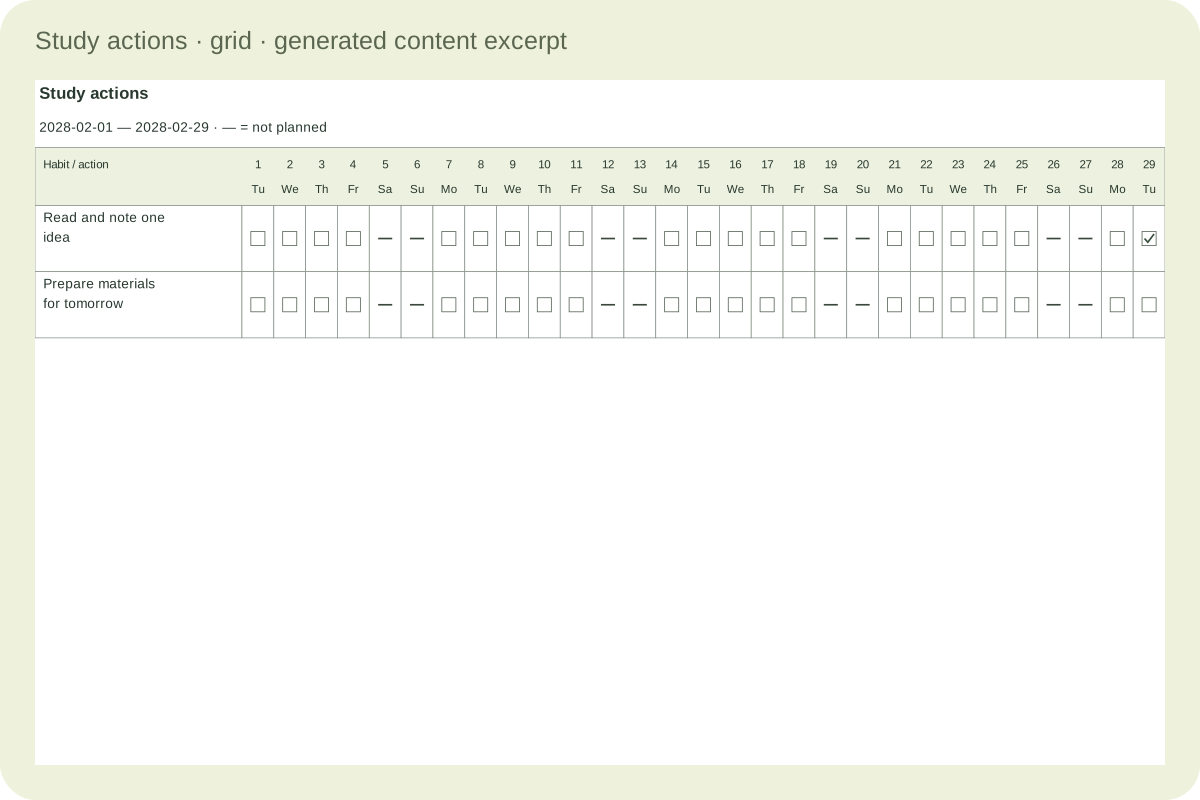
A dash means the action was not planned for that date. An empty mark means no entry has been recorded. Choose a checkbox, circle or numeric field for your task and keep rest days distinct from missing observations.
Small cards, complete tracking periods
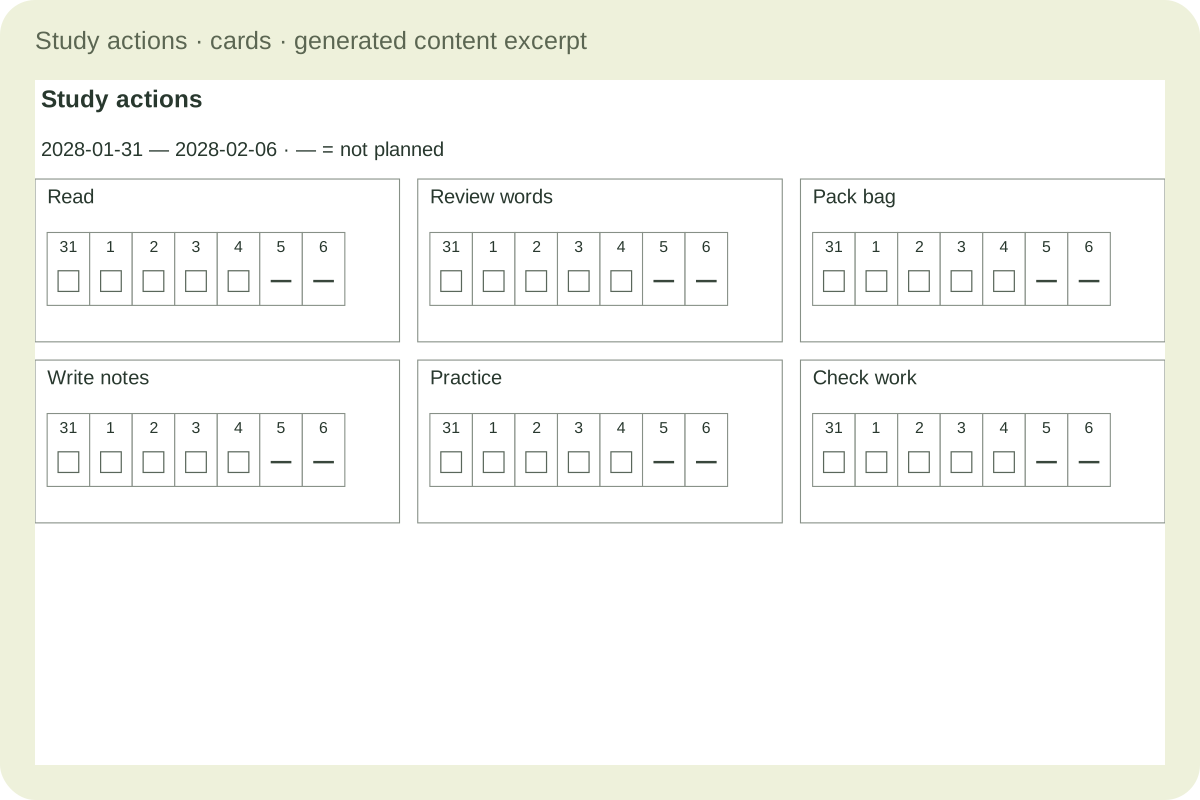
One action belongs to each card. Choose one to six columns, with consecutive continuation cards when a long period needs more room. Repeated action names identify the continuation, while longer reflections print in a separate review section.
Build a useful editable master
Match the dates and writing space to your task.
- 01
Write an action you can recognise
A habit tracker printable works best when the row names explain what you intend to record. “Read and write one idea” is more specific than “be better at reading.” You can also record preparing tomorrow’s materials, reviewing a small set of words or beginning a practice session. These are editable examples, not requirements imposed by the tool or predictions about learning results.
Create between one and thirty habit entries. Each has its own text, optional review notes, check records and numeric records. Repeated names are allowed because the entries have separate identities. For paper-only use, leave the action name blank and write it after printing. Extra empty rows are an explicit setting, so the generator does not add unwanted pages merely to fill a template.
Back to the tool - 02
Choose a week, a real month or a custom span
Weekly mode uses the week containing the selected date, starting on your chosen Monday or Sunday. Monthly mode uses the complete real calendar month containing that date. It does not add a thirtieth or thirty-first day to February, and leap years include the twenty-ninth correctly. The printed date range identifies which period the numbered day columns refer to.
Custom mode starts exactly on the selected date and runs for seven to one hundred days. Its cells use consecutive day numbers, beginning at one, while the editor retains their actual dates. A custom span can cross month and year boundaries. Choose a duration that serves your recording task; a twenty-one-day or thirty-day sheet is a time window, not evidence that a habit has formed.
Back to the tool - 03
Separate rest days from empty records
Choose the weekdays on which you plan the actions. You may exclude weekends or any other weekdays, and the date editor can exclude an individual date for all habits in the document. An excluded cell prints a dash. A planned cell without a record stays an empty checkbox, circle or numeric space. These two states have different meanings and remain distinguishable in black and white.
Excluding a date does not erase an existing record. If you later include the day again, its previous entry becomes visible. The same preservation rule applies when you move to another month or shorten a custom range. Scheduling applies to the whole document; make separate documents when different groups of habits need different rest-day calendars. There is no forced streak or automatic penalty for a blank cell.
Back to the tool - 04
Use checks, circles or small measurements
Checkboxes and circles record whether an action was completed. They share the same completion dates, so switching between them changes the printed mark without losing the record. Number mode stores a value from zero to 999.9 with at most one decimal place. Decide what the value means in the habit name, such as minutes read, pages reviewed or practice rounds completed.
Numeric entries are stored separately from completion marks. A zero is a real recorded value and is different from an empty numeric field. Clearing the input removes that date’s numeric record. Changing to checkboxes does not convert a number into a completed action. The generator displays your observations without assigning a score, comparing learners or deciding that a target has been achieved.
Back to the tool - 05
Choose a date grid or individual cards
The main grid places habits down the page and dates across it. It uses landscape paper to keep the columns usable. The minimum row height can be increased for handwriting; long action names wrap in the name column and make the row taller when needed. More habits continue on another page with the date headings repeated, rather than compressing every row to fit.
A full month may split into the first fifteen days and the remaining days when the date columns would be too narrow. Numeric cells need extra width, so they can split more often than checkboxes. Long custom periods also form consecutive date groups. The page count reflects every group and continuation. Review the range at the top and the numbered column headings before marking a paper sheet.
Back to the tool - 06
Arrange short cards without losing days
Individual cards keep one action together with its date marks. Choose one to six columns, then review the actual size. A short weekly action can fit in a narrow card; a long name or a hundred-day span needs more height and may continue as another card with the action name repeated. Dates or custom day numbers remain in order, so the continuation is part of the same record.
Each row of cards moves as a complete unit when it cannot fit the remaining space. The maximum rows setting can deliberately limit a page, while zero uses the available height. Numeric cards reserve wider cells than checkbox cards. If the requested width cannot hold even one readable numeric cell, the tool asks you to reduce columns or change paper rather than silently shrinking the value.
Back to the tool - 07
Review and preserve the observations
Use the notes field to record context: which material was useful, which time was practical or what you want to adjust next week. Notes print in a separate review section with the action name. Long notes wrap and continue instead of being clipped into a tiny grid cell. A review can discuss an interruption without treating the interruption as a failure or requiring a new streak.
Save the generated version in this browser and download JSON for a reusable backup. The file includes dates outside the current view, excluded days, both kinds of records and the notes. Import validates the document before replacement. Deleting a habit removes its records after confirmation. Browser storage is not cloud synchronisation, and changing devices requires transferring the editable file yourself.
Back to the tool - 08
Print a record you can comfortably use
Choose A4 or Letter and inspect the preview before printing. The grid uses landscape; cards can use portrait or landscape. Match those choices in the browser’s print dialog, select actual size or one hundred percent, and disable browser headers and footers. Existing margins protect the page edges, so avoid adding a second large margin that would shrink the writing cells.
Print one sample with the pen or pencil you intend to use. The soft-colour option adds gentle section shading; black-and-white output keeps all state distinctions through visible marks and text. Save a fixed copy through the browser’s PDF destination if needed. Regenerate after editing before you save, download or print. This is a record of chosen actions, not a reward exchange, reading bibliography, assessment or health evaluation.
Back to the tool
Common questions
Practical answers about dates, records and printing.
Yes. Monthly mode generates the real month: twenty-eight or twenty-nine days in February, and the correct thirty or thirty-one elsewhere. A custom period instead uses seven to one hundred consecutive dates with numbered day cells. No nonexistent dates are added to fill a rectangle.
Yes. Select planned weekdays and optionally exclude individual dates for all habits in the document. Excluded cells show a dash rather than an empty completion mark. Existing records remain stored and return when the date becomes planned again. Use separate documents for different rest-day rules.
No. The duration only defines the recording window. This tool does not diagnose progress, evaluate health or promise that an action will become automatic after a fixed number of days. Choose a useful interval, review your observations and adjust the next plan yourself.
This tracker records repeated actions or small numeric observations over dates. A reward chart adds agreed recognition conditions. A reading log keeps book details and responses. Choose the relevant tool for the information you need instead of expecting one grid to perform all three jobs.
No. Numeric values and completion dates are saved independently. Checkboxes and circles use the same completion records. Switching to numbers reveals the stored values; it does not interpret checks as a numeric amount. Zero is a valid entry, while clearing the field removes that numeric record.
A date cell needs enough width for its mark or number. When a whole month would be too narrow, the grid splits at day fifteen, with further groups if needed. More habits continue vertically with repeated date headers. The preview includes all physical pages and does not omit the later days.
Yes. Choose individual cards and one to six columns. The action name wraps and repeats on any continuation card. A long period may use several consecutive cards. Numeric cells need more width, so reduce columns if the chosen paper cannot hold a readable value.
Yes. JSON preserves records outside the current period, excluded dates, both record types and review notes. Notes print in an appendix. Deleting a habit removes its records after confirmation. Browser saving is local, so download a backup before clearing browser data or moving to another device.
Prepare the next set of pages
Generate, check the actual pages and keep an editable copy.