LOOK · TRACE · WRITE
Number tracing worksheet generator A little less guidance, one clear number at a time
Use the number tracing worksheet generator to set digit and writing-cell heights separately. Choose a familiar range or type the exact numbers your learner needs. New sheets place complete blocks close together at their actual width, without item numbers or a numbering gutter. Two-digit numbers stay together. Switch to manual columns when needed; packing never shrinks the numerals or adds unrequested copies.
Custom 0–99 · Compact unnumbered blocks · Teacher reference
Number tracing worksheet generator
Create whole-number writing blocks with separate models, tracing and blank spaces.
My worksheets
Drafts save automatically in this browser, including unfinished input. Keep up to 20 named worksheets across all tools. Large images may exceed browser storage; download data as a backup.
Worksheet preview
Fit complete rows onto each page using the selected columns and writing space. Extra page space stays at the bottom; answer gaps are not stretched.
New sheets pack blocks to their actual width without item numbers. Switch compact packing off to choose 1–6 blocks per row. Two-digit numbers and complete practice rows stay together.
These are vertical stages inside one block, not columns across the page. Keep at least one traced or blank space. Without model or traces, give the target number orally.
Quantity aids require every number to be 0–20. Turn them off to practise 21–99. Starting cues follow the first stroke of this model, not a complete stroke sequence.
Current cell: 13 mm high; digit design: 10 mm. A fixed cell height leaves the digit size unchanged. Keep at least 3 mm more than the digit height; automatic mode follows the digit height.
Dimensions stay fixed when columns change. Larger blocks may require fewer columns or repetitions. The model has a base on 1, a closed-top 4 and a 7 without a crossbar. Review these forms against your classroom example.
Generate a set to review the numeral shapes, writing guides and teacher reference.
Match A4 or Letter in the browser print dialog. Choose Save as PDF and review every student and answer page; switch off browser headers and footers if needed.
Make the support visible, then leave room to try
The printed page gives every stage a clear purpose.
One number, three kinds of space
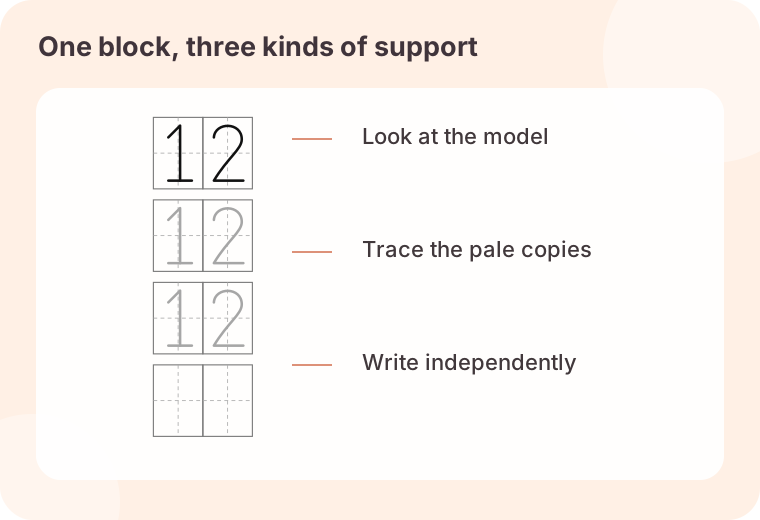
A practice block can begin with one dark model, continue with light gray copies to trace, and finish with empty spaces to write independently. The two repetition settings are separate: three traced copies and two blank spaces mean five writing attempts, plus the optional model. These stages stack vertically inside each block. Numbers such as 10 and 99 stay side by side within every stage, so increasing the column count never sends the second digit to a different line.
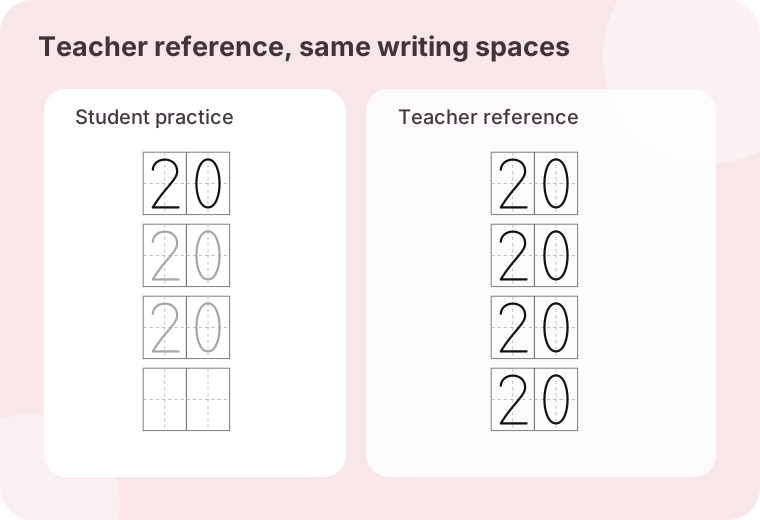
A teacher reference that shows the intended forms
The separate reference copy fills every writing space with a dark model of the same number. Item order and version match the student copy, including any repeated entries. It is useful when preparing materials or discussing a particular shape; it is not an automatic mark scheme for handwriting quality. The supplied forms include a base on 1, a closed-top 4 and an uncrossed 7. Compare them with your classroom model before using the sheet, because a different accepted numeral style may be taught locally.
One numeral, more writing room
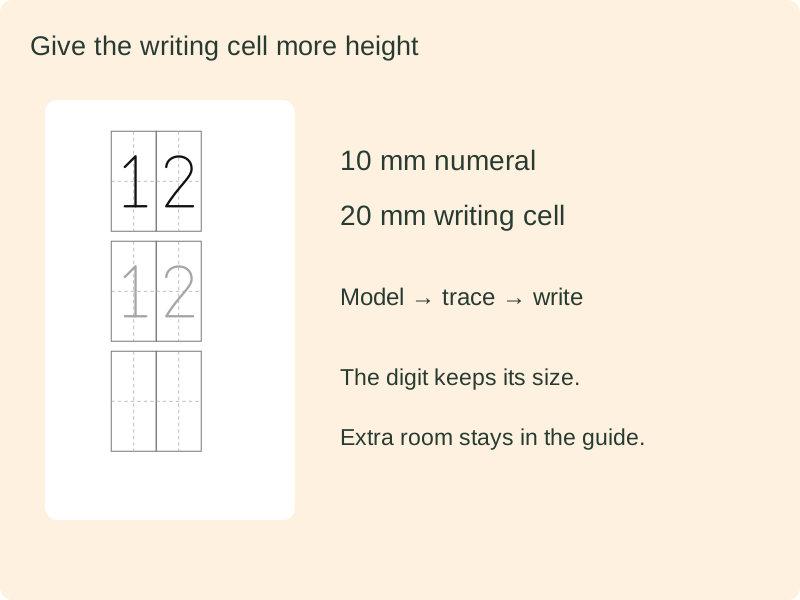
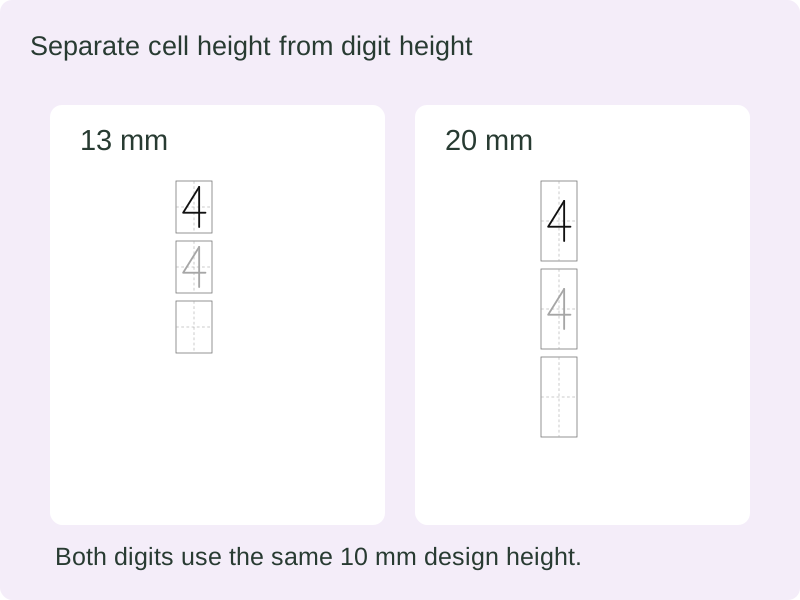
The actual numeral drawing sits inside a taller box; changing cell height preserves its shape and scale.
Same digit height, different guide heights
Compare 13 mm and 20 mm writing cells around a 10 mm numeral. The blank stage grows by the same amount.
Build a focused trace-and-write activity
Keep the number list, support level and physical writing size under your control.
- 01
Start your number writing practice with a short list
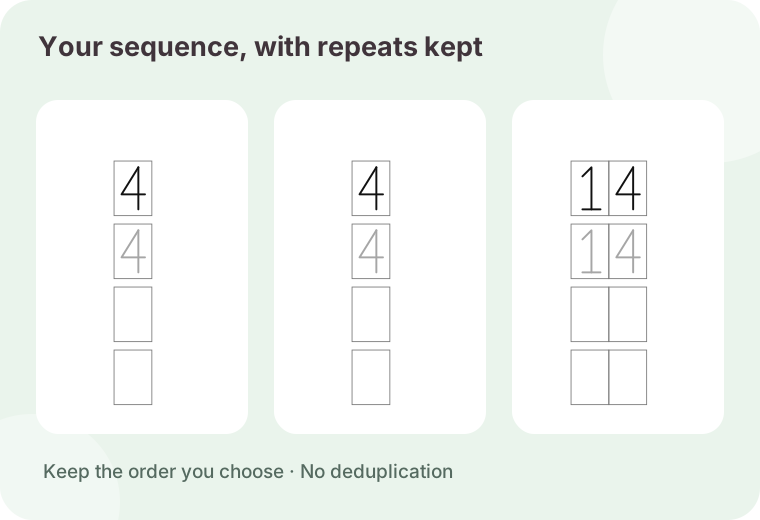
Use the 0–9, 1–10 or 1–20 buttons, then edit the list if necessary. Custom number tracing accepts whole numbers from 0 to 99, separated by spaces, commas or new lines. A list such as 4, 7, 4, 10 keeps both appearances of 4. Enter 10 as one number, rather than separating its digits. Negative values, decimals, number words and values above 99 are outside this tool’s scope. Leading zeroes such as 07 are rejected rather than silently changed into a different writing task.
The list can contain up to 120 entries. The generator creates writing practice for Arabic numerals. Use the separate counting tool when the lesson is about matching quantities, and a character handwriting tool for written Chinese number words. Keeping those tasks separate makes it easier to decide what a learner is being asked to do.
- 02
Choose the order and repeat only what you intend
Input order preserves your sequence exactly. Numeric order sorts the entries from smallest to largest while retaining duplicates. The whole-list copies control repeats that chosen sequence between one and six times, with a maximum of 120 blocks in the complete worksheet. This is separate from repetitions within a block. Two copies of the list 2, 5 create four blocks; two tracing repetitions in each block create two guided attempts for each occurrence.
A short list is not duplicated automatically to fill unused paper. Increase whole-list copies when repeated practice is your intention, or leave the remaining space free. A new version seed changes the worksheet identifier, but it does not shuffle or invent numbers: the list and selected order determine the content.
- 03
Adjust the balance between tracing and writing
Keep the model visible when learners need a reference directly above their work, or switch it off when that support is unnecessary. Choose zero to eight traced copies and zero to six independent writing spaces per block. At least one traced or blank space must remain. Blank spaces contain guide lines only, with no faint numeral hiding underneath. When both the model and tracing are switched off, use the teacher reference to give the target number orally.
Gray level controls the lightness of the tracing strokes: 35% is darker and 80% is lighter. Check a printed sample before preparing a large batch, especially on a copier that loses pale marks. This setting changes the tracing strokes only. Models and reference numerals stay dark, and the guide lines remain visible.
- 04
Select guides that match the writing task
Choose box guides, a four-part Tian grid or a baseline with an upper guide. Each digit has its own fixed-width space; a two-digit number uses two adjacent spaces as one unbroken unit. Box height follows the selected digit height with extra clearance above and below. The baseline sits at the bottom of the designed numeral. Different teaching settings use different guides, so none of these options is presented as a universal handwriting standard.
The numeral models are original vector centre-line shapes shared by all three tracing styles. Optional cues show the starting point and first movement; later strokes are not numbered. Demonstrate the complete motion using your classroom convention and review the forms of 1, 4 and 7 before assigning a sheet.
- 05
Pack fixed-size blocks without a numbering gutter
New worksheets use compact packing. The actual guide width determines how many complete blocks fit across, with only a two-millimetre gap. There are no item numbers or reserved numbering strips. At the default nine-millimetre guide width, a single-digit list fits up to sixteen blocks per row; a list containing two-digit numbers fits up to nine. Quantity aids and wider guides reduce that capacity. Digit height, cell height and guide width stay fixed. Packing does not create additional copies of your list. Switch compact packing off to select one through six columns yourself. Older saved files retain their chosen column count, while the unnecessary printed item labels are still removed.
Automatic pagination is the default. It adds complete rows while they fit in the usable page area, then continues on another page. A whole practice block stays together, so a small remainder at the bottom may be unavoidable when the next complete row is taller. A4 and Letter are available; match the browser print dialog to the selected paper and use actual size when checking millimetre measurements. Manual pagination is available when you deliberately want a fixed number of rows.
- 06
Review, edit and retain the exact worksheet
Select the student copy, teacher reference or both, then inspect every prepared print page. Teacher references appear separately after student pages when both are selected. Use the individual item editor to replace a source number. If whole-list copies are enabled, all copies of that source entry update together. Numeric sorting may move the changed number to a different position, and the revised reference follows the same order.
Save in this browser for a convenient return, or download the worksheet data to retain the exact list, guide settings and dimensions. Import checks the saved configuration against the derived entries and rejects inconsistent files. Browser storage can be cleared, so use a downloaded copy for work you want to keep. The print command uses the prepared page layout and can also be used with the browser’s Save as PDF option.
- 07
Choose a tracing line and a starting cue
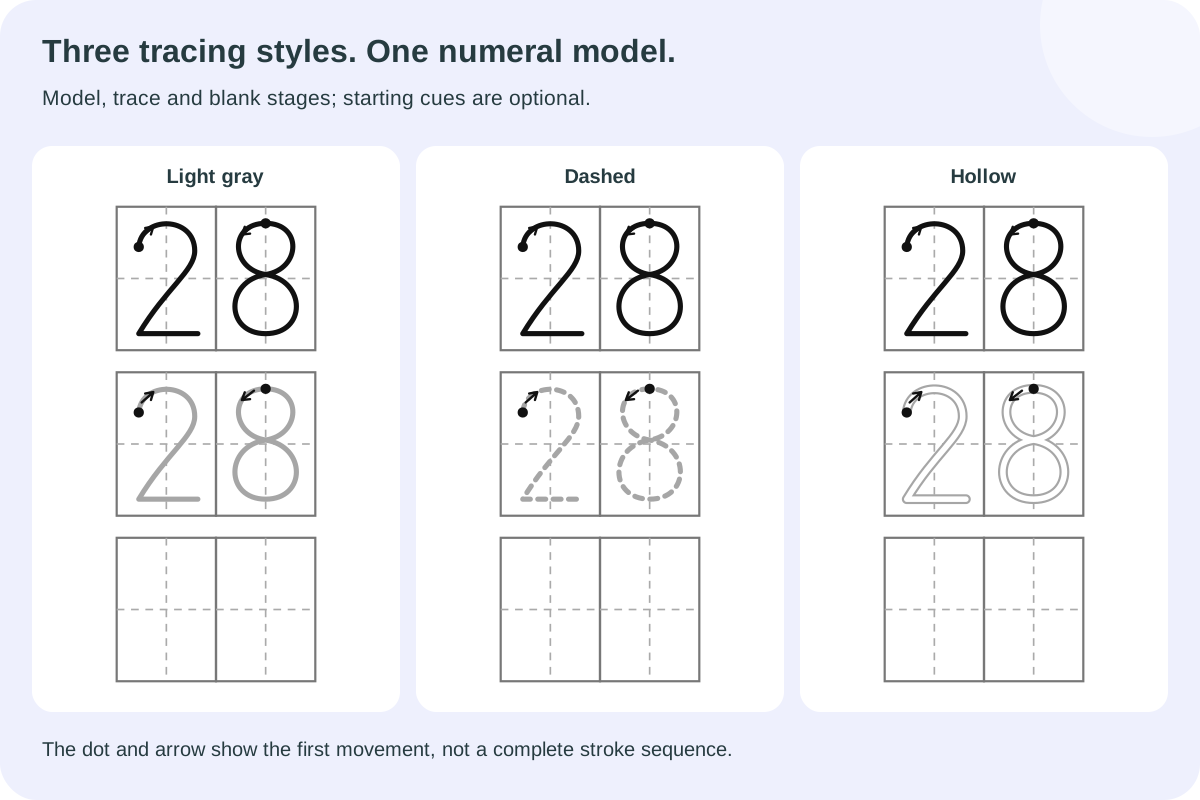
Gray strokes, dashed strokes and hollow strokes use the same numeral shapes. The dark model stays solid, while the tracing stages use your chosen style and lightness. Hollow strokes leave a white channel to write inside. Optional start dots and arrows follow the first segment of each digit in this model. They appear on models and traces, not independent blank writing spaces. They do not number every stroke or decide whether a child followed a classroom stroke sequence. Review one, four and seven with your own teaching example before assigning a set.
- 08
Connect a numeral with a small quantity
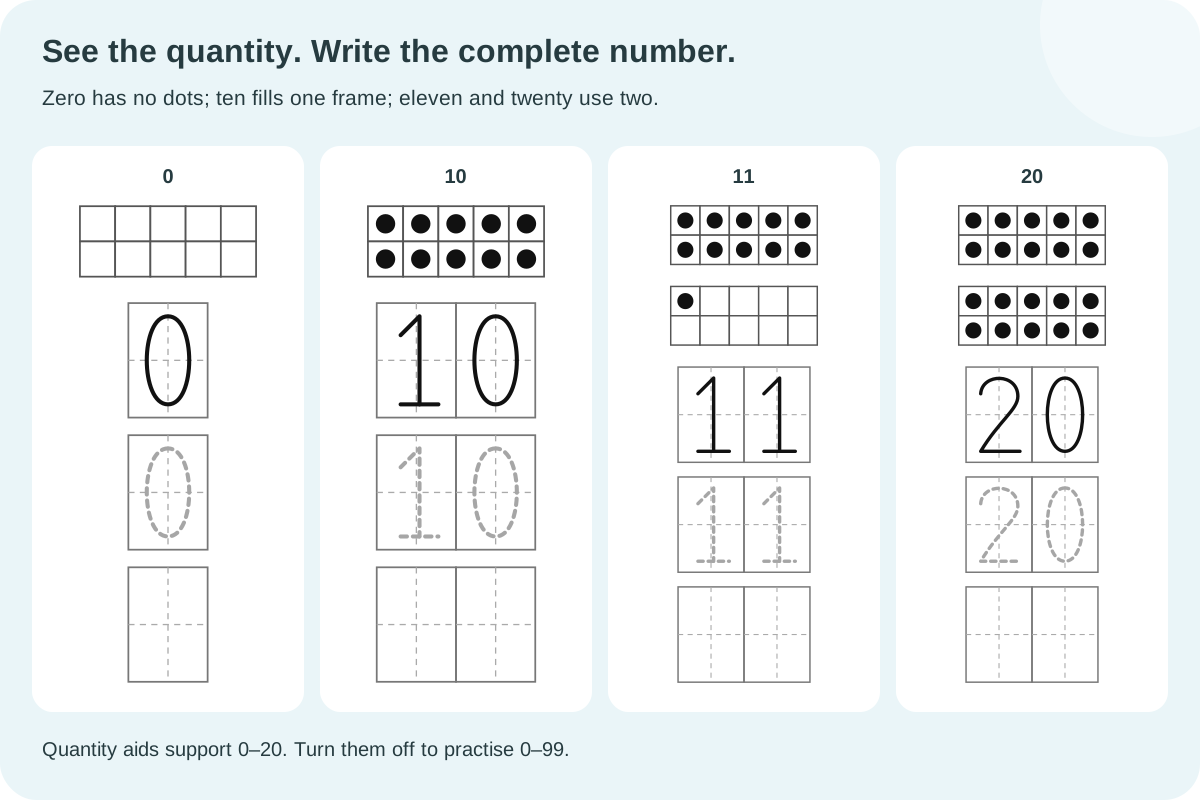
Turn on ordered dots or ten frames to place one quantity aid above each complete writing block. Zero contains no dots. Ten fills one frame; eleven uses a full first frame and one dot in the second; twenty fills both. Every frame has exactly two rows of five cells. Dot collections use rows of up to five. These aids support numbers from zero to twenty. If your list includes ninety-nine, switching the aid on shows an error and preserves the previous valid sheet. Remove the larger entry or leave the aid off; your source list is never silently shortened.
- 09
Adjust the writing cell without enlarging the number
Digit design height controls the numeral drawing. Writing cell height controls the vertical space for each model, traced copy and blank attempt. Automatic mode keeps the previous digit-height-plus-three-millimetres rule. Choose a fixed height from 9 to 40 mm when the same number should sit inside a taller writing box. The design is centred vertically, and the top guide and baseline move with it. Its scale, width, numeral form and starting cue remain unchanged.
For example, keep a 10 mm digit and compare a 13 mm cell with a 20 mm cell. The extra space belongs to the guide, not to a larger numeral. Keep at least 3 mm of total clearance. If a new height would leave too little clearance or make the complete practice block too tall, the current worksheet stays available and the setting reports a correction. Reduce repetitions or restore automatic height before trying again. Changing these dimensions does not reshuffle the number list or create a new content revision. Two-digit numbers remain one practice block.
Questions about custom numbers and printing
Practical details to check before preparing your next set.
Yes. Enter that number alone, then choose how many traced copies and blank spaces belong inside its block. Use whole-list copies if you want several separate blocks of the same number. A single block is not automatically repeated across the sheet. This keeps the amount of work under your control.
Yes. Each list entry is a whole number, and both digits remain in the same writing stage. The tens digit stays on the left and the ones digit on the right. Their guide spaces touch as one unit; neither digit is moved to a new line when you change page density.
Numeral shapes vary between teaching materials. These models use a base on 1, a closed-top 4 and a 7 without a crossbar. Review them before use and follow your teacher’s convention when it differs. The tool shows one checked set of forms; it does not claim that every school uses those forms or provide a complete stroke-order lesson.
Yes. Tracing repetitions and blank spaces have separate settings. For example, keep one dark model, choose one trace and three blanks. Blank spaces are truly empty apart from their guides. If you remove both the model and tracing, the student copy becomes a blank practice activity that needs an oral or external prompt.
No automatic shrinking is applied. The selected digit height and guide width stay fixed. Default sizes allow two-digit numbers at six columns, with the stages stacked vertically. Larger dimensions may not fit at that density; reduce columns or adjust the size deliberately. Too many vertical repetitions can also make a complete block too tall to print safely.
Yes. Repeated entries remain part of the source list, including when numeric order is selected. Whole-list copies repeat the entire ordered sequence explicitly. The maximum is 120 blocks after those copies are applied. Editing a source entry updates its corresponding block in each list copy, while a separately entered duplicate remains its own entry.
The optional dot and arrow show only the first movement of this model; they are not a complete stroke-order lesson or handwriting score. Turn on dots or ten frames for quantities 0–20, with no dots for zero and a full first frame above ten. To practise 21–99, leave quantity aids off. Gray, dashed and hollow tracing retain the same digit shapes and independent blank spaces.
Choose A4 or Letter in the generator and the same paper size in the browser dialog. Use 100% or actual-size printing where available, and review margins, headers and footers. Print one page first if physical size matters. Automatic pagination uses complete rows, so changing to smaller blocks or fewer vertical repetitions can allow more rows without shrinking the numerals.
Yes. Set Writing cell height to a fixed millimetre value and leave Digit design height unchanged. The numeral stays centred at the same scale. Allow at least 3 mm more cell height than digit height. Automatic height restores the previous spacing rule, and both options are saved with the worksheet.
Give each number room to become familiar
Choose the list, balance tracing with independent writing, and keep the matching reference.
Browser printing & PDF · No registration